
2026 Safety App Guide for Teens Walking to School
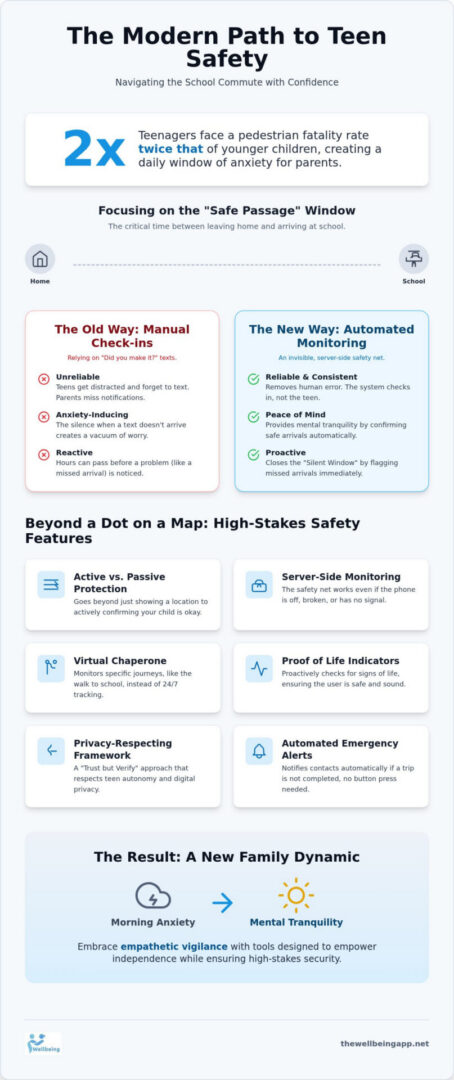
Did you know that teenagers have a pedestrian fatality rate twice that of younger children? This startling reality often sits heavy in the back of a parent’s mind as they watch their child head out the door for the morning commute. You likely want to foster the independence they crave, yet you’re tired of the “did you make it?” texts that go unanswered. It’s exhausting to balance your protective instincts with their need for personal space, especially when the risks on the road are real and rising.
This guide explores how a modern safety app for teenagers walking to school can bridge that gap, providing a reliable, automated safety net that only intervenes when it’s truly necessary. We’ll show you how to trade constant morning anxiety for genuine mental tranquility by using digital tools that respect your teen’s privacy while maintaining high-stakes security. We’ll examine the latest 2026 safety innovations, including Proof of Life indicators and virtual Chaperone services, to ensure your child stays protected without feeling like they’re being stalked by a map dot. By the end, you’ll have a clear roadmap for keeping your family connected and secure.
Key Takeaways
- Identify the “Safe Passage” window to focus your security efforts on the critical minutes between your front door and the school gates.
- Understand why a dedicated safety app for teenagers walking to school offers more reliability than manual texting by using automated, server-side monitoring.
- Implement a “Trust but Verify” framework that respects your teenager’s digital privacy through journey-based monitoring rather than constant surveillance.
- Discover how high-stakes features like virtual Chaperone services and Proof of Life indicators provide a proactive safety net for high-risk transit times.
- Shift your family dynamic from one of constant morning anxiety to a state of mental tranquility with tools designed for empathetic vigilance.
Why Teenagers Need a Dedicated Safety App for the School Commute
The morning routine often feels like a race against the clock, but for parents, the real race begins once the front door clicks shut. This initiates the “Safe Passage” window, that critical interval where your child is neither under your roof nor the school’s supervision. In 2026, we’ve seen a significant psychological shift; teenagers are increasingly protective of their digital footprints and demand a level of privacy that traditional tracking often ignores. Balancing this need for independence with your duty as a guardian requires a philosophy of empathetic vigilance. It’s about being present without being intrusive, ensuring they’re secure while respecting their growing autonomy.
Relying on a manual “I’m here” text is often the weakest link in any family safety plan. Teenagers get distracted by friends or music, and parents can easily miss a notification during a busy meeting. When that text doesn’t arrive, the silence creates a vacuum filled by escalating anxiety. Using a dedicated safety app for teenagers walking to school removes the “human error factor” by automating the check-in process. It provides a consistent, invisible safety net that doesn’t require constant manual input from a distracted teen.
The Evolution of Personal Security in 2026
Modern security has evolved from reactive measures to proactive, automated systems. We no longer just wait for a call for help; instead, we rely on technology that monitors for silence. The landscape of personal safety apps has shifted toward server-side monitoring, which ensures that alerts are triggered even if a device is powered off or destroyed. This shift fosters community unity, as families can coordinate safety efforts without feeling like they’re constantly “policing” their children. It turns a safety app for teenagers walking to school into an instrument of empowerment rather than a tool for surveillance.
The Risks of the “Silent Window”
The “Silent Window” represents the dangerous gap of time between a teenager failing to arrive at school and a parent actually realizing there is a problem. Without automated monitoring, hours might pass before a school reports an absence. High-stakes safety tools close this gap by providing immediate, server-managed indicators if a scheduled arrival is missed. This proactive approach drastically reduces the panic response. Instead of frantic calls, you receive steady, reliable data that preserves your mental tranquility and ensures that every second counts if a genuine emergency occurs.
Beyond GPS: The Core Features of a High-Stakes Safety App
While many believe a GPS dot on a map is enough, location alone often provides a false sense of security. A standard safety app for teenagers walking to school might show you their phone is at a specific intersection, but it can’t tell you if they’ve dropped their device or if they’re in distress. This is the fundamental difference between passive tracking and active protection. Active systems shift the focus from simply seeing where a child is to confirming they are actually okay.
Technical robustness is the foundation of this shift. Most standard apps rely on local alerts that fail if the phone loses power or is tampered with. High-stakes safety requires server-side monitoring. This means the security protocol lives on a remote server, not just the teen’s phone. If the device goes offline during a transit window, the server notices the silence and triggers an alert automatically. This ensures a reliable safety net that stays active even in worst-case scenarios, giving parents true mental tranquility.
Understanding the Virtual Chaperone Concept
A Virtual Chaperone acts as an always-on digital guardian for specific journeys. Instead of constant 24/7 surveillance, which many teens find intrusive, this tool monitors the expected duration of the school commute. If the app detects an anomaly, such as an unexpected stop or a deviation from the usual route, it flags the event immediately. For students staying late for sports or clubs, a Night Watch feature provides extra layers of protection during those darker evening hours. It’s a way to maintain empathetic vigilance without hovering over every step they take.
The Power of Automated Emergency Alerts
In a true crisis, a teenager might not have the time or ability to reach for their phone and press a button. Automated Emergency Alerts remove this burden by dispatching notifications to designated contacts based on pre-set conditions. This system relies heavily on the Proof of Life indicator. Proof of Life is a proactive status check that triggers an emergency protocol upon silence. By requiring a simple, non-intrusive interaction at set intervals, the app confirms the user is physically capable and safe. If that confirmation is missing, the system doesn’t wait for a manual signal; it acts on your behalf to initiate a response. While real-time Location Sharing remains a useful secondary tool for coordination, it shouldn’t be the only pillar of your family’s strategy when selecting a safety app for teenagers walking to school. You can find more information on these integrated tools at thewellbeingapp.net.
Manual vs. Automated Check-Ins: Why Automation Wins
The human error factor is the most significant hurdle in any family security protocol. Teenagers, naturally focused on their music, social interactions, or the day’s first class, rarely prioritize sending a status update. Conversely, parents often find themselves swept up in the morning rush of meetings and commutes, only realizing twenty minutes too late that a check-in text never arrived. This gap in communication is where anxiety thrives. A modern safety app for teenagers walking to school solves this by shifting the responsibility from the individual to a reliable, automated system.
When you move away from manual notifications, you’re essentially outsourcing your child’s safety to a system that doesn’t get distracted. Automated systems use server-managed timers to track the school commute in real time. If a journey exceeds its expected duration or a scheduled confirmation is missed, the system acts immediately. This removes the “False Alarm” problem that plagues manual methods; instead of a parent panic-calling because they simply forgot to check their phone, the app provides a structured, logical escalation that filters out minor delays before alerting emergency contacts.
The Failure of the “Text Me When You Get There” Method
Manual texting creates a dangerous false sense of security. It relies on a reactive loop: the teen must remember to send the text, and the parent must remember to expect it. If an incident occurs, the delay between the missed text and the parent taking action can be substantial. This creates a painful dilemma: did they simply forget to text, or are they actually in trouble? By using an automated safety app for teenagers walking to school, you eliminate this guesswork. The system knows the schedule, monitors the progress, and provides the “all clear” without anyone needing to lift a finger.
How Automated Proof of Life Systems Function
The mechanics of a high-stakes safety check-in are designed to be non-intrusive yet technically robust. At pre-set intervals during the commute, the system initiates a Proof of Life check. This is not a phone call or a distracting message, but a simple, vibration-based prompt that the teen can acknowledge with a single tap. If the window is missed, the escalation ladder begins. First, the app attempts to re-establish contact with the user; if silence persists, the server-side monitoring triggers a high-priority alert to parents and designated guardians. This “watchful protector” approach ensures that help is summoned the moment a silence is detected, preserving your mental tranquility throughout the morning. This proactive management allows the system to maintain a high level of security while respecting the teen’s desire for an uninterrupted journey.
How to Implement a Safety App Without Invading Privacy
Digital independence is a significant milestone for every teenager, but it shouldn’t come at the cost of their physical security. Adopting a “Trust but Verify” framework allows you to support their growth while maintaining a discreet, reliable safety net. Instead of invasive 24/7 surveillance, a high-quality safety app for teenagers walking to school should focus strictly on journey-based monitoring. This specific approach respects their personal space during the school day while providing robust protection when they are most vulnerable in transit. It shifts the narrative from “I am watching you” to “the system is here if you need it.”
Positioning the technology as a tool for personal agency is the best way to ensure long-term cooperation. When teenagers are involved in the setup process, they view the app as a proactive management tool rather than a digital leash. This collaborative mindset fosters a sense of harmony within the family, where safety becomes a shared goal rather than a point of contention. It’s about providing them with a silent, compassionate guardian that stays in the background until it is truly required.
Step 1: Establishing the Safety Perimeter
Establishing the safety perimeter is the first practical step toward mental tranquility. Sit down with your teen to define their primary school route and the typical transit times for both morning and afternoon. By setting up the Chaperone feature for these specific windows, the app remains dormant during school hours, which builds trust and reduces battery drain. It is also vital that the teen understands how to trigger a manual alert; knowing they have a silent, immediate way to signal for help if they feel uneasy empowers them to manage their own transit proactively without needing to make a conspicuous phone call.
Step 2: Configuring Proof of Life Intervals
Finding the right rhythm for automated check-ins is essential for a non-intrusive experience. You should choose Proof of Life intervals that balance high-stakes security with a seamless user journey. These frequencies are fully customizable, allowing you to adapt the system to the unique geography of your neighborhood. Proof of Life intervals should be shorter for high-traffic or isolated areas to ensure help is never more than a few minutes away if an unexpected silence is detected. This tailored approach ensures that the “watchful protector” is always calibrated to the actual level of risk.
Step 3: The Emergency Escalation Plan
Transparency is the foundation of a successful emergency escalation plan. Clearly define the hierarchy of who gets notified first if a check-in is missed, which helps foster a “Community Watch” mindset among your inner circle of family and neighbors. This collective responsibility ensures that the burden of safety is shared, reinforcing the idea that the community is looking out for its own. To further preserve daily privacy, configure the system so that detailed location sharing is only activated during a live emergency alert. This ensures their daily movements remain entirely private unless a genuine need for intervention arises. To begin building a safety plan that respects your teen’s autonomy, learn how to get started with The Wellbeing App.
Achieving Mental Tranquility with The Wellbeing App
Choosing a safety app for teenagers walking to school is more than a technical decision; it’s an act of care for your family’s emotional well-being. The Wellbeing App stands as a compassionate guardian, designed to replace the constant friction of “helicopter” parenting with the quiet assurance of empathetic vigilance. Our system doesn’t just track location. It creates a protective atmosphere where your child can thrive and explore their world without the shadow of anxiety hanging over every step they take during their morning commute.
The technical robustness of our platform is matched only by its human-centric design. While many services offer simple GPS, we provide a sophisticated investment in continuous, server-side protection. This means that even if a device is damaged or the battery dies during a commute, our monitoring remains active on our end. It’s this dedication to reliability that fosters true social cohesion and trust between parents and their children. You’re not just buying software; you’re securing the preservation of your family’s collective mental state through a system that values harmony as much as security.
The Wellbeing App Advantage: Proof of Life and Chaperone
Our specific features, such as the Chaperone service, act as a virtual escort for every walk to school. This isn’t a passive tool. It’s an active, always-on partner that monitors transit duration and flags anomalies automatically. Families choose us for this unique around-the-clock empathetic vigilance because they know our server-side monitoring is infallible. If a teen loses their phone, our server still knows they haven’t checked in, ensuring that help is summoned when it’s needed most. It’s why we’re the preferred safety app for teenagers walking to school for parents who prioritize proactive security.
Empowering Your Teenager for the Future
We believe that learning to manage one’s own safety is a critical life skill for the modern world. By using The Wellbeing App, teenagers gain a sense of personal agency that standard tracking apps simply don’t provide. They learn to be proactive about their transit, moving from being passively monitored to being actively empowered managers of their own security. The app serves as an instrument of empowerment, allowing them to prove their responsibility while you enjoy the mental tranquility that comes from a reliable safety net. It’s a balanced approach that prepares them for the independence of adulthood while keeping them safe in the present moment.
Empowering Your Family’s Morning Journey
The transition toward teenage independence doesn’t have to be a source of constant stress for your household. By moving beyond passive GPS tracking and embracing automated systems, you close the dangerous “Silent Window” and ensure that help is always just a heartbeat away. True security involves a “Trust but Verify” framework, where journey-based monitoring respects your child’s privacy while keeping a watchful eye on their most vulnerable moments during the school commute.
Implementing a dedicated safety app for teenagers walking to school is a powerful step toward reclaiming your family’s mental tranquility. With our unique Proof of Life technology and automated server-side monitoring, you gain a reliable safety net that functions even if a device is lost or damaged. We invite you to step into a role of empowered guardianship where safety is a shared, seamless part of your daily rhythm. Secure your family’s peace of mind with The Wellbeing App today. You’ve done the hard work of raising an independent teen; now, let us help you protect that independence with the care and vigilance it deserves.
Frequently Asked Questions
Is a safety app better than a basic GPS tracker for a teenager?
Yes, because it provides active protection rather than just passive location tracking. A safety app for teenagers walking to school confirms the user is actually safe, whereas a GPS tracker only shows the phone’s position. This distinction is vital; if a phone is dropped or stolen, a tracker provides a false sense of security. Our system uses server-side monitoring to detect silence and trigger alerts automatically.
What happens if my teen’s phone battery dies while walking to school?
The Wellbeing App utilizes server-side monitoring, which means the safety protocol lives on a remote server rather than just the physical device. If the phone loses power or is destroyed during an active transit window, the server recognizes the loss of signal as a potential emergency. It then initiates the escalation protocol to notify designated contacts immediately, ensuring the safety net remains intact regardless of hardware status.
Can I set the app to only monitor my teen during school hours?
You can customize the monitoring to focus strictly on the “Safe Passage” windows, such as the morning walk to school and the afternoon return. Features like Chaperone and Night Watch are designed for these specific high-risk transit times. This journey-based approach respects your teenager’s digital privacy during the school day while maintaining empathetic vigilance when they are most vulnerable in the community.
How does the Proof of Life feature differ from a regular check-in?
Proof of Life is a proactive status check that requires a simple, non-intrusive interaction to confirm the user is physically safe and capable. Unlike a manual text check-in, which is often forgotten by distracted teens, this feature is automated and server-managed. If the user fails to acknowledge the prompt within the set window, the system doesn’t wait; it immediately triggers an emergency protocol to summon help.
Will using a safety app make my teenager more anxious about walking alone?
Most families find that using a safety app for teenagers walking to school actually fosters a sense of empowerment rather than fear. By framing the technology as a silent, compassionate guardian, you provide your teen with the confidence to explore their independence. It removes the stress of constant parental “check-in” calls, allowing the teenager to focus on their journey while the system handles the security.
What is the “Virtual Chaperone” and how does it work for daily commutes?
The Chaperone service acts as a digital escort that monitors the expected duration and route of a specific journey. Once the commute begins, the app tracks progress and flags any anomalies, such as unexpected stops or significant deviations from the path. This proactive management ensures that help is initiated the moment a disruption is detected, providing families with mental tranquility during the busiest times of the day.
How much does a professional safety monitoring subscription typically cost?
Professional safety monitoring is generally provided through recurring subscription plans, which are available for both individuals and families. These fees cover the technical robustness of continuous server-side monitoring and the automated dispatch of emergency alerts. While prices vary across the industry, these plans are an investment in high-stakes security and the preservation of your mental state. You can choose between monthly or annual billing cycles to suit your needs.
Can I add multiple family members to my safety monitoring plan?
Yes, family access plans are designed to extend protective reassurance to every member of your household under a single account. This allows you to manage Proof of Life intervals and emergency contact circles for multiple people simultaneously. It reinforces a pillar of collective responsibility, ensuring that your entire family stays connected and secure through a unified, technologically sophisticated safety net.