
2026 Guide: Proactive Safety for College Students
Imagine your student is walking back from a late night library session, and they forget to send that “I’m home” text. You’re left staring at a silent phone, wondering if they’re just exhausted or if something is actually wrong. It’s a heavy weight to carry, and you shouldn’t have to choose between their independence and your own peace of mind. Traditional manual check-ins are prone to human error, often creating unnecessary panic or, worse, failing during a real emergency. This is why automated safety monitoring for college students has become a vital tool for families in 2026.
You deserve a system that acts as a compassionate guardian, watching over them without being intrusive. We’ll show you how proactive features like Proof of Life and Chaperone provide a digital safety net that works even if a phone is lost or damaged. By the end of this guide, you’ll understand how to implement a layer of protection that ensures rapid emergency response while maintaining the student autonomy they’ve worked so hard to earn. Discover how to replace constant worry with true mental tranquility, knowing that help is always ready, even when they can’t call for it themselves.
Key Takeaways
- Learn how modern safety monitoring for college students has evolved from basic GPS tracking into a proactive digital system that respects student autonomy.
- Understand the critical limitations of manual SOS buttons and why automated Proof of Life indicators are essential for ensuring help arrives even if a student is incapacitated.
- Discover how features like Chaperone and Night Watch provide targeted, server-side protection during high-risk moments like late-night walks across campus.
- Find out how to establish a collaborative safety plan using designated contacts to foster a sense of shared responsibility and collective vigilance.
- Explore how server-side monitoring ensures that emergency alerts are delivered to your family even if a student’s phone is lost, dead, or destroyed.
Redefining Campus Security: What is Safety Monitoring for College Students?
Modern safety monitoring for college students isn’t just about knowing where someone is on a map. It’s a proactive digital system designed to verify well-being automatically, moving beyond the intrusive nature of standard GPS tracking. While traditional tracking can feel like an invasion of privacy, goal-oriented safety indicators focus on outcomes. They ask a simple, vital question: Is the student safe? This distinction is essential for maintaining trust between students and their families. By focusing on indicators rather than constant surveillance, students keep their autonomy while parents gain a reliable safety net.
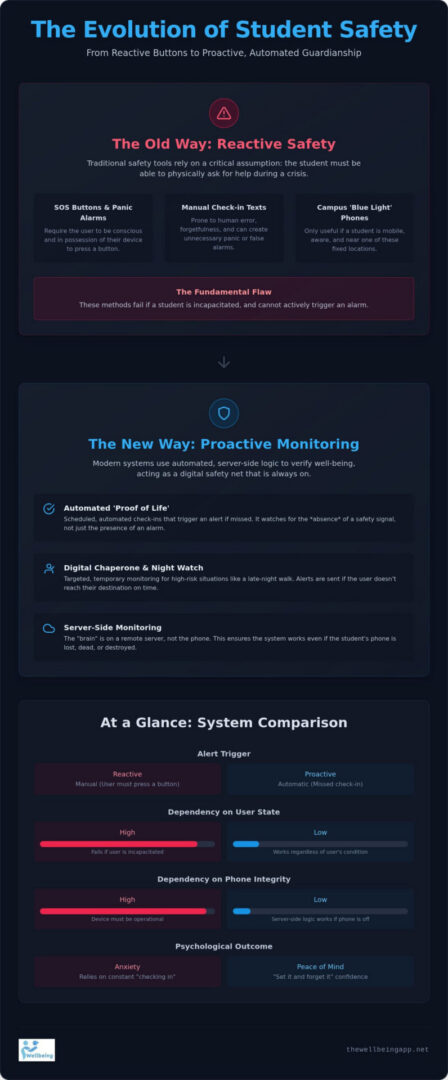
Historically, campus security relied on physical infrastructure like “Blue Light” phones. These tools were landmarks of safety, yet they had a significant flaw. They required a student to be mobile and conscious to trigger an alert. In the current landscape of 2026, students require a system that functions even during incapacitation. Automated server-side monitoring ensures that if a student can’t call for help, the system recognizes the silence and initiates a response. It’s the evolution from a passive button to an always-on guardian that stays vigilant when the user cannot.
The Limitations of Traditional ‘Safe Walk’ Programs
Many institutions offer physical escorts or student-led walk programs, but these aren’t always available when they’re needed most. There’s often a persistent psychological barrier to calling Campus police for what feels like a “minor” concern, such as a ten-minute walk from the library to a dorm after midnight. Students don’t want to feel like they’re wasting resources. Transitioning to a digital Chaperone allows students to maintain their independence without the hesitation. It provides a way to secure a virtual escort for everyday movements, ensuring that Location Sharing and active monitoring are ready to trigger Emergency Alerts if a student doesn’t reach their destination.
The Psychology of Empathetic Vigilance
This shift in technology is deeply rooted in the psychology of empathetic vigilance. Safety apps reduce friction between parents and students by removing the need for constant “checking in” texts that can feel like prying. When a family knows that Night Watch and Proof of Life indicators are active, they achieve a state of mental tranquility. It builds a culture of community unity where safety is a shared responsibility rather than a source of anxiety. This approach empowers the student to manage their own proactive safety management while providing the family with the quiet confidence that their loved one is never truly alone.
Reactive vs. Proactive: Why Automated ‘Proof of Life’ is Essential
Traditional safety tools often rely on a single, critical assumption: the student must be able to ask for help. While SOS buttons and panic alarms have their place, they possess a fundamental flaw. They require the user to be conscious, mobile, and in possession of their device during a crisis. If a student is incapacitated or their phone is forcibly taken, these reactive measures fail. This is why safety monitoring for college students must shift toward a proactive model that doesn’t depend on the user’s immediate physical state.
The Proof of Life feature represents this shift. It functions as a scheduled, automated check-in system that operates on server-side logic. This means the monitoring happens on a remote server, not just the local device. If a student’s phone is destroyed, runs out of battery, or is stolen, the server still knows that a check-in was expected. When that indicator isn’t met, the “if-then” logic triggers an immediate response. It’s a silent guardian that watches for the absence of safety rather than waiting for a cry for help. To see how this technology integrates into daily life, you can explore the automated safety features designed for campus living.
How Automated Check-ins Prevent Missing Person Incidents
In any emergency, the “Golden Hour” is the most critical window for a successful outcome. Reducing the time gap between a missed check-in and an emergency response can be life-saving. According to the U.S. Department of Education on Campus Security, timely warnings and accurate reporting are cornerstones of a safe environment. Automated systems ensure these warnings happen instantly. Proof of Life is a proactive safeguard against silent emergencies that ensures silence is never mistaken for safety.
Customizing Alerts for Student Life
Every student has a different rhythm. Some work late-night shifts at the campus cafe, while others prefer dawn study sessions in the library. Safety monitoring for college students should be as flexible as their schedules. Features like Night Watch allow families to set specific monitoring windows during these high-risk times. If a check-in is missed, the system follows an automated escalation path. It starts with a gentle app notification to the student, then moves to a family alert only if the student fails to respond. This balance ensures student privacy is respected while the necessity of safety verification remains absolute.
Essential Safety Features for the 2026 College Experience
Modern campus life doesn’t stop when the sun goes down. Whether it’s a marathon study session or a late shift at a local job, students are often on the move during hours that require extra vigilance. Effectively implementing safety monitoring for college students means moving beyond generic tools and adopting features designed for specific, high-stakes scenarios. These tools don’t just track; they provide a layer of protection that adjusts to a student’s unique daily rhythm. By focusing on targeted features, families can build a safety net that is both robust and respectful of a student’s growing independence.
The Virtual Chaperone: A Digital Partner for Night Walks
The walk from the library to a dorm can feel long after midnight. While many schools provide physical escorts, students often hesitate to call them for short distances or “routine” walks. The Chaperone feature fills this gap by providing a continuous digital connection during transit. It acts as a watchful protector, monitoring the student’s progress in real time through server-side logic. Knowing that a status is being actively monitored serves as a powerful deterrent and provides the student with a sense of personal agency. Unlike physical services that might have long wait times, a digital chaperone is always ready. It ensures that if a student veers off course or stops unexpectedly, the system is already prepared to initiate a response.
Night Watch: Specialized Protection for Vulnerable Hours
The hours between 12 AM and 6 AM represent a specific window of vulnerability. During this time, many students are either deep in sleep or navigating a quiet, sparsely populated campus. Night Watch is specifically engineered to cover these hours, providing automated monitoring that doesn’t require the student to be awake or active. This feature is a cornerstone of student well-being because it addresses the “silent” risks of campus life. According to the U.S. Department of Education on Campus Security, institutional transparency and proactive safety measures are vital for a secure learning environment. Night Watch extends this security into the private hours, ensuring that safety is verified even when the rest of the world is asleep.
To round out a proactive safety net, students should also utilize smart Location Sharing and Direct Emergency Alerts. Location Sharing works best when it’s goal-oriented, focusing on safe arrivals rather than constant, intrusive surveillance. This approach maintains the student’s autonomy while keeping the safety net intact. Direct Emergency Alerts are designed to bypass standard hurdles, such as silenced phones or “Do Not Disturb” settings, to reach designated contacts immediately. By combining these features, families can achieve true mental tranquility, knowing their student has the tools to stay safe in any situation.
Building a Collaborative Student Safety Plan
Creating a safety plan shouldn’t feel like a lecture on danger. Instead, it’s an exercise in empowerment. When you sit down to discuss safety monitoring for college students, the focus should remain on providing a digital safety net that allows them to explore their new world with confidence. The first step is identifying “Designated Contacts.” These are the trusted individuals, perhaps a mix of family members and close friends, who will receive automated alerts if a safety indicator is missed. By establishing this group early, you create a circle of collective responsibility that ensures someone is always looking out for the student’s best interests.
Clear boundaries are essential for maintaining trust and ensuring the system is used effectively. You should decide together when monitoring features like Location Sharing are active and when they remain private. This ensures the technology serves as a tool for safety, not a mechanism for constant surveillance. Integrating these app features with existing campus resources creates a comprehensive network of protection. For instance, knowing how to quickly share a status with campus security or local health services adds an extra layer of functional credibility to your plan. You can start building your collaborative safety plan today to ensure every member of the family feels supported.
Step-by-Step Implementation for Freshman Year
Freshman year is a time of significant transition where new routines are formed daily. Start by mapping out common routes, such as the path from the dorm to the student union or late-night lab sessions in the engineering building. You can then schedule Proof of Life checks to trigger during these specific windows when they are most likely to be alone. Testing the system together before they leave for school builds trust in the automated alerts. It allows both the student and the family to see exactly how the server-side monitoring responds when a check-in is missed, providing a practical demonstration of the digital safety net in action.
Maintaining Autonomy while Ensuring Security
It might seem counterintuitive, but automated systems actually grant students more freedom. They remove the burden of manual “parental check-ins” that often feel like prying or a lack of trust. With features like Night Watch, the student manages their own safety settings, which fosters a sense of personal agency and maturity. This community unity ensures that safety is managed proactively, allowing everyone to maintain their mental tranquility without the friction of constant texting. By framing safety monitoring for college students as a tool for independence, you help them transition into adulthood with a reliable, always-on partner by their side.
Total Peace of Mind with The Wellbeing App Guardian Suite
Families often find themselves caught between a desire to protect their children and a need to respect their growing independence. While generic location apps offer basic tracking, they frequently lack the specialized logic required for true emergency management. The Wellbeing App bridges this gap by combining sophisticated technology with sincere compassion. It provides safety monitoring for college students that functions as a supportive guardian rather than a simple tracking device. This dedicated platform ensures that students living both on and off-campus have a reliable safety net that stays active even when they are unable to reach for their phone.
Choosing a dedicated safety platform over a standard location app is about prioritizing the quality of response. Generic apps often rely on the student’s phone being active and connected to the internet to send a signal. The Wellbeing App utilizes subscription-based security with 24/7 server-side monitoring. This means the system is watching from the cloud. If a student’s device is lost, stolen, or runs out of power, the server recognizes the missed check-in and initiates the protocol. It’s this level of technical robustness that provides families with a sense of harmony and interpersonal connection, even across great distances.
Specialized Features: Chaperone and Night Watch
The Chaperone feature is specifically designed for those everyday moments that cause the most anxiety, such as a late-night commute or a walk across a quiet campus. It maintains a continuous connection through server-side indicators, ensuring that a student’s progress is verified every step of the way. Night Watch extends this protection into the most vulnerable hours, providing automated monitoring that watches over students while they sleep or study in solo sessions. These specialized features preserve mental tranquility for parents by replacing constant worry with the quiet confidence that a professional safety system is always active. By automating the check-in process, the technology removes the friction of parental prying while keeping the safety net intact.
Joining a Community of Watchful Protectors
The Wellbeing App is more than just a software provider; it’s a mission rooted in social responsibility and altruism. Our goal is to prevent missing person incidents nationwide by providing a system that values human life above all else. This proactive protection fosters social cohesion and strengthens family trust by giving students the tools to manage their own safety. Whether your student is attending a local college or moving across the country, our national coverage ensures they are never truly alone. Joining this community means choosing a path of empowerment and proactive safety management. Secure your student’s peace of mind today with The Wellbeing App and ensure they have the protection they deserve as they navigate the 2026 college experience.
Empowering Your Student’s Next Chapter
Transitioning to campus life is a significant milestone that requires a modern approach to security. By moving from reactive SOS buttons to proactive safety monitoring for college students, you provide a digital safety net that works even when they can’t. We’ve explored how automated check-ins and digital chaperones replace the anxiety of manual “text me” systems with reliable, always-on protection. This shift doesn’t just improve physical safety; it fosters a deeper sense of trust and agency as your student navigates their new environment.
Our guardian suite relies on 24/7 Server-Side Monitoring and unique Proof of Life indicators to ensure that help is dispatched even if a device is lost or destroyed. With Automated Family Alerts, you’re only notified when something is actually wrong, preserving your student’s independence and your own mental tranquility. It’s time to replace constant worry with the quiet confidence of professional protection. Start Protecting Your Student with The Wellbeing App and join a nationwide community of watchful protectors. Your student is ready to take on the world; now you can be ready for them.
Frequently Asked Questions
How does safety monitoring for college students differ from standard GPS tracking?
Safety monitoring for college students differs from GPS tracking by focusing on well-being indicators rather than constant surveillance. While GPS tracking simply shows a dot on a map, monitoring uses automated logic to verify that a student is safe. It asks if they reached their dorm or finished their late-night shift. This goal-oriented approach respects student autonomy while ensuring help is ready if a specific safety milestone isn’t met.
What happens if my student misses a ‘Proof of Life’ check-in?
If a student misses a Proof of Life check-in, the system immediately begins an automated escalation process. First, the app sends a notification to the student’s device to verify their status. If there’s no response within the set grace period, the server-side monitoring triggers alerts to their designated family contacts. This ensures that silence is treated as a call for help, providing a critical safety net when the student can’t physically reach their phone.
Is the app intrusive to a student’s privacy or daily life?
The app is designed to be a silent guardian, not a tool for micromanagement. It prioritizes student privacy by focusing on “all is well” indicators rather than logging every step of their day. Students maintain control over when features like Chaperone or Night Watch are active. This balance ensures they feel empowered and independent, knowing the system only shares information with family members when a potential safety issue is detected by the server.
Does the monitoring work if the student’s phone battery dies?
Yes, the monitoring remains effective even if a phone battery dies or the device is destroyed. Because our system uses server-side logic, the watch happens in the cloud rather than on the local handset. If the phone goes offline and misses a scheduled Proof of Life check-in, the server recognizes the absence of a signal. It then initiates the alert protocol, ensuring family members are notified even during a complete hardware failure or loss.
Can the app replace campus security or 911 services?
Safety monitoring acts as a vital bridge to emergency services rather than a replacement for them. While 911 handles the physical response, our app provides the automated alerts and location data that family members need to initiate that help. It ensures that if a student is incapacitated, their designated contacts are informed instantly. Those contacts can then provide campus security or local authorities with the precise information required for a rapid and effective rescue.
How do I talk to my college student about using a safety monitoring app?
Frame the conversation around empowerment and mental tranquility rather than fear. Explain that using safety monitoring for college students actually removes the friction of frequent “checking in” texts. It gives them the freedom to explore campus life without feeling like they’re being watched by parents. By positioning the app as a digital safety net for high-risk moments, you encourage them to take personal agency over their own well-being while providing the family with peace of mind.
What is the ‘Night Watch’ feature and when should it be used?
Night Watch is a specialized feature designed for the most vulnerable hours of the day, typically between midnight and 6 AM. It should be used during late-night study sessions, overnight travel, or even while sleeping in a new environment. This feature provides automated, server-side monitoring that stays vigilant when the student is most likely to be alone or inactive. It ensures that safety is verified during the quietest hours of campus life.
Are automated alerts more reliable than manual SOS buttons?
Automated alerts are significantly more reliable than manual SOS buttons because they don’t require user intervention. In many crises, a student might be unable to reach their phone or press a button due to injury or incapacitation. Manual systems fail in these silent emergencies. Automated Proof of Life indicators remove this human requirement by triggering a response based on a missed milestone, ensuring that help is summoned even when the student cannot call for it.