
The Best App That Alerts Family If You Don’t Check In: A 2026 Guide to Passive Safety
What if the most effective way to protect your safety isn’t a button you press, but the silence an app hears when you can’t reach your phone? For many of the 11 million seniors living alone in the United States, the fear of an undetected emergency is a constant shadow. You want to maintain your independence, yet you know the anxiety your family feels when a call goes unanswered. Finding a reliable app that alerts family if you don’t check in is no longer just a luxury; it’s a vital part of proactive safety management.
We understand that the burden of remembering to send daily check-in texts can feel restrictive. You deserve a solution that works quietly in the background, acting as a watchful protector that values your mental tranquility. This guide explores how automated Proof of Life technology ensures your loved ones are notified the moment you become unresponsive. By shifting from reactive buttons to passive monitoring, you can enjoy total peace of mind while keeping your daily routine private. We will preview the top-rated safety tools for 2026, focusing on systems like Night Watch and Emergency Alerts that guarantee a rapid response in a crisis without sacrificing your personal agency.
Key Takeaways
- Learn why traditional SOS buttons often fail during medical emergencies and how passive monitoring bridges the “Silence Gap” to ensure you’re never left undetected.
- Discover how a modern app that alerts family if you don’t check in uses automated logic to notify your inner circle even if your device is powered off.
- Balance your personal agency with safety by utilizing event-based location sharing, providing protection without the need for constant, invasive tracking.
- Master the setup of high-stakes features like Night Watch and Emergency Alerts to create a reliable digital safety net that respects your daily rhythm.
The Silence Gap: Why Traditional SOS Buttons Often Fail
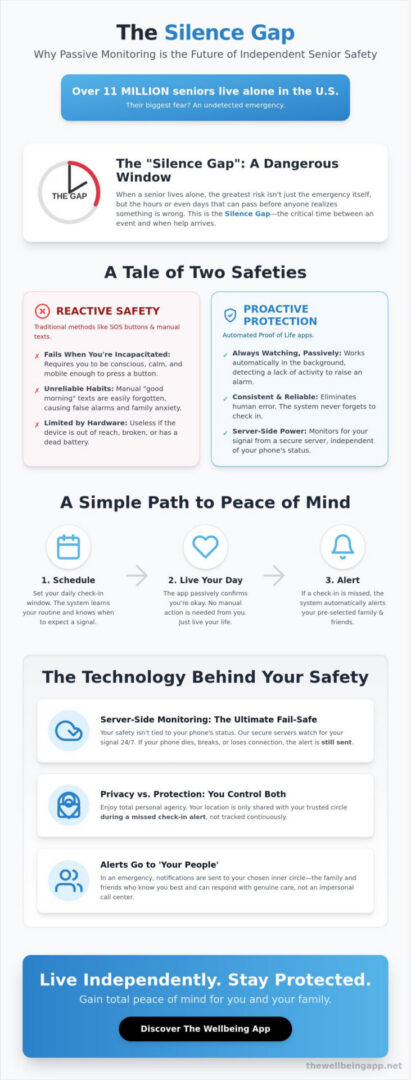
Silence is often the loudest warning sign. When an individual lives alone, the greatest risk isn’t just the accident itself, but the hours or even days that can pass before anyone realizes something is wrong. We call this the “Silence Gap.” It’s the dangerous window between a medical event or fall and the moment help finally arrives. While traditional security tools have focused on reactive measures, 2026 has ushered in a new standard of mental tranquility through passive safety. This approach ensures that your well-being is confirmed without you ever having to lift a finger.
The fundamental flaw of active SOS buttons and wearable pendants is that they require you to be conscious, mobile, and calm enough to use them. In a real-world crisis, such as a severe stroke or a hard fall, reaching for a button is often impossible. This is why a modern app that alerts family if you don’t check in has become the cornerstone of a proactive safety plan. It addresses the “what if” scenarios that keep solo dwellers and their families awake at night, providing a compassionate guardian that watches over you even when you can’t call for help yourself.
The Limitation of Manual Texting
Many families rely on a “good morning” text as their primary safety check. While well-intentioned, this system is deeply flawed. Life happens; you might forget your phone in another room, sleep in, or simply get distracted by a neighbor. When that text doesn’t arrive, it triggers a wave of unnecessary anxiety for your loved ones. Conversely, if you truly are in trouble, your family might wait hours before realizing the missed text wasn’t just a lapse in memory. Automation removes this human error. By using a dedicated app that alerts family if you don’t check in, you replace inconsistent habits with a disciplined, always-on partner that knows exactly when to raise the alarm.
Active vs. Passive Safety Monitoring
Understanding the difference between active and passive monitoring is essential for maintaining your personal agency. Active monitoring includes tools like panic buttons or standard personal safety app features that require a manual trigger. These are excellent for immediate threats when you are alert. However, passive monitoring, such as our Proof of Life technology, works on the principle of absence. It looks for your “OK” and only acts when that signal is missing.
A hybrid approach provides the most robust safety net for independent living. You might use Location Sharing for peace of mind during a late-night walk, while relying on Night Watch to protect you while you sleep. By combining these layers, you ensure that help is always within reach, even if you are unable to reach for it. This shift toward proactive protection empowers you to live life on your terms, knowing your family’s peace of mind is secured by a reliable, automated system.
How ‘Proof of Life’ Apps Automate Family Peace of Mind
Peace of mind shouldn’t be a chore. While traditional safety tools often feel like a burden, a modern app that alerts family if you don’t check in functions as a silent, supportive partner. The logic behind this technology is elegantly simple: you establish a routine, and the system only steps in when that routine is broken. This automated sequence typically follows a three-step path: Schedule, Check-in, and Alert. By shifting the responsibility from your memory to a sophisticated digital guardian, you can focus on enjoying your day instead of managing your safety.
One of the most critical features of this technology is server-side monitoring. Unlike basic alarms that rely on your phone’s battery or signal, our Proof of Life system lives on a secure remote server. If your phone dies, breaks, or loses connection, the server remains active. It expects a signal from you at a specific time. If that signal doesn’t arrive, the server initiates the escalation process automatically. This fail-safe ensures that your safety isn’t dependent on a piece of hardware remaining functional during a crisis. It is a level of technical robustness that was once reserved for high-end security firms, but is now accessible to anyone seeking mental tranquility.
When an alert is finally triggered, it doesn’t go to a distant call center worker who doesn’t know your name. Instead, it goes to “your people,” the trusted inner circle you’ve chosen. These are the individuals who know your habits and can respond with genuine care. This community-based approach is similar to how innovators are pioneering new ways to keep women safe by leveraging technology to foster social cohesion and collective responsibility. Your family receives the alert, your location data, and your status report, allowing them to act immediately and effectively.
Customizing Your Check-In Schedule
You can easily align your safety checks with your Activities of Daily Living (ADLs). Perhaps you set a Proof of Life indicator for 8:00 AM when you have your first cup of coffee, and another for 10:00 PM before you settle in for the night. Proof of Life is a non-intrusive safety heartbeat that confirms your well-being without interrupting your flow. If you’re ready to see how these schedules can fit into your life, you can explore the options available through The Wellbeing App today.
The Alert Escalation Workflow
The process begins with a “soft nudge,” which is a gentle notification sent to your device. This serves as a reminder to check in before any family members are notified. We then provide a grace period, giving you ample time to respond if you were simply busy or away from your phone. Only after this period expires does the system move to a final dispatch. This final stage sends an Emergency Alert to your contacts, providing them with the vital information they need to coordinate a wellness check or a rapid response.
Privacy vs. Protection: Finding the Right Monitoring Level
Independence is a core value that defines our sense of self. Many people hesitate to use safety technology because they fear it will turn into a surveillance tool. This is a valid concern. Constant GPS tracking can feel like an invasion of privacy, especially for seniors who value their autonomy. However, a modern app that alerts family if you don’t check in is designed differently. It acts as an instrument of empowerment, prioritizing your personal agency while providing a safety net that remains invisible until it is truly needed. By choosing a system that only shares data when something is wrong, you maintain your freedom without sacrificing your security.
Current research on personal safety apps highlights the importance of user-centric design in fostering trust between family members. When users feel they are in control of their information, they are more likely to adopt these life-saving tools. This academic perspective supports the idea that the best safety solutions are those that respect the user’s mental tranquility. We believe that technology should serve you, not track you, creating an atmosphere of safety that encourages you to live your life fully and without hesitation.
Location Sharing on Your Terms
We believe that you should never have to trade your privacy for your safety. While some services focus on constant monitoring, our Location Sharing feature operates strictly on your terms. Your location data is only released to your emergency contacts during a missed check-in event. This creates a “Virtual Chaperone” that remains silent and respectful during your normal routine. For instance, the Night Watch feature provides protection during vulnerable hours, such as when you are sleeping, without intruding on your private life. Maintaining your dignity is paramount; this is why many seniors prefer a discreet app over bulky, conspicuous hardware pendants that can feel like a label of fragility.
Empowering the ‘Watchful Protector’
Reframing family involvement is essential for a healthy safety dynamic. It isn’t about “helicoptering” or constant, anxious oversight. Instead, it’s about establishing a system of compassionate guardianship. By using an app that alerts family if you don’t check in, you are fostering social cohesion and a shared sense of responsibility. Your loved ones take on the role of a watchful protector, ready to step in only when the automated system signals a potential crisis. This arrangement preserves mental tranquility for both the user and their designated contacts, transforming safety from a source of stress into a foundation of harmony and trust.
Setting Up Your Digital Safety Net: A Practical Guide
Designing a safety net is an act of love, both for yourself and for those who care about you. Once you’ve chosen an app that alerts family if you don’t check in, the next step is ensuring the system is configured for maximum reliability. This isn’t just about downloading software; it’s about building a community of care that understands how to respond when an indicator is missed. By taking a few intentional steps today, you can establish a foundation of harmony that allows everyone to breathe a little easier.
Talking to your family about this shift is a powerful moment of agency. Frame the conversation around mental tranquility rather than fear. Explain that this automated check-in service isn’t a sign of fragility, but a sophisticated tool that allows you to maintain your independence. It removes the human error of forgotten texts and replaces it with a disciplined system. To get started with your own personalized safety plan, you can download The Wellbeing App and begin configuring your response team today.
Choosing Your Response Team
Your response team should be a strategic mix of emotional and practical support. While your children or siblings might be your primary emotional anchors, a nearby neighbor who has a key to your home is often the most effective first responder. Our Emergency Alerts system is designed to notify your entire circle simultaneously. This ensures that while your daughter in another state is calling your phone, your neighbor can already be at your front door checking on your well-being. This collective responsibility ensures no single person carries the entire weight of your safety.
Optimizing App Settings for Reliability
Reliability depends on more than just the app itself; it requires your device to be a willing partner. You must ensure that Critical Alerts are enabled in your phone settings. This allows the app that alerts family if you don’t check in to bypass Do Not Disturb or Silent modes during a high-stakes event. For those living with chronic conditions, setting up Night Watch ensures that you are protected during the quietest hours of the night. To keep the safety net active, we recommend checking your battery optimization settings to ensure the app is allowed to run in the background without being restricted by your operating system.
Before going live, run a dry test. Inform your contacts that you are testing the system and allow a check-in window to expire. This helps everyone understand what the notification looks and sounds like, preventing panic during a real event. Integrating these checks into your daily routine turns safety into a background process, leaving you free to focus on the activities that bring you joy.
The Wellbeing App: Your Companion in Proactive Protection
The Wellbeing App isn’t just a software solution; it’s a dedicated companion in your journey toward a life of uncompromised independence. Throughout this guide, we’ve explored the necessity of closing the “Silence Gap” and the technical logic that makes automated safety possible. Now, we invite you to experience the culmination of these efforts. By choosing an app that alerts family if you don’t check in, you are making a profound commitment to your own well-being and the mental tranquility of those who love you most. It’s about moving beyond the limitations of reactive buttons and embracing a future where safety is a silent, supportive presence in your daily life.
Our platform is built around specialized nomenclature that reflects our mission as a watchful protector. We don’t just provide tracking; we provide a framework for harmony and trust within your family. This technology is an instrument of empowerment, designed to respect your personal agency while ensuring that you are never truly alone in a crisis. When you integrate these tools into your routine, you are fostering social cohesion and a shared sense of responsibility that strengthens the bonds of your community.
Proprietary Features for Total Tranquility
- Proof of Life: This is the automated heartbeat of our service. It never sleeps and never forgets. By monitoring your status based on your custom schedule, it ensures that help is dispatched the moment you become unresponsive, providing a level of vigilance that manual check-ins simply cannot match.
- Chaperone: This feature acts as a virtual companion during your solo walks or commutes. It provides active monitoring when you are away from home, bridging the gap between passive check-ins and real-time safety during your most active hours.
- Night Watch: We recognize that the late-night hours can be the most vulnerable for those living alone. Night Watch provides specialized monitoring while you rest, ensuring that a medical event during sleep doesn’t go undetected until the next morning.
Join a Community of Proactive Safety
The choice to use a subscription-based model is a choice for absolute reliability. Our monthly and annual plans represent a commitment to uninterrupted server monitoring. As we discussed in previous sections, this server-side logic is what ensures your Emergency Alerts are sent even if your phone is powered off or disconnected. This is the difference between a simple tracking tool and a robust safety net. It is a disciplined approach to safety that values your welfare above all else.
Getting started is a seamless process designed to empower you immediately. You have a duty to yourself to live without the shadow of “what if,” and a duty to your loved ones to ensure they are never left in a state of anxious uncertainty. By taking this proactive step, you transform safety from a source of stress into a foundation of peace. Secure your peace of mind with The Wellbeing App today.
Embrace a Future of Proactive Peace
Safety in 2026 is no longer about reacting to a crisis after it happens; it is about ensuring you are never alone in the first place. We’ve explored how closing the Silence Gap requires a shift toward passive monitoring, where automated Proof of Life indicators confirm your well-being without interrupting your day. By choosing a reliable app that alerts family if you don’t check in, you replace the anxiety of forgotten texts with the disciplined protection of server-side monitoring. This technology ensures that even if your phone is powered off, your safety net remains active and ready to notify your loved ones immediately.
You deserve to maintain your independence while providing your family with the mental tranquility they need. Our empathetic design focuses on personal agency, allowing you to live life on your terms while a watchful protector remains in the background. It’s a simple yet powerful step toward fostering harmony and security within your home. Start your 24/7 safety monitoring with The Wellbeing App and discover the freedom that comes with true proactive protection. You’ve looked out for others your whole life; now it’s time to let a compassionate guardian look out for you.
Frequently Asked Questions
How does an app know if I haven’t checked in?
The system monitors your status through a pre-set schedule you create during setup. When a designated check-in window arrives, the app sends a nudge to your device. If you don’t acknowledge this prompt within the allotted time, the server-side logic recognizes the silence as a missed indicator. This automated heartbeat ensures your safety net is always active without requiring you to remember to send manual updates every day.
Will my family be alerted immediately if I miss a check-in by one minute?
No, your family won’t be alerted the very second a check-in time passes. We provide a customizable grace period to account for life’s little delays, such as being in the shower or leaving your phone in another room. Only after this period expires without any response from you will the system send an Emergency Alert to your designated contacts, ensuring help is only summoned when it’s truly necessary.
Does the app track my GPS location all the time?
No, the app does not need to track your GPS location constantly to keep you safe. To preserve your privacy and mental tranquility, Location Sharing is typically event-based. This means your coordinates are only released to your response team if a high-stakes event occurs, such as a missed check-in. This approach ensures you maintain your personal agency and dignity while knowing your family can find you quickly in a crisis.
What happens if my phone battery dies or I lose internet connection?
Your safety is protected by server-side monitoring that functions independently of your phone’s power or signal status. If your battery dies or you lose your internet connection, the server still expects your check-in signal at the scheduled time. When that signal doesn’t arrive because the phone is off, the system treats it as a missed indicator and initiates the escalation process to notify your family that you are unreachable.
Can I use this for an elderly parent who isn’t tech-savvy?
Yes, an app that alerts family if you don’t check in is designed with simplicity as a core principle. Once the initial setup is complete, the user only needs to tap a single button on their screen when prompted by the notification. There are no complex menus to navigate or hardware devices to charge, making it an ideal solution for seniors who want to maintain their independence without learning complicated technology.
Is a safety app better than a medical alert necklace?
A safety app offers a layer of passive protection that a medical alert necklace cannot provide. While a necklace requires you to be conscious and mobile enough to press a button, a check-in app works on the principle of absence. It recognizes when you are unable to respond, effectively closing the “Silence Gap” that often leaves people undetected after a serious medical event. This makes it a vital partner for solo dwellers.
Can I set different check-in times for weekends vs. weekdays?
Yes, you can fully customize your Proof of Life schedule to match your unique weekly rhythm. If you prefer a later check-in on Saturday mornings or want extra monitoring during specific weekday activities, the settings are easily adjustable. This flexibility ensures that your safety net aligns perfectly with your lifestyle, providing protection that feels like a supportive companion rather than a rigid or intrusive requirement that disrupts your routine.
What if I accidentally trigger an alert?
You can easily cancel an alert during the grace period before your family is ever notified. If you miss the initial nudge, you’ll receive a secondary reminder giving you ample time to check in and reset the timer. Even if an Emergency Alert is eventually sent to your contacts, you can still send a status update through the app to let them know you’re safe, preserving harmony and peace of mind within your response team.