
Find My Friends vs Life360: Which is Best for Family Safety in 2026?
It is 10:30 PM, the rain is starting to fall, and your teenager’s “I’m home” text is twenty minutes overdue. You open your phone, staring at a static dot on a map, wondering if it represents a safely parked car or a silent emergency. This moment of heart-sinking uncertainty is why millions of families are debating the best family safety solution in 2026, often comparing tools like Find My Friends. While these tools provide a digital tether, you already know that a simple dot on a screen isn’t the same as true mental tranquility.
We understand that your family’s safety is a sacred responsibility, not just a data point. This guide offers an expert comparison of the leading location-sharing tools to help you decide which fits your unique lifestyle. You will learn why passive tracking often falls short and how proactive monitoring serves as the missing link in modern family protection. We will explore the latest 2026 updates for leading family safety solutions, including Apple’s newest privacy controls and advancements in other comprehensive safety offerings. Finally, we will look at how moving toward a model of empathetic vigilance can replace tracking anxiety with genuine peace of mind and personal agency.
Key Takeaways
- Discover the core differences between Apple’s ecosystem-locked tools and Life360’s cross-platform flexibility to find the right fit for your household’s unique device mix.
- Learn why the debate of find my friends vs life360 is only the beginning, as true safety requires moving from passive dots on a map to proactive status verification.
- Master the technical nuances of 2026 GPS tracking, including how to manage smartphone battery depletion while maintaining a reliable emergency notification system.
- Evaluate high-stakes safety features like automated alerts and SOS protocols that provide a protective safety net during late-night travel or solo commutes.
- Gain a clear decision framework to assess your family’s specific risk profile, ensuring you choose a tool that respects personal agency while preserving mental tranquility.
Find My Friends vs Life360: Choosing Your Family Safety Ecosystem
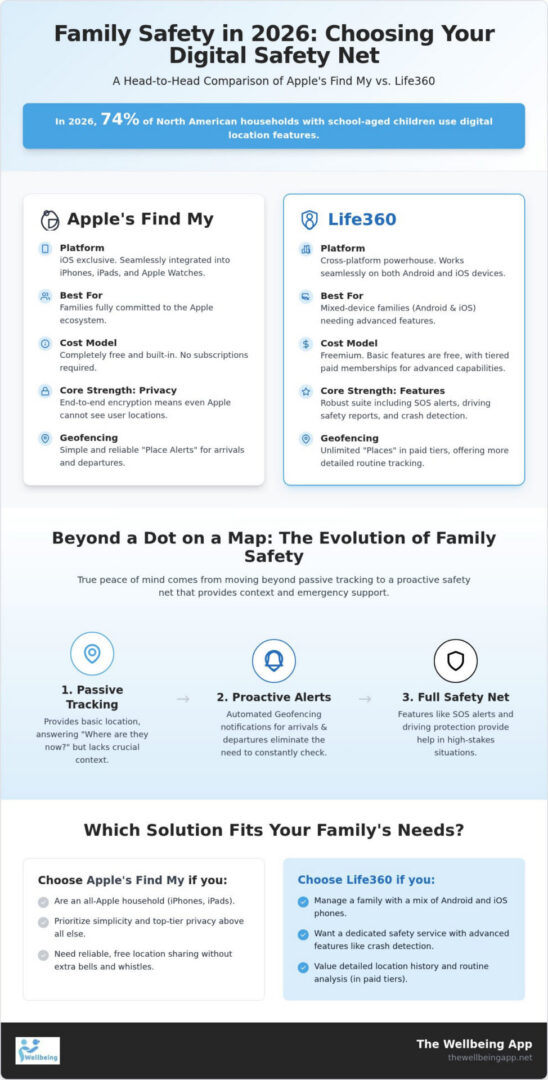
Choosing between find my friends vs life360 isn’t just about picking an app; it’s about selecting a safety ecosystem that fits your family’s daily rhythm. In 2026, over 74% of North American households with school-aged children use digital location features, making this choice a cornerstone of modern parenting. The decision usually begins with your hardware. If everyone in your home uses an iPhone, the path seems clear, but mixed-device families face a more complex puzzle. We’re seeing a profound shift in how these tools are used. They’ve evolved from simple ways to find a lost pair of keys into sophisticated systems designed for protecting people and preserving mental tranquility.
The Apple Ecosystem Advantage: Simplicity and Privacy
For those fully immersed in the iOS world, Apple’s Find My network offers a seamless, integrated experience that requires no additional subscriptions. It links your iPhone, Apple Watch, and AirTags into a single, intuitive interface. Many families start here because it’s native to their devices and doesn’t cost a dime. Apple’s stance on privacy is a major draw. They use end-to-end encryption for location data, meaning even Apple can’t see where you or your children are. It’s a “set it and forget it” solution that prioritizes the user’s personal agency while keeping a quiet, watchful eye on the group. This simplicity creates a sense of harmony for parents who want basic awareness without managing another monthly membership.
Life360: The Cross-Platform Powerhouse
Families with a mix of Android and iOS devices often find themselves limited by Apple’s walled garden. This is where Life360 shines as a cross-platform leader. It bridges the gap between different operating systems, ensuring that every family member remains visible regardless of their phone choice. The app uses a “Circles” architecture, allowing you to manage different groups like immediate family, carpools, or neighborhood watches with distinct privacy settings. Life360 moves beyond the map by offering tiered memberships that include advanced safety indicators and automated alerts. It’s built for those who want a dedicated safety membership rather than a utility tool. When you’re comparing find my friends vs life360, consider whether your priority is basic location sharing or a more robust, feature-rich safety net.
Whether you choose the privacy-first simplicity of Apple or the flexible, cross-platform features of Life360, the goal remains the same. You want to foster a sense of security that allows your loved ones to explore the world with confidence. Both platforms serve as a reliable, always-on partner in your daily life, but they’re only the first step in a truly proactive safety strategy.
Feature Face-Off: SOS Alerts, Geofencing, and Driving Safety
When you look beyond the basic map, the real value of find my friends vs life360 lies in how these tools handle the unpredictable moments of daily life. For many parents, the primary goal isn’t constant surveillance; it’s the quiet relief of knowing a child arrived at practice or a partner made it to their hotel safely. This emotional reward is delivered through geofencing and emergency protocols. While both apps offer these features, they approach them with different levels of technical depth and urgency. Understanding these nuances helps you build a safety net that supports your family’s independence while preserving your mental tranquility.
Real-Time Awareness and Geofencing
Geofencing is the digital boundary that eliminates the need for “Did you get there?” texts. Apple’s Find My uses “Place Alerts,” which are simple and reliable. They notify you when someone arrives at or leaves a specific location. However, Life360 offers a more robust version of this feature. While the free version of Life360 is limited to two “Places,” their paid tiers allow for unlimited geofenced zones. This is particularly helpful for families navigating complex schedules across schools, workplaces, and extracurricular hubs. Because Apple’s tool is integrated at the system level, its notification speed is often slightly faster, but Life360 provides a more detailed view of family routines through its location history. In 2026, Life360’s Gold and Platinum tiers offer 30 days of history, whereas Apple focuses on real-time presence, encouraging a more immediate form of empathetic vigilance.
Driving and Roadside Protection Features
For families with teenage drivers, the feature set in Life360 often tips the scales. It goes far beyond a stationary dot on a map by providing individual driver reports that track top speeds, phone usage, and hard braking events. These indicators aren’t meant for punishment, but for fostering a culture of collective responsibility on the road. Life360 also includes crash detection in all tiers, including the free version. If a collision is detected, the app can automatically alert Circle members and emergency services. This level of proactive monitoring is a significant differentiator. While Apple offers crash detection on the latest iPhone and Apple Watch models, Life360 brings this capability to the app level, making it accessible even on older hardware. To truly move beyond passive tracking, many families are now looking toward proactive safety suites that offer even more specialized indicators like automated check-ins.
Ultimately, the choice comes down to the level of detail you need to feel secure. If you simply want to know your spouse left the office, Apple’s native alerts are excellent. If you need to monitor a new driver’s habits or want the security of integrated roadside assistance, Life360’s specialized features provide a more comprehensive guardian persona. Both tools serve to bridge the gap between technical features and the real-world impact of keeping your loved ones safe.
The Tracking Trap: Why Passive GPS Isn’t Enough for True Safety
While the debate over find my friends vs life360 often centers on accuracy and features, there is a deeper risk that many families overlook. It’s the “False Sense of Security” that comes from seeing a stationary dot on a map. You might check your phone and see that your elderly parent is at home or your spouse is at their office, but a static icon doesn’t tell you if they are actually safe. It only tells you where their device is located. This is the fundamental limitation of passive tracking. It monitors hardware, not well-being, leaving a dangerous gap during what we call a silent emergency. True peace of mind requires a shift from simply knowing where someone is to knowing they are okay.
When Location Sharing Fails: Incapacitation and Inactivity
A silent emergency occurs when a loved one is incapacitated but their phone remains stationary. In these moments, traditional GPS data stops being a safety tool and becomes a misleading indicator. If a senior falls and cannot reach their phone, the map will continue to show them safely at home. No alert will trigger because no digital boundary was crossed. This is why we advocate for proactive status verification over passive location sharing. Features like Proof of Life change the narrative by requiring a simple, non-intrusive response at set intervals. When a check-in is missed, automated alerts are sent to the family immediately. This ensures that help is dispatched because of a lack of activity, rather than waiting for a movement that may never come.
Empathetic Vigilance vs. Intrusive Spying
The psychological burden of constant surveillance is real. Many teenagers and young adults feel a sense of resentment when they know their every move is being watched, which can lead to them “ghosting” the app or disabling GPS entirely. True safety shouldn’t feel like a “Big Brother” experience. It should be built on a foundation of personal agency and mutual trust. By shifting toward a model of empathetic vigilance, families can use high-stakes tools like Night Watch or Chaperone during specific, vulnerable times. These features provide a protective safety net when someone is traveling alone or walking home late at night, without the need for 24/7 tracking. This approach preserves the user’s mental state and strengthens the family bond by prioritizing empowerment over intrusive spying.
Privacy, Data, and Technical Reliability in 2026
Safety is a sacred trust, and that trust is built on the foundation of data privacy. As you weigh the merits of find my friends vs life360, the question of who sees your location history becomes paramount. Many users feel a sense of unease regarding tracking “creepiness,” yet they need the reliable emergency notification system these tools provide. In 2026, managing this balance requires a technical understanding of how your data is handled and how your device maintains its connection to the group. It’s about ensuring mental tranquility while respecting the personal agency of every family member.
Protecting Your Family’s Data
Apple’s privacy architecture is widely regarded for its privacy-first stance, using end-to-end encryption that prevents even the manufacturer from accessing your movements. In early 2026, with the release of iOS 26.3, Apple introduced a “Limit Precise Location” feature. This allows you to prevent cellular carriers from accessing precise data without affecting app-based sharing. Life360 has also made strides, publishing an updated privacy policy on August 24, 2026, to offer more granular control. To maintain harmony, we recommend auditing your app permissions regularly. Ensure that motion and fitness data are only shared when necessary, as these indicators are often used to detect driving behavior or falls.
Ensuring App Reliability in High-Stakes Moments
Technical reliability is the difference between a helpful alert and a missed opportunity. Smartphone battery depletion is a common pain point, often caused by GPS sensors constantly refreshing in the background. To optimize performance, you can adjust background refresh settings, though this may impact real-time accuracy. The most robust systems utilize server-side status monitoring. This ensures that if a device enters a “dead zone” or the battery dies, the system recognizes the loss of signal as a potential indicator of trouble rather than just a technical glitch. Troubleshooting a “Location Not Found” error during a crisis is a parent’s nightmare. By choosing a service that prioritizes proactive monitoring, you ensure that the safety net remains intact even when the map goes dark. You can experience this level of dedicated protection by exploring the proactive safety suite at The Wellbeing App, which focuses on status verification rather than just dots on a map.
Setting healthy boundaries is also essential for long-term trust. Features like “Bubbles” in Life360 allow users to share a generalized location rather than a precise coordinate for a set period. This respects personal agency while still providing a broad sense of security. Whether you are managing a teenager’s first solo trip or a senior’s daily walk, the right technical configuration ensures that your safety tool remains a supportive partner rather than an intrusive presence.
Choosing Your Safety Net: Which Solution Fits Your Family?
The final decision in the find my friends vs life360 debate depends entirely on your family’s unique risk profile. A teenager learning to drive has different needs than an elderly parent living alone or a young professional commuting late at night. While generic location trackers provide a helpful baseline, specialized safety apps offer a more nuanced layer of protection. True safety isn’t found in a constant stream of location data. It’s found in the assurance that someone is watching over your loved ones when it matters most. It’s about moving from passive awareness to a state of mental tranquility.
Tailoring Safety to Your Loved Ones
For households with new drivers, Life360’s focus on speed monitoring and crash detection offers significant value. It helps build a culture of collective responsibility behind the wheel. However, for seniors who value their independence and personal agency, the constant surveillance of a map can feel intrusive. This is where specialized tools like Proof of Life become essential. They offer a way to verify well-being without the “Big Brother” feel of traditional tracking. Solo commuters also benefit from more than just a map. Features like a virtual Chaperone provide a protective safety net during high-stakes moments, such as walking through a dark parking garage or taking an unfamiliar route home.
The Wellbeing App: Proactive Protection for Total Peace of Mind
The Wellbeing App fills the critical gap that passive apps leave behind. While you may still use Apple or Life360 for daily logistics, integrating a proactive safety suite ensures that silence is never mistaken for safety. Our Proof of Life feature acts as a compassionate guardian, checking in on seniors at scheduled times. If a check-in is missed, the system triggers automated alerts to the family immediately. This server-side monitoring means that even if a phone is lost or the battery dies, the safety protocol remains active. It’s a disciplined approach to safety that respects the user’s boundaries while keeping the family connected.
For those traveling late, Night Watch and Chaperone offer empathetic vigilance by monitoring your status until you reach your destination safely. These tools are designed to preserve your mental state by moving beyond the map and focusing on status verification. You can ensure your family’s safety with The Wellbeing App by choosing a system that prioritizes empowerment and proactive management. Ultimately, the best safety strategy often involves a combination of tools. Use the free ecosystem features for basic awareness, but trust specialized services for the moments that truly count.
Empowering Your Family with Proactive Protection
Choosing the right safety ecosystem is a vital step in fostering collective responsibility within your home. While the debate over find my friends vs life360 often focuses on technical features or cross-platform compatibility, the most important factor is moving beyond passive dots on a map. Real safety in 2026 requires a shift from simple location sharing to empathetic vigilance. You deserve the mental tranquility that comes from knowing your loved ones are actually safe, not just that their devices are stationary. It’s about ensuring that every family member feels empowered rather than surveyed.
A comprehensive safety strategy combines the convenience of daily trackers with specialized tools that verify well-being. By prioritizing personal agency and proactive management, you can ensure that silence never leads to uncertainty. Our service offers automated alerts for missed check-ins and 24/7 server-side status monitoring, providing a reliable safety net that stays active even when phones go dark. Protect your family with proactive Proof of Life monitoring and reclaim your peace of mind today. You have the power to create a secure environment where every family member feels supported. Take this step toward a more harmonious and protected future for those you love most.
Frequently Asked Questions
Is Life360 better than Find My for family safety?
Life360 provides a more expansive safety membership with features like crash detection and speed reports across both Android and iOS. Find My is an excellent, free tool for basic location sharing within the Apple ecosystem. The best choice depends on whether you value cross-platform flexibility or privacy-first simplicity. When you’re weighing find my friends vs life360, consider your family’s specific risk profile to ensure everyone feels empowered and secure.
Does Life360 sell my location data to third parties?
Life360 updated its privacy policy on August 24, 2026, to provide users with more granular control over their data. While the company has faced questions about data practices in the past, they now offer settings to manage what is shared. You can audit your permissions to protect your mental tranquility. Choosing a service that prioritizes personal agency ensures that your family’s safety doesn’t come at the cost of their digital privacy.
How much does Life360 cost per month in 2026?
In August 2026, Life360 offers three paid membership tiers to fit different needs. The Silver Plan costs $7.99 per month or $79.99 annually. The Gold Plan is $14.99 per month or $149.99 per year, including 30 days of location history. For the most comprehensive coverage, the Platinum Plan is $24.99 per month. These options allow you to choose a level of protective reassurance that fits your family’s budget and security requirements.
Can I use Life360 on an iPhone while my child uses Android?
You can definitely use Life360 across different operating systems without any loss of functionality. It’s a cross-platform powerhouse designed to keep mixed-device families connected. This is a major advantage when comparing find my friends vs life360, as Apple’s tool is locked to iOS devices. Life360 ensures that parents on iPhones can still keep a watchful eye on children using Android phones, fostering a sense of collective responsibility regardless of the hardware.
What is a “Proof of Life” check-in app?
A Proof of Life app is a specialized safety tool that uses scheduled check-ins to verify well-being. It moves beyond passive tracking by requiring the user to confirm they are safe at set intervals. This proactive monitoring is ideal for seniors or solo travelers who want a safety net without constant surveillance. If a check-in is missed, the system automatically sends emergency alerts to the family, ensuring help is dispatched immediately.
Does location sharing drain my phone battery significantly?
Location sharing can lead to smartphone battery depletion, but modern apps use sophisticated algorithms to minimize the impact. You can optimize performance by using geofencing instead of constant map refreshes. Many families find that proactive status verification is more battery-efficient than passive GPS tracking. It’s about finding a balance that maintains app reliability in high-stakes moments without leaving your loved ones with a dead phone when they need it most.
What happens if I miss a scheduled check-in on a safety app?
If you miss a scheduled check-in, the system triggers automated alerts to your designated family members. Because this monitoring happens on the server side, the alert will fire even if your phone is off or out of range. This ensures that silence is never mistaken for safety. It provides a protective safety net that standard trackers lack, giving you the mental tranquility of knowing that someone is always looking out for you.
How do I track an elderly parent without being intrusive?
Tracking a senior parent requires a delicate balance of safety and personal agency. Instead of 24/7 surveillance, we suggest using empathetic vigilance through scheduled check-ins or features like Night Watch for specific trips. This approach respects their independence while providing you with reliable indicators of their well-being. It builds trust rather than resentment, positioning the technology as a compassionate guardian that supports their lifestyle rather than an intrusive spying tool.