
The Best Dead Man’s Switch App for Personal Safety in 2026
Imagine a Tuesday evening where you don’t return home as planned, and because you’re alone, no one realizes you’re in trouble until it’s too late. It’s a heavy burden to carry the fear of being injured and unable to call for help, especially when you know the anxiety it would cause your family. You likely agree that safety should be a shared effort, yet you might feel a natural mistrust toward complex, hardware-based medical alerts. This is why a modern dead man’s switch app is becoming an essential tool for personal agency.
Discover how a modern dead man’s switch app can transform from a legacy messaging tool into a proactive, life-saving digital safety net. In this guide, we’ll explore how these software solutions offer an automated way to provide a Proof of Life indicator through simple daily check-ins. We’ll preview the best options for 2026 that prioritize your mental tranquility, ensuring your emergency contacts are notified exactly when they need to be. You’ll learn how to choose a reliable partner that acts as a watchful protector, giving you and your loved ones the confidence to live fully while staying connected.
Key Takeaways
- Understand how modern technology has evolved the traditional dead man’s switch into a dynamic, life-saving tool for your daily protection.
- Learn how to utilize a dead man’s switch app to establish an automated Proof of Life indicator that monitors your safety even if your device is compromised.
- Discover the critical difference between legacy messaging services and proactive safety systems that prioritize rapid response times during an emergency.
- Follow a simple five-step process to customize your digital safety net, aligning your check-in intervals with your unique routine and personal goals.
- Achieve lasting mental tranquility for yourself and your family by choosing a software-based solution that acts as a compassionate guardian rather than just a passive tool.
What is a Dead Man’s Switch App and Why Do You Need One in 2026?
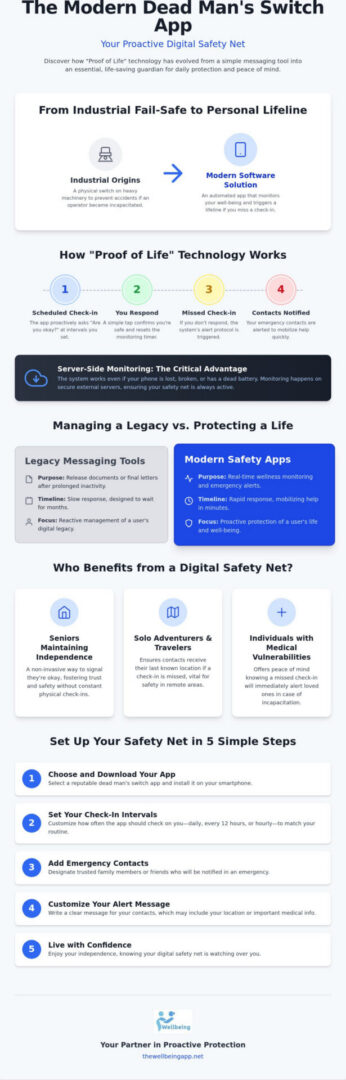
A Dead man’s switch was once a rugged physical fail-safe found on locomotives and heavy industrial equipment. If an operator let go of a handle or stopped pressing a pedal, the machine would safely shut down. Fast forward to 2026, and this concept has been reimagined as a sophisticated software solution. A modern dead man’s switch app isn’t about stopping a train; it’s about starting a lifeline. It functions as a silent, watchful protector that monitors your well-being through automated indicators. If you stop interacting with the system, it triggers a pre-set response to ensure your safety. This shift from industrial tool to personal safety net reflects our growing need for empathetic vigilance in an increasingly solo world.
Choosing to use this technology isn’t about living in fear. It’s about the preservation of your mental state and the well-being of those who care about you. We’ve moved past the era of reactive security into a time of proactive harmony. By using a software-based guardian, you’re ensuring that you are never truly alone, even when you’re enjoying your independence. It’s a commitment to personal agency, providing a reliable way to say “I’m okay” without needing to send a single text.
The Core Difference: Legacy vs. Life-Saving Switches
In the past, these digital tools were mostly used for legacy messaging. They were designed to release passwords, final letters, or legal documents after a user had been inactive for months. While that has its place, the 2026 user requires something more proactive. A modern dead man’s switch app focuses on real-time monitoring and immediate Proof of Life checks. Instead of waiting weeks to take action, these systems can check in daily or even hourly. This ensures that if an emergency occurs, help is mobilized in minutes rather than months. It’s the difference between managing a legacy and protecting a life.
Common Use Cases for Modern Safety Apps
- Seniors Maintaining Independence: Many older adults want to live in their own homes without the constant intrusion of physical check-ins. An app provides a non-invasive way to signal they’re okay every morning, fostering a sense of trust and safety.
- Solo Adventurers and Travelers: Hikers or solo travelers in remote areas often face risks where a quick response is vital. Automated alerts ensure that if they don’t check in by sunset, their emergency contacts receive their last known location through server-side monitoring.
- Individuals with Medical Vulnerabilities: For those managing conditions that could lead to sudden incapacitation, the fear of being unable to call for help is a constant weight. Using a safety app offers mental tranquility, knowing that a missed check-in will alert loved ones immediately.
By framing safety as a shared effort between technology and community, these apps empower users to live fully. They don’t just react to tragedy; they proactively manage personal agency and well-being through constant, supportive monitoring.
How Proof of Life Technology Works: The Mechanics of Safety
The “Proof of Life” indicator is the heartbeat of a modern dead man’s switch app. Unlike traditional alarms that require you to press a button during a crisis, this system proactively asks, “Are you okay?” at scheduled intervals. It’s a subtle but powerful shift in how we manage safety. If you respond, the timer resets; your mental tranquility remains undisturbed. However, if a check-in is missed, the system transitions from a silent observer into an active advocate for your well-being. This ensures that help is on the way even if you are unable to reach for your phone.
A significant advantage of this technology is server-side monitoring. Many users worry about what happens if their phone is lost, stolen, or runs out of battery. Because the monitoring happens on secure, external servers, the alert protocol isn’t dependent on your device’s status. If the server doesn’t receive your signal, it knows something is wrong. This creates a “watchful protector” that never sleeps, ensuring that your safety net remains intact even in the worst-case scenarios. Recent interest in this technology, such as the viral safety app trends, shows that people are looking for these reliable, software-based solutions that offer more than just basic messaging.
Customizing Your Check-In Intervals
Every routine is different, so flexibility is essential for maintaining a sense of personal agency. You can set daily “Proof of Life” indicators to confirm you’ve started your day safely, which is ideal for seniors living independently. For moments of higher risk, such as walking to your car after a late shift, the “Chaperone” feature allows for more frequent, hourly checks. For the most vulnerable hours of the night, “Night Watch” provides dedicated monitoring. This tiered approach ensures your protection matches your current environment and activity level perfectly.
Alerting Your Circle: How Notifications Are Dispatched
When a check-in is missed, the app follows a strict escalation protocol. It typically begins with a series of urgent app notifications and SMS messages sent directly to you. If there’s still no response, the system dispatches emergency alerts to your pre-selected contacts. These notifications include real-time location sharing, providing your circle with the exact coordinates needed to find you. This fosters a sense of collective responsibility, where family members and friends act as a coordinated rescue team. By establishing these clear protocols, you can invest in proactive safety that empowers both you and your loved ones with lasting peace of mind.
Comparing Dead Man’s Switch Apps: Legacy Messaging vs. Proactive Safety
When you choose a dead man’s switch app, the most critical factor is the timeline of intervention. The industry is currently split into two distinct philosophies: posthumous administration and active rescue. While the term itself covers a broad category of tools, the difference between a system that waits six months to act and one that acts in sixty minutes is the difference between managing an estate and saving a life. A true fail-safe is defined by the ability to trigger alerts without any user intervention. This means the system assumes you need help unless you explicitly state otherwise, creating a safety net that functions even when you cannot.
The reliability of these systems often hinges on whether they use automated or manual check-ins. Manual systems require you to remember to log in or click a link, which can lead to false alarms if you simply forget. Automated indicators, however, monitor your activity silently and only prompt you when necessary. This distinction is vital for those seeking mental tranquility rather than another chore on their to-do list. In 2026, the personal safety app market is valued at approximately 1.11 billion to 1.8 billion dollars, reflecting a massive shift toward these sophisticated, software-based guardians.
Legacy Apps (The ‘Digital Will’ Category)
Legacy apps are designed for the long term. They excel at distributing digital assets, passwords, and final farewells to loved ones after a user passes away. However, they have significant limitations for daily safety. For example, the Google Inactive Account Manager has a minimum inactivity trigger of three months. Even specialized services like deadmansswitch.net typically offer a minimum check-in interval of two days. These long inactivity buffers are useful for digital wills, but they provide no protection during a medical emergency or a sudden accident where every minute counts.
Proactive Safety Apps (The ‘Guardian’ Category)
Proactive safety apps are built for immediate emergency response and daily wellness. They focus on senior safety and solo protection by offering much tighter monitoring windows. The Wellbeing App fits perfectly into this category because it prioritizes life-saving features like Night Watch and Chaperone services. Instead of waiting days, these systems use frequent Proof of Life checks to detect trouble in real-time. By shifting the focus from “what happens after” to “what is happening now,” these apps empower you to maintain your independence while providing your family with the warmth of knowing you are always protected.
Setting Up Your Digital Safety Net: A 5-Step Guide
Setting up your digital safety net is a purposeful step toward mental tranquility. It transforms a standard dead man’s switch app into a personalized guardian that understands your specific needs. By taking a few minutes to configure the system correctly, you’re making a proactive safety investment in your independence. Follow these five steps to ensure your protective shield is ready when you need it most.
Building your safety net begins with clarity. Step 1: Define your primary safety goal. Whether you’re managing a medical condition or simply enjoying solo travel, your goal dictates how the app behaves. Step 2: Choose your Proof of Life intervals. Align these with your natural rhythm, such as a morning check-in or a Chaperone check for a specific high-risk event. Step 3: Select your Circle of Trust. Identify the individuals who are reliable and ready to act; they are your first line of defense. Step 4: Enable Location Sharing. This ensures responders aren’t searching blindly if a crisis occurs. Step 5: Test the system. Familiarity prevents panic. By running a controlled test, you ensure your circle understands the difference between a routine check and a genuine emergency alert.
Choosing the Right Emergency Contacts
Not all contacts serve the same purpose in your safety plan. A Primary Responder is typically someone local who can physically check on you, while a Secondary Contact might be a distant relative who provides emotional support and coordination. When talking to your family about using a safety app, frame it as a gift of peace of mind. It’s about watchful reassurance; they don’t have to worry about your well-being because they know the system will alert them if anything goes wrong. This shared effort strengthens family unity and ensures everyone knows their role.
Optimizing Your Device for 24/7 Monitoring
For your safety net to be effective, your phone must be prepared. Ensure that your dead man’s switch app has the necessary background app permissions to run without interruption. Battery optimization settings can sometimes put apps to sleep, so you’ll want to exclude your safety tool from these restrictions. If you’re using Night Watch, make sure your phone’s settings allow for Proof of Life notifications even during quiet hours. By keeping your indicator active and your device optimized, you ensure your watchful protector never misses a beat.
Ready to build your personalized safety net and protect your independence? You can start your proactive safety journey today and give your loved ones the mental tranquility they deserve.
The Wellbeing App: Your Partner in Proactive Protection
The Wellbeing App is built on a foundation of sincere concern for the vulnerable. While it functions as a sophisticated dead man’s switch app, its true purpose is to serve as a compassionate guardian for your everyday life. This isn’t just about code and servers; it’s about the preservation of your mental state. By integrating the Proof of Life feature, we provide a bridge of trust between seniors and their families. This allows older adults to maintain their cherished independence while giving their children the mental tranquility of knowing their loved one is safe.
Our Chaperone service acts as a virtual partner for those moments when you feel exposed. Whether you’re walking home late from a shift or navigating a quiet parking garage, the app maintains an empathetic vigilance over your journey. Because we utilize a subscription model, we can guarantee continuous, server-side monitoring. This means that even if your phone is destroyed or loses connectivity, our systems remain active. Your safety isn’t dependent on a single piece of hardware; it’s backed by a robust, always-on digital safety net that never sleeps.
Night Watch: Protection When You Are Most Vulnerable
Vulnerable adults often face the highest risks during the quiet hours of the night. Our Night Watch feature ensures this dead man’s switch app provides 24/7 monitoring that specifically targets these periods of potential isolation. By setting automated indicators, we can prevent missing person incidents before they escalate into tragedies. This empowers users to live independently without the heavy feeling of being “watched” or monitored by intrusive cameras. Instead, it’s a silent, respectful presence that only steps in when a Proof of Life check is missed.
A Commitment to Community and Family Unity
We believe that safety is a shared effort. Our “Altruistic Tech” philosophy prioritizes human life and interpersonal connection over mere data storage. By using this technology, you’re fostering social cohesion within your own family and community. It’s a subtle but powerful appeal to your sense of duty toward your loved ones. When we work together, we create an atmosphere of harmony and trust that allows everyone to feel empowered rather than anxious. You can secure your peace of mind today with The Wellbeing App and join a community dedicated to proactive protection.
Embrace a Future of Shared Safety and Mental Tranquility
Your journey toward lasting mental tranquility starts with a single, proactive decision. We’ve explored how technology has evolved from industrial fail-safes to a sophisticated dead man’s switch app designed for your daily well-being. By choosing a system that prioritizes real-time protection over posthumous messaging, you’re investing in your own independence and your family’s peace of mind. You don’t have to carry the weight of uncertainty alone when you have a compassionate guardian watching over your routine.
Whether you’re utilizing automated Proof of Life indicators to start your day or relying on a virtual Chaperone for your solo evening walks, you’re embracing a life of empowerment. Our server-side fail-safe monitoring ensures that your safety net remains active, even if your device is compromised. It’s a powerful way to fulfill your duty to your loved ones while maintaining your personal agency. Take the next step in fostering family unity and collective responsibility. You can protect your loved ones with The Wellbeing App’s Proof of Life monitoring today. Let’s create a future where safety is a shared, effortless harmony.
Frequently Asked Questions
What is a dead man’s switch app used for?
A dead man’s switch app serves as a proactive safety tool that triggers automated alerts to designated contacts if a user fails to check in at scheduled times. Unlike legacy tools used for digital wills, a modern app provides real-time monitoring for daily wellness. It ensures that if you’re incapacitated, your circle of trust is notified immediately. This technology transforms a passive device into a watchful protector for your personal agency.
Is a dead man’s switch app safe to use for seniors living alone?
Yes, it’s a highly safe and non-invasive way for seniors to maintain their independence while providing mental tranquility to their families. By using Proof of Life indicators, the system confirms the senior is active and well without requiring intrusive hardware or constant phone calls. It fosters a sense of collective responsibility and family unity, acting as a compassionate guardian throughout the day and night.
Can a dead man’s switch app send my location in an emergency?
Most modern safety apps, including The Wellbeing App, include real-time Location Sharing as a core feature. If a Proof of Life check-in is missed, the system automatically dispatches your last known coordinates to your emergency contacts. This precise data is critical for responders to locate you quickly. It’s especially vital in situations where you’re unable to communicate your position yourself due to injury or sudden illness.
How often should I set my proof of life check-in?
You should align your check-in frequency with your specific routine and safety goals. For general daily wellness, a morning and evening check-in often provides sufficient mental tranquility. However, if you’re in a high-risk situation, features like Chaperone allow for hourly checks. Specialized protection like Night Watch provides dedicated monitoring during the most vulnerable hours of your sleep cycle, ensuring your safety net is always active.
What happens if I forget to check in on the app?
If a check-in is missed, the system follows a strict escalation protocol to minimize false alarms. You’ll typically receive a series of urgent notifications and SMS prompts to your device first. If you don’t respond to these indicators within a set grace period, the app then dispatches Emergency Alerts and location data to your pre-selected circle. This ensures that help is mobilized only when it’s truly needed.
Do dead man’s switch apps work if my phone is turned off?
Reliability depends on server-side monitoring, which ensures the system works even if your device is powered off or destroyed. Because the timer resides on a secure external server rather than just your phone, the system knows if you haven’t signaled an “all clear.” This fail-safe architecture is what makes a professional dead man’s switch app more reliable than simple manual texting or local alarms that require battery power.
Are there dead man’s switch apps that offer 24/7 monitoring?
Professional safety platforms like The Wellbeing App offer round-the-clock protection through features like Night Watch. This service provides constant, uninterrupted monitoring for vulnerable users, ensuring that a watchful protector is always active. By automating the Proof of Life process, these apps provide a reliable safety net that functions 24 hours a day. It offers a software-based solution that doesn’t require extra hardware or physical security personnel.
How much does a safety monitoring app subscription cost?
Pricing varies across the industry, but most providers offer recurring monthly and annual subscription plans to cover server costs and automated alert dispatch. These fees provide users and families with continuous access to the full suite of monitoring tools and server-side reliability. While costs depend on the level of protection required, a subscription is best viewed as a proactive safety investment in your long-term mental tranquility and independence.