
How to Ensure Privacy with a Location Sharing App: A 2026 Safety Guide
Did you know that 62% of Americans now share their mobile location with loved ones, yet many of those same people report a persistent anxiety about being “watched” every second of the day? It’s a heavy trade-off to make. You want the reassurance that someone is looking out for you during a late commute, but you shouldn’t have to sacrifice your personal autonomy or worry about your data being sold to third parties to get it. Learning how to ensure privacy with a location sharing app is the key to regaining that balance. We understand that true safety shouldn’t feel like surveillance; it should feel like a quiet, supportive presence that only steps in when it’s truly needed.
In this 2026 safety guide, you’ll discover how to master the latest digital discretion tools to maintain your personal security. We’ll show you how to move beyond basic tracking and embrace a setup that prioritizes your mental tranquility. You’ll learn how to use automated tools provided by The Wellbeing App, such as Proof of Life for scheduled check-ins and Night Watch for protection during specific high-risk windows. By the end, you’ll have a clear understanding of modern data encryption and a proactive safety plan that provides peace of mind without the battery drain or the constant feeling of being monitored.
Key Takeaways
- Distinguish between intrusive surveillance and protective monitoring to avoid the “privacy fatigue” that often leads users to disable safety features entirely.
- Master granular permission settings like “Approximate Location” and “While Using” to maintain digital discretion without compromising your physical security.
- Explore how to ensure privacy with a location sharing app by auditing data policies and choosing services that utilize end-to-end encryption for your movement history.
- Leverage proactive features like Night Watch and Proof of Life to provide your loved ones with reassurance during specific times without 24/7 tracking.
Understanding the Balance Between Personal Safety and Digital Privacy
Safety shouldn’t feel like a digital leash. For many, the weight of being watched every second of the day creates a specific kind of exhaustion known as privacy fatigue. When you feel like your every movement is under a microscope, you’re more likely to disable your GPS settings entirely. This leaves you vulnerable during the moments you actually need a guardian. Understanding how to ensure privacy with a location sharing app starts with a fundamental shift in philosophy. We must distinguish between intrusive surveillance, which is about constant visibility and control, and protective monitoring, which is about being present only when it truly counts.
The ultimate goal of any safety tool should be mental tranquility. You deserve to walk through your day with the quiet confidence that you’re protected, without feeling like a mere data point for third-party advertisers. Privacy-First Safety is the intentional sharing of data only when a safety threshold is crossed. This approach respects your Internet Privacy by minimizing the collection of movement history while maximizing your security during high-stakes moments. As of 2026, twenty US states have enacted comprehensive consumer privacy laws, reflecting a national shift toward data agency. This legal environment supports your right to choose how much of your life is digitized.
The Evolution of Location Sharing in 2026
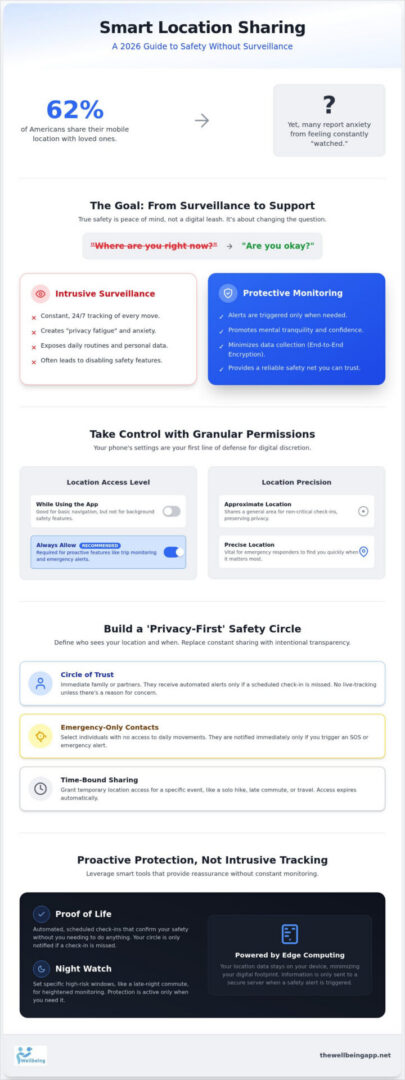
In 2026, the technology behind your safety has matured. Modern apps have moved beyond simple dots on a map that drain your battery and expose your daily routine to anyone with access. The integration of edge computing now allows much of your location data to stay on your device, only transmitting to a secure server when an alert is triggered or a scheduled check-in is missed. This shift changes the fundamental question from “Where are you right now?” to a much more caring and supportive “Are you okay?” It is a proactive stance that empowers you rather than tracking you, ensuring that your digital footprint remains small while your safety net remains wide.
Identifying Your Personal Privacy Comfort Zone
Not everyone in your life needs a live feed of your coordinates at all times. To maintain digital discretion, it’s vital to audit who actually requires access to your whereabouts and under what circumstances. By setting these boundaries, you learn how to ensure privacy with a location sharing app while still fulfilling your duty to your loved ones.
- Circle of Trust: This should be limited to immediate family or partners who receive automated alerts only if a safety indicator, like a Proof of Life check-in, is missed.
- Emergency-Only Contacts: These are individuals who have no access to your daily movements but are notified immediately if you trigger an SOS or an Emergency Alert.
- Time-Bound Sharing: This involves granting temporary access for a specific event, such as a solo hike, a late-night commute, or traveling in an unfamiliar area.
By defining these zones, you replace constant surveillance with a system of empathetic vigilance. You aren’t hiding; you’re choosing transparency with intention, ensuring that your safety never comes at the cost of your personal dignity.
Configuring Granular Permissions for Maximum Protection
Mastering your device settings is the first practical step in reclaiming your digital autonomy. Many users simply tap “Allow” during installation without realizing they’re granting permanent access to their movements. Knowing how to ensure privacy with a location sharing app starts with understanding the difference between “While Using the App” and “Always Allow.” For basic navigation, “While Using” is often sufficient. However, for proactive safety features that monitor your status in the background, “Always Allow” is typically required. The key is to verify that your chosen app uses this access responsibly, only activating data transmission when a specific safety event occurs.
You can further refine your discretion by toggling between “Precise Location” and “Approximate Location.” Precise data is vital for emergency responders or finding a loved one in a crowded stadium, but approximate data is often enough for general check-ins. Managing your background data refresh also plays a dual role. It preserves your battery life while ensuring the app remains reliable when you need it most. The Cybersecurity and Infrastructure Security Agency provides excellent guidance on Privacy and Mobile Device Apps, emphasizing that limiting data collection is a cornerstone of digital safety. Choosing an app that respects these boundaries, such as The Wellbeing App, ensures your safety circle remains a source of comfort rather than a point of vulnerability.
Mastering OS-Level Privacy Controls
By 2026, both Android and iOS have standardized sophisticated Privacy Dashboards. These tools provide a transparent timeline of every instance an app accessed your GPS hardware. You should set up system-level alerts to receive a notification whenever your location is being shared in the background. Additionally, utilize the “Safety Check” feature to quickly review and revoke access from people or apps that no longer need it. This regular maintenance prevents legacy access from lingering after a temporary trip or event has ended.
In-App Privacy Features to Look For
High-quality safety tools offer internal controls that go beyond the operating system’s basic toggles. Look for geofencing limits that allow you to define “Safe Zones,” where your exact coordinates are only shared if you leave a designated area. An “Invisible Mode” is also essential for those moments when you want to pause sharing without fully disabling your safety net. You should also have the ability to customize notification triggers. This means your spouse might get an alert if you don’t arrive home on time, but a casual friend only sees your status during a specific group outing. These granular choices are central to how to ensure privacy with a location sharing app while maintaining a watchful, caring presence for those you love.
Auditing App Data Policies: What Happens to Your Movement History?
When you consider how to ensure privacy with a location sharing app, the most critical factor isn’t what the app does while you’re moving, but what it does with that information once you’ve arrived. A true safety app should treat your movement history as a liability, not an asset. Every coordinate stored is a potential point of vulnerability for your digital life. Data minimization is the gold standard of modern safety. This principle dictates that a service should only collect the bare minimum information required to keep you protected. If an app tracks and stores your history for weeks on end, it’s no longer just a guardian; it’s a database of your personal habits.
You should prioritize apps that implement end-to-end encryption for location packets. This technical safeguard ensures that your coordinates are scrambled during transmission, making them unreadable to anyone except your designated safety circle. Following guidance from the eSafety Commissioner can help you navigate the risks of over-sharing and understand how to mitigate them through careful policy audits. By choosing a provider that views your data as a sacred trust rather than a commodity, you can maintain your mental tranquility while staying connected to those you love.
Red Flags in a Privacy Policy
Be wary of vague or overly complex language in a provider’s legal documents. If a policy mentions “third-party marketing partners” or “enhancing user experiences through data sharing,” your location is likely being monetized. Another common tactic is “Anonymized Aggregation.” While this sounds safe, location data is notoriously easy to de-anonymize with just a few known routine points. For users in the United States, always check for US-based data centers. This ensures your sensitive information is protected by domestic legal frameworks and isn’t subject to the unpredictable regulations of foreign jurisdictions.
The 2026 Standard for Data Expiry
In 2026, the standard for digital discretion is automatic data expiry. Your movement history should ideally delete itself after a 24 to 48-hour window. This timeframe is long enough to review a recent safety event if needed, but short enough to prevent the creation of a permanent archive of your movements. You should also look for a manual “Purge” option that allows you to clear your digital footprint instantly at any time.
It’s vital to understand the difference between server-side monitoring and server-side storage. Server-side monitoring allows an app to watch for missed check-ins or emergency triggers in real-time. This provides proactive protection without the need to store that data indefinitely once the “all-clear” is given. This approach ensures your safety net remains an instrument of empowerment rather than a tool for constant surveillance.
Best Practices for Establishing a ‘Privacy-First’ Safety Circle
Technical settings provide the framework, but the human element is what makes safety sustainable. Understanding how to ensure privacy with a location sharing app requires more than just toggling switches. It involves setting clear, empathetic boundaries with those you love. When you approach location sharing with a Chaperone mindset, you view the technology as a tactical tool rather than a constant tether. This means sharing is conditional. It should activate during a late-night solo commute or a trip to an unfamiliar area, rather than functioning as a 24/7 broadcast of your life. By treating safety as a shared responsibility, you foster a culture of mutual accountability where everyone in the circle follows the same rules to preserve each other’s mental tranquility.
Creating a Social Contract for Location Sharing
Before you invite someone into your safety circle, it’s vital to establish a social contract. This agreement defines the difference between Emergency Use Only and Casual Check-ins. You should agree on a no-judgment rule for movement alerts. If an automated system flags a missed check-in, the response should be one of support, not interrogation. Handling false alarms with grace is equally important. If the integrity of the system is to remain intact, users must feel comfortable knowing that an occasional technical glitch won’t lead to a privacy breach or a family argument. This social foundation ensures that the technology serves the family, not the other way around.
Using Technology to Replace Interrogation
One of the greatest benefits of a sophisticated safety tool is its ability to replace the intrusive “Where are you?” text. Automated alerts for when a loved one has arrived safely at a common destination provide reassurance without the need for manual check-ins. This reduces the cognitive load on both the sender and the receiver. Features like a virtual Chaperone build trust by offering a watchful eye during specific high-stakes windows. This ensures that your status is known only when it truly matters. To experience a guardian that respects your boundaries, you can set up your privacy-first safety circle today. By shifting from active tracking to proactive alerts, you protect both your physical security and your digital discretion.
Proactive Protection Without Intrusive Tracking: The Wellbeing App Approach
True safety shouldn’t require you to surrender your personal dignity. While traditional tools rely on constant, intrusive visibility, The Wellbeing App is built on a philosophy of empathetic vigilance. This approach shifts the focus from where you are to how you are. Features like Proof of Life prioritize your status over your exact coordinates, functioning as a binary check-in that only transmits data when you need a guardian. This is the definitive answer for those wondering how to ensure privacy with a location sharing app without losing the safety net their family relies on. By focusing on status rather than surveillance, you maintain your personal agency while providing your loved ones with the reassurance they deserve.
We designed our services to be tactical rather than tethering. Night Watch provides specialized protection during your most vulnerable hours, such as late-night shifts or solo travel, without requiring 24/7 monitoring during your private time. Similarly, the Virtual Chaperone acts as a temporary, high-security bridge for specific journeys like walking to your car after dark. These features are automated to only fire alerts when you don’t check in as scheduled. This ensures that your normal daily activity remains entirely private, and your location is only shared if a safety threshold is crossed and you are unable to respond.
Empowerment Through Automated Vigilance
The core of our technology is server-side monitoring, which offers a significant advantage over peer-to-peer tracking. This system acts as an automated witness that doesn’t require a family member to be constantly watching their screen. If a scheduled Proof of Life check-in is missed, the system initiates an automated dispatch of alerts to your circle. This proactive management preserves mental tranquility for everyone involved. You can live your life freely, and your family can rest easy knowing that the system is always on, even when they are not. It’s a disciplined, serious approach to safety that respects the harmony of your interpersonal connections.
Join a Community of Proactive Protection
At The Wellbeing App, our mission is rooted in social responsibility and altruism. We believe that safety is a shared effort, and our subscription model is a central pillar of that commitment. By choosing a paid service, you ensure that our interests are perfectly aligned with your privacy; we never sell your data to third parties because our business is your well-being, not your movement history. This creates an atmosphere of trust and empowerment, framing our technology as an instrument for a safer, more cohesive society. Secure your peace of mind with The Wellbeing App today. By mastering how to ensure privacy with a location sharing app, you take a proactive step toward a life defined by safety and digital discretion.
Reclaiming Your Digital Autonomy and Peace of Mind
True safety in 2026 is no longer about constant tracking; it’s about intentional transparency and proactive protection. By mastering granular permissions and auditing data policies, you transform your mobile device into an instrument of empowerment. Learning how to ensure privacy with a location sharing app allows you to protect your loved ones while preserving the mental tranquility you deserve. It’s a delicate balance, but it is entirely achievable with the right philosophy and tools. You have the power to define your boundaries while maintaining the duty of care you feel toward your family.
The Wellbeing App stands as a compassionate guardian in this digital landscape. Our encrypted, privacy-first architecture is trusted by families nationwide to provide safety without surveillance. With 24/7 automated Proof of Life monitoring, you gain the reassurance of a watchful protector that only steps in when it’s truly needed. You don’t have to choose between your digital discretion and your family’s security. Start your journey toward mental tranquility with The Wellbeing App and embrace a future where safety and privacy live in perfect harmony. You’re never alone when you have a partner dedicated to your welfare.
Frequently Asked Questions
Is it possible to share my location only during an emergency?
Yes, you can configure your settings to only transmit data when a safety threshold is crossed. Features like Emergency Alerts or automated missed check-in triggers ensure your coordinates are shared only in high-stakes moments. The Wellbeing App specifically utilizes Proof of Life check-ins to confirm your status without requiring constant tracking. This allows you to maintain your digital discretion during normal daily activities while ensuring a safety net is ready to activate if you are truly vulnerable.
How do I know if a safety app is selling my location data?
You should audit the privacy policy for mentions of “third-party marketing” or “anonymized aggregation.” Apps with a subscription model, such as the Wellbeing App, typically align their interests with your privacy because they don’t rely on data monetization. If the service is free, your movement history is often the product. Learning how to ensure privacy with a location sharing app involves verifying that the provider treats your data as a liability rather than an asset.
Will location sharing apps drain my phone’s battery in 2026?
Modern apps utilize edge computing and low-energy GPS polling to minimize power consumption. By 2026, the Wellbeing App’s server-side monitoring ensures that your phone isn’t constantly broadcasting high-power signals. Instead of 24/7 active tracking, the system relies on periodic check-ins and automated alerts. This approach preserves your battery life while maintaining the uninterrupted nature of the protective service you and your family rely on for mental tranquility. Your device stays efficient while your safety remains a priority.
What is the difference between ‘Find My’ services and a safety monitoring app?
‘Find My’ services are generally reactive tools designed to locate lost devices or provide passive location updates. In contrast, a safety monitoring app like the Wellbeing App provides proactive protection through features like Night Watch and Chaperone. These tools actively monitor your status and trigger automated dispatch of alerts if you fail to check in. It is the difference between someone being able to look for you and a system that automatically knows when to call for help.
Can I set a privacy timer on my location sharing?
Yes, many high-stakes safety apps now include time-bound sharing features. You can activate a Virtual Chaperone for a specific solo walk or a Night Watch window for a late commute. Once that specific time period ends or you reach your destination safely, the sharing automatically expires. This ensures that your movements aren’t tracked indefinitely. It gives you personal agency over exactly when and how your digital footprint is visible to others in your safety circle.
What happens to my data if I delete the app?
Reputable safety providers should offer a manual purge option to clear your movement history instantly. In 2026, the standard for data expiry is 24 to 48 hours, meaning most of your history is already deleted automatically. If you delete the Wellbeing App, your active monitoring ceases immediately. You should always verify in the privacy settings that your account and any lingering server-side storage are fully erased to protect your long-term internet privacy and personal dignity.
How do automated check-ins protect my privacy better than GPS tracking?
Automated check-ins, such as Proof of Life, focus on your status rather than your coordinates. Instead of a family member watching a dot move on a map, they only receive a notification if you miss a scheduled check-in. This is a core part of how to ensure privacy with a location sharing app. It replaces constant surveillance with empathetic vigilance, ensuring your privacy is respected during normal activity while still providing a robust safety net for your family.
Is my location data encrypted while it’s being shared?
Yes, modern safety apps use end-to-end encryption for all location packets. This ensures that your movement data is scrambled during transmission and can only be decoded by your designated safety circle. This level of technical robustness prevents unauthorized third parties from intercepting your sensitive information. By choosing a provider with a privacy-first architecture, you ensure that your safety remains a private matter between you and your trusted community, fostering an atmosphere of trust and harmony.