
Automated Check-In App: 2026 Lone Worker Safety Guide
What happens if you’re working alone and a sudden emergency leaves you unable to reach your phone? It’s a quiet fear that many of the 25% of the U.S. workforce who operate in isolation carry every day. You know that manual check-ins are easy to forget when you’re busy, and the idea of being constantly tracked often feels like an invasive burden on your privacy. We understand that you want to feel safe without feeling watched. You deserve a solution that prioritizes your agency while acting as a silent, compassionate guardian. An automated check-in app for lone workers transforms this anxiety into mental tranquility by shifting the weight of safety from your shoulders to a reliable, proactive system.
In this 2026 guide, you’ll discover how automated check-in technology provides a proactive safety net that ensures help is always on the way, even when you can’t call for it. We’ll explore how Proof of Life protocols replace the stress of manual texting with a fail-safe countdown that triggers automatically if you’re incapacitated. You’ll learn how modern apps respect your personal boundaries through dynamic privacy while maintaining constant server-side vigilance. From understanding the latest OSHA General Duty Clause implications to choosing a virtual chaperone for high-risk transitions, this guide covers everything you need to build a safety plan that works as hard as you do.
Key Takeaways
- Transition from unreliable manual check-ins to a “Proof of Life” system that protects you even when you are unable to reach your phone.
- Learn how an automated check-in app for lone workers provides a proactive safety net while strictly respecting your personal privacy and independence.
- Discover why cloud-based monitoring is more reliable than traditional hardware, ensuring help is dispatched even if your device suffers from a dead battery or signal loss.
- Identify your highest-risk working hours and learn how to structure an automated escalation path to notify your designated Guardians immediately.
- Gain the mental tranquility that comes from knowing a compassionate, virtual chaperone is always watching over your welfare during isolated tasks.
The Vulnerability of Lone Working: Why Manual Check-ins Fail
In 2026, the concept of a lone worker has expanded far beyond the traditional industrial site. Today, it includes the visiting nurse providing late-night home care, the freelance consultant working from a remote cabin, and the real estate agent showing a property to a stranger. Understanding lone worker definitions and risks is the first step in acknowledging that isolation isn’t just a job description; it’s a distinct vulnerability. When you work alone, the silence can be peaceful, but it also carries a heavy psychological weight. You constantly wonder if someone would actually notice if you didn’t come home on time.
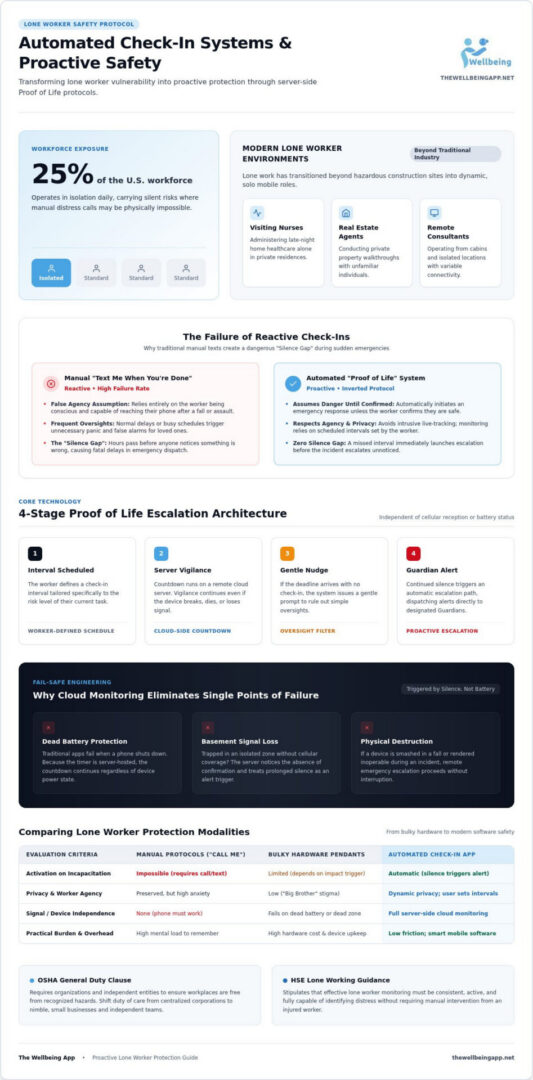
Most people rely on a “text me when you’re done” system, but this is a dangerously fragile safety net. It creates a false sense of security that quickly crumbles when life gets busy. It’s easy to forget a manual check-in when a meeting runs long or a task becomes intense. When you forget, your loved ones experience unnecessary panic. More importantly, if you actually need help, you might be physically unable to send that text at all. An automated check-in app for lone workers solves this by turning the process upside down. An automated check-in is a proactive safety protocol that assumes you need help unless you specifically confirm you’re safe.
The Limits of ‘Just Call Me’
The biggest flaw in manual systems is the assumption of agency. If you suffer a medical emergency, a sudden fall, or an encounter with a hostile individual, you can’t “just call.” Reactive safety depends entirely on your ability to act during a crisis. Proactive safety, however, acts on your behalf when you can’t. If you miss a scheduled check-in, the system doesn’t wait for a family member to get worried three hours later. It initiates a response immediately. This eliminates the dangerous “silence gap” that often leads to tragic delays in help arriving.
Lone Working Risks in a Modern Economy
Our economy now thrives on independent contractors and mobile professionals. While this offers incredible freedom, it also creates a gap in the traditional “Duty of Care” usually provided by large corporations. Small businesses and families now carry this responsibility for their members. We’re seeing a significant transition from bulky, expensive hardware pendants to smart, software-based solutions. These apps offer the same server-side vigilance without the “big brother” feel of a physical tracker. It’s about preserving your personal agency while ensuring you’re never truly alone in a moment of need.
How Automated Check-In Technology Creates a Safety Net
While many people assume safety is just about knowing where someone is, true protection is actually about knowing how they are. An automated check-in app for lone workers goes far beyond simple GPS tracking by establishing an active, two way dialogue between the user and a secure monitoring system. This approach aligns with the core principles of HSE guidance on lone working, which suggests that effective monitoring must be consistent and capable of identifying when a worker is in distress. By shifting from passive surveillance to active confirmation, the technology ensures that help is triggered by your silence rather than your ability to reach for a phone.
The ‘Proof of Life’ Indicator Explained
The heart of this safety net is the Proof of Life indicator. Unlike traditional tracking that can feel like an invasive “big brother” watching your every move, this mechanism respects your personal agency. You control the schedule by setting check-in intervals that match the risk level of your current task. If you are safe, a quick tap on your screen at the scheduled time confirms your status. If that confirmation doesn’t arrive, the system immediately begins a structured escalation path. It starts with a gentle nudge to your device, ensuring that a simple oversight doesn’t cause unnecessary worry for your loved ones.
The most critical feature of this technology is server-side monitoring. Your safety shouldn’t depend on your phone’s battery life or a perfect cellular signal. Because the countdown happens on a remote server, the alert system is triggered if the server doesn’t receive your “safe” signal. If your phone dies, breaks, or loses connection in a basement, the server notices the absence of your check-in and dispatches automated alerts to your designated emergency contacts. This creates a fail-safe environment where help is guaranteed to be on the way, even when your hardware fails.
Location Sharing and Real-Time Context
Privacy-first design is what makes these modern tools sustainable for daily use. Your real-time location isn’t constantly broadcast; instead, it’s typically encrypted and only released to your Guardians when a check-in is missed or an alert is raised. This balance ensures you maintain your independence while providing the exact context needed for help to find you. For specific moments of vulnerability, like walking through an isolated area, you can activate a Chaperone service. This feature provides a virtual guardian for high-risk transitions, offering a heightened level of vigilance until you reach your destination safely. Selecting a tool that offers this kind of proactive support is a meaningful investment in your mental tranquility and long-term well-being.
Comparing Lone Worker Solutions: App vs. Hardware vs. Corporate Platforms
Choosing the right safety tool is about finding a balance between robust protection and daily convenience. For years, the security industry relied on dedicated hardware pendants. These devices were often clunky, required separate charging, and were easily forgotten on a nightstand. In a modern, mobile economy, an automated check-in app for lone workers has largely made these physical devices obsolete. By using the smartphone you already carry, you eliminate the friction of managing extra equipment while gaining access to sophisticated safety features that hardware simply can’t replicate.
The Case for App-Based Monitoring
App-based solutions offer a level of flexibility that traditional hardware cannot match. Instead of a large upfront cost for a device that might break or become outdated, a subscription model allows you to access a safety net that evolves with you. These platforms receive continuous updates, ensuring you always have the latest Proof of Life indicators and alert protocols. For the worker, it’s as simple as responding to a push notification. For emergency contacts, it’s a seamless way to receive location data and status updates without needing specialized monitoring equipment. This ease of use is vital for maintaining a consistent safety habit over the long term.
Why Corporate Tools Often Fail Individuals
Many large-scale enterprise platforms are designed with corporate compliance and liability in mind rather than the user’s personal well-being. These systems often carry a “Big Brother” stigma, tracking every movement in a way that feels invasive and restrictive. For independent professionals, freelancers, or small teams, these complex interfaces can be a significant deterrent. Most importantly, corporate tools rarely prioritize family or community notification. They’re built for security dispatch desks, not for the spouse or parent who needs to know their loved one is safe at the end of a shift.
Even for those not working in heavy industry, looking at OSHA regulations on working alone provides valuable insight into the necessity of regular accounting for isolated workers. While these standards often target shipyard or industrial settings, the principle of regular check-ins is a universal safety best practice. A personal safety app takes these rigorous standards and translates them into a user-friendly experience that fits your specific lifestyle and professional needs.
Ultimately, the best solution is the one that provides true mental tranquility. You want to know that your safety net is always active without it becoming a source of daily stress. By choosing a software-driven approach, you invest in a compassionate guardian that respects your agency while ensuring you are never truly out of reach. It’s about finding harmony between professional independence and the peace of mind your family deserves.
Setting Up Your Personal Safety Protocol
Building a personal safety protocol is more than just a technical setup; it’s a commitment to your own mental tranquility. When you transition from a reactive “hope for the best” mindset to a proactive safety strategy, you reclaim control over your environment. An effective automated check-in app for lone workers serves as the foundation for this protocol, but its success depends on how well you tailor it to your specific life and risks. By following a structured setup, you ensure that your safety net is always ready to catch you without ever becoming a burden on your daily workflow.
The first step is identifying your high-risk windows. You should evaluate your schedule to pinpoint times when you are most isolated or in unfamiliar locations. Once these are identified, you can select your “Guardians.” These are the trusted individuals who will receive your automated alerts. After selecting your team, configure your check-in frequency to match the task at hand. A low-risk office task might only need a check-in every few hours, while a high-risk transition requires a more frequent Proof of Life indicator. Finally, always perform a live test of the system to ensure alerts reach your contacts as expected.
Defining Your Emergency Contacts
Reliability is the most important trait when selecting your Guardians. You need people who are likely to be available and responsive during your specific working hours. It’s vital to educate these contacts on what the Proof of Life concept actually means. They need to understand that if they receive an alert, it’s because the server hasn’t heard from you, and a specific response plan must be followed. For those who operate during unconventional hours, using a feature like Night Watch provides an extra layer of empathetic vigilance when the rest of the world is asleep, ensuring someone is always looking out for your welfare.
Integrating Safety into Your Daily Routine
Safety shouldn’t feel like a chore that interrupts your productivity. A well-integrated protocol becomes a seamless part of your movement. For example, you can activate a Chaperone service specifically for the walk to your vehicle in a dimly lit parking lot. This virtual protection stays active until you safely confirm you’ve reached your destination. Over time, you should review your safety logs to identify patterns or recurring risks in your routine. This reflection allows you to refine your check-in intervals and improve your personal security habits. Ready to build your own safety net? You can start securing your workday today with a system designed for your personal agency and peace of mind.
Empowering Your Independence with The Wellbeing App
True independence shouldn’t come at the cost of your safety or the peace of mind of those who care about you. While we have explored the technical mechanics and the necessity of a protocol, the real value of an automated check-in app for lone workers lies in the emotional freedom it provides. The Wellbeing App doesn’t just track coordinates; it acts as a compassionate guardian that stands watch when you are most vulnerable. By choosing a system rooted in empathetic vigilance, you transform your daily work experience from one of quiet anxiety into one of profound mental tranquility.
The core strength of our Proof of Life technology is its ability to prevent the silence that leads to missing person incidents. In a world where solitary work accounts for approximately 20% of all occupational safety incidents, having a fail-safe that doesn’t rely on your ability to call for help is life-changing. If you are ever incapacitated, the app ensures that the silence is heard immediately. This proactive approach means that help isn’t just a possibility; it’s a guarantee that’s already in motion. It’s a commitment to ensuring that every lone worker returns home safely to the people who matter most.
Designed for Your Mental Tranquility
Our philosophy is built on the idea of protective reassurance rather than invasive surveillance. We believe that technology should serve your well-being and harmony without stripping away your personal agency. When you use The Wellbeing App, the emotional reward is the knowledge that you are never truly alone, even in the most isolated environments. This shared effort in safety strengthens the bonds of community and family, creating a foundation of trust that allows you to focus on your professional goals with a clear mind. By integrating this service into your life, you foster deeper social cohesion and family trust through a shared commitment to mutual welfare.
Getting Started with Proactive Protection
Taking the first step toward a safer workday is a simple process designed for individual professionals and small families alike. You don’t need complex corporate infrastructure or proprietary hardware to start protecting your welfare today. Our platform provides immediate access to a full suite of safety features, including the Proof of Life indicator, our virtual Chaperone service for high-risk transitions, and the Night Watch for those who work while the rest of the world sleeps. Each feature is an instrument of empowerment, allowing you to manage your own safety with sophistication and care. You have a duty to yourself and your loved ones to stay protected. Secure your peace of mind with The Wellbeing App today.
Secure Your Future with Proactive Protection
Lone working shouldn’t mean sacrificing your safety or your family’s peace of mind. By moving away from unreliable manual texts and adopting an automated check-in app for lone workers, you create a robust safety net that works even when you can’t reach for your phone. We’ve explored how Proof of Life technology preserves your personal agency while providing 24/7 automated monitoring that doesn’t depend on battery life or signal strength. You also know that an empathetic virtual chaperone can guide you through high-risk transitions with vigilance, ensuring you never feel truly alone during isolated tasks.
It’s time to invest in your own well-being and join a community that treats safety as a shared responsibility rather than just a compliance checkbox. You deserve to work with confidence, knowing that your guardians are always ready to respond if your status remains unconfirmed. Your safety is a gift to yourself and a duty to those who love you. Take control of your environment and embrace the freedom that comes with professional protection.
Start your journey to mental tranquility with The Wellbeing App.
Frequently Asked Questions
What is an automated check-in app and how does it work?
An automated check-in app for lone workers is a proactive safety tool that uses a countdown timer to confirm your status. Unlike manual texting, it requires you to tap a Proof of Life indicator at scheduled intervals. If the timer expires without a response, the system automatically dispatches emergency alerts to your designated contacts. This ensures that help is triggered by your silence, providing a safety net even if you are incapacitated.
Is an automated check-in app better than a wearable safety button?
Yes, an app is often superior because it is proactive rather than reactive. A wearable button only works if you are conscious and physically able to press it during an emergency. An automated check-in app for lone workers monitors your status via server-side timers. If you can’t reach your phone or lose consciousness, the alert triggers automatically. Additionally, you don’t have to worry about charging or carrying a separate piece of hardware.
Can the app alert my family if my phone battery dies?
Yes, the system uses server-side monitoring to protect you even if your hardware fails. Because the check-in countdown happens on a remote server, it isn’t dependent on your phone’s active connection. If your battery dies or you lose signal in a dead zone, the server will fail to receive your safe signal. Once the interval expires, the app dispatches automated alerts to your family, informing them of your last known location.
How often should a lone worker check in for maximum safety?
The ideal check-in frequency depends on the specific risks of your environment and task. For high-risk transitions, such as visiting an unfamiliar property, you might set the Proof of Life indicator to prompt you every 15 to 30 minutes. For low-risk office work, a check-in every few hours is usually sufficient. The goal is to find a balance that provides mental tranquility without creating fatigue or interrupting your professional focus.
Does an automated safety app track my location at all times?
No, modern safety apps prioritize your personal agency and privacy through dynamic location sharing. Your GPS coordinates are typically encrypted and only released to your designated Guardians if a check-in is missed or an emergency alert is triggered. This approach balances the need for transparency during a crisis with your right to privacy during normal operations. You remain in control of your data, ensuring you never feel like you’re under constant surveillance.
What happens if I miss a check-in by accident?
If you miss a scheduled check-in, the system provides a short grace period with gentle nudges to your device. This gives you a chance to confirm you’re safe before any emergency alerts are sent. We understand that meetings run long and tasks can be absorbing. By providing these reminders, the app prevents unnecessary panic for your family while maintaining the empathetic vigilance needed to keep you safe if a real emergency occurs.
Can I use a lone worker app for my elderly parents who live alone?
Absolutely, these tools are excellent for protecting vulnerable family members who value their independence. By setting up Proof of Life intervals, you can ensure they are safe throughout the day without the need for intrusive daily phone calls. If they miss a check-in, you’ll be notified immediately with their last known location. It’s a compassionate way to foster family trust and social cohesion while providing a reliable digital safety net.
Is a subscription-based safety app worth the monthly cost?
A subscription is an investment in your mental tranquility and long-term security. Unlike one-time hardware purchases that can become obsolete, a subscription provides 24/7 server-side monitoring and continuous feature updates. You are paying for a dedicated guardian that is always on, ensuring that help is dispatched even when you can’t call for it. For most professionals and families, the peace of mind knowing a loved one is protected is worth the recurring cost.