
Family Locator App with Privacy Controls: A 2026 Buyer’s Guide
What if the best family locator isn’t the one that shows everyone’s location all the time? A family locator app with privacy controls should help your family stay connected while making it clear who can see someone’s location, when sharing is active, and how access can be stopped.
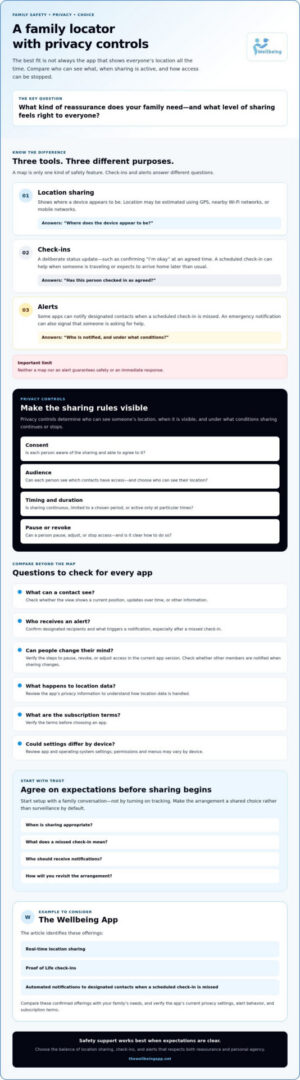
It’s reasonable to want reassurance without making anyone feel watched. A map is only one kind of safety feature. Check-ins can confirm someone is okay, while alerts can notify designated contacts when a check-in is missed. Knowing the difference helps your family choose the support it needs and agree on expectations before sharing begins.
This 2026 buyer’s guide compares family locator apps by consent, sharing controls, and alert design. You’ll learn what to check about visibility, sharing duration, and revoking access, as well as what to ask about missed check-ins and emergency alerts. We’ll distinguish continuous location sharing from check-ins and proactive alerts, including options such as The Wellbeing App, which offers real-time location sharing, Proof of Life check-ins, and automated notifications to designated contacts when a scheduled check-in is missed. The goal is to help you make an informed choice with safety and personal agency in view.
Key Takeaways
- Compare a family locator app with privacy controls by who can see each person’s location, when sharing happens, and how it can be stopped.
- Separate continuous location sharing from check-ins and alerts so you can choose the kind of reassurance your family needs.
- Before choosing an app, verify its alert recipients, privacy practices, sharing controls, and subscription terms.
- Start setup with a family conversation about consent and expectations, not by turning on tracking.
- Consider how location sharing, check-ins, and alerts can work together in a family safety plan, and whether The Wellbeing App’s confirmed offerings fit your needs.
What a Family Locator App with Privacy Controls Should Actually Do
Families often want to know someone arrived safely without making every trip feel monitored. A useful family locator app with privacy controls should support connection while respecting each person’s autonomy and trust. Start by finding out what information the app shares, who can see it, and what happens when someone needs support.
A family locator app lets a person share their location with selected people, but the experience depends on the app’s actual settings. Location may be estimated using technologies such as GPS, nearby Wi-Fi networks, or mobile networks. For a neutral overview of how mobile phone tracking works, consider how these methods inform location data and why sharing choices matter.
Privacy controls determine who can see a person’s location, when it’s visible, and under what conditions sharing continues or stops. That definition gives families a practical starting point: look beyond the map and check how much choice each person has.
Location sharing is not the same as a safety check-in
A location map indicates where a device appears to be. A check-in communicates status, such as confirming “I’m okay” at an agreed time. Scheduled check-ins can be useful when a family member is traveling or expects to arrive home later than usual. If a check-in is missed, some apps can notify designated contacts. Check how those alerts work and who receives them. Neither a map nor an alert guarantees safety or an immediate response.
These tools answer different questions. Location sharing can help a family see someone’s position. A check-in provides a deliberate update, while an emergency notification can signal that someone is asking for help. Depending on the situation, combining them may be more useful than relying on a map alone.
What privacy controls mean in a family app
Compare whether an app lets each person understand and manage the basics. Treat these as features to verify, not capabilities every app provides:
- Consent: Is the person aware of sharing and able to agree to it?
- Audience: Can they see which contacts have access?
- Duration: Can sharing be limited to a chosen period, or does it continue until someone changes a setting?
- Stopping access: Is it clear how to pause or revoke sharing?
Review the app’s privacy information to understand how location data is handled. Confirm alert recipients and behavior before relying on notifications. Clear family expectations matter just as much as settings: agree on when sharing is appropriate, what a missed check-in means, and how often to revisit the arrangement. That helps make safety support a shared choice rather than surveillance by default.
Which Location-Sharing Privacy Settings Should Families Compare?
Once you know what kind of support your family wants, compare three practical controls: who can see a person’s location, when sharing is active, and how that person can change or stop it. A map that updates continuously works differently from a scheduled check-in or an alert someone sends themselves. Don’t assume the same settings are available across apps, devices, or operating systems.
Who can see location, and for how long?
Check whether sharing is limited to selected contacts or visible to a larger group. Find out whether users can choose a time period or have to leave sharing on continuously. Before enabling it, look at the view a contact receives. Does it show a current position, updates over time, or other information? These details shape what a family shares and what each person can expect.
Can users pause sharing or change their minds?
Find out whether users can pause, revoke, or adjust access, then confirm the steps in the current app version. If it matters to your household, check whether other members receive a notification when sharing changes. Controls that are easy to find and understand support trust as well as convenience. Review app and operating-system settings too, since permissions and menus may differ by device.
Use this comparison as a checklist while reviewing each app’s current settings and help information:
| Control | Question to ask | Why it matters |
|---|---|---|
| Audience | Can a person choose which contacts see their location? | Clarifies who has access instead of assuming everyone in a group sees the same thing. |
| Timing | Is sharing continuous, time-limited, or started for a specific occasion? | Helps match visibility to the family’s purpose and comfort level. |
| Check-ins | Can someone send a status update at an agreed time? | A check-in communicates “I’m okay”; it isn’t the same as viewing a live location. |
| Alerts | What event triggers an alert, and who receives it? | Sets clear expectations for missed check-ins or user-initiated notifications. |
| Stopping access | Can a user pause or revoke sharing, and are others notified? | Makes it easier to maintain personal agency and household trust. |
These distinctions can make a family locator app with privacy controls easier to assess: continuous sharing, scheduled check-ins, and user-initiated alerts serve different purposes. The University of Illinois ACES explores how sharing can shape family communication. Discussing expectations together can help build trust and responsibility around whichever settings you choose.
If your family is considering location sharing alongside check-ins and alerts, you can explore The Wellbeing App’s safety features, then confirm current sharing controls, alert behavior, and subscription terms before deciding whether they fit your needs.
How to Compare Family Locator Apps Beyond the Map
A map can show a shared position, but it doesn’t tell you whether someone has checked in or asked for help. Compare apps by the kind of safety signal they provide. Location-only tools focus on viewing a shared position. Check-in tools let someone report their status, while broader safety-monitoring apps may combine these functions with alerts. Choose an app whose sharing model matches the family’s agreed safety needs.
More features don’t automatically mean better privacy or a better fit. Consider whether each feature serves a real need, and whether everyone understands what information is shared and what triggers a notification. That distinction matters: commentary on tracking apps has raised concerns about blurring the line between care and control.
Location-only apps versus check-in and alert tools
Location-only tools are built around viewing a shared position, subject to their specific settings. A scheduled check-in adds a separate status signal, while an automated alert may be triggered by a missed check-in or another defined event. Don’t assume every app includes all three. Verify exactly what causes an alert, who receives it, and what the person sharing their location can control.
Match app capabilities to the family’s needs
Start with the situation, not the feature list. For everyday family coordination, prioritize clear sharing boundaries and controls people can understand. If a relative living alone wants to check in at an agreed time, ask whether scheduled check-ins and missed-check-in notifications suit that routine. For a walk or journey, consider whether a chaperone-style feature fits the need, then verify how it works before relying on it.
Use this framework to compare options, then confirm details in the app’s current documentation and settings:
| Comparison area | What to check | Why it matters |
|---|---|---|
| Location visibility | Who can view a person’s location, and what do they see? | Helps define the audience and information being shared. |
| Check-in options | Can a person send or schedule a status update? | Separates a deliberate “I’m okay” signal from a location map. |
| Alert triggers | What event sends an alert, and to which contacts? | Clarifies what a notification means and who may need to act. |
| User control | Can users manage or stop sharing? Are changes visible to others? | Supports informed participation and helps set expectations. |
| Verification needed | Do the features work as described on your devices and current app versions? | Settings and feature behavior can vary by app and operating system. |
A family locator app with privacy controls should fit the people and purpose, not simply offer the longest feature list. The Wellbeing App’s confirmed offerings include Location Sharing, Proof of Life, Chaperone, Night Watch, and Emergency Alerts. Families considering it can review how these features may fit their safety needs, while confirming current controls, alert behavior, and subscription terms directly.
How to Set Up Family Location Sharing Without Eroding Trust
Location sharing should support an agreed safety need, not become surveillance by default. Before anyone installs an app or switches on tracking, talk about what reassurance the family wants and what each person is comfortable sharing. A consent-led conversation gives everyone a chance to ask questions and helps make the arrangement feel mutual rather than imposed.
Agree on boundaries before turning on sharing
Keep the discussion age-appropriate and specific. A child, teenager, or adult relative may have different needs and expectations. Agree on the purpose, participants, timing, and how the family will revisit the arrangement. Pausing or changing the agreement should be an accepted option, not treated as a breach of trust.
- Start with the reason. Is the goal to coordinate arrivals, support a planned check-in, or share a location during a particular journey?
- Choose who participates. Decide together who shares information and which contacts may receive it. Don’t assume every family member needs the same access.
- Set timing and expectations. Clarify whether sharing is intended to be ongoing or tied to a specific situation. Check the app’s actual options before agreeing on a schedule.
- Agree on alerts and follow-up. Discuss what a missed check-in or emergency notification means, who will respond, and how the family will review the setup.
A family locator app with privacy controls is useful for your household only if its available settings support these agreed boundaries. Verify what users can manage rather than relying on a feature label or assumption.
Test alerts, permissions, and expectations
Before relying on the app, review permission prompts and any location-sharing indicators with each participant. Confirm what designated contacts can see. If the app allows it, test a check-in or alert in a way its instructions permit, then verify which contacts receive the notification and what it says. Don’t trigger an emergency alert as a test unless the app explicitly provides a safe test method.
Make a simple response plan: who will try to contact the person, what to do if they can’t be reached, and when to seek help through appropriate channels. An app notification is information for designated contacts, not proof that responders have been dispatched. Revisit the plan when family routines or comfort levels change.
Once you’ve agreed on your requirements, compare The Wellbeing App’s safety features, including Location Sharing, Proof of Life, Chaperone, Night Watch, and Emergency Alerts. Confirm current controls, alert behavior, and subscription terms before deciding whether they fit your family’s plan.
When The Wellbeing App May Fit a Family Safety Plan
The Wellbeing App may suit families looking for more than a map, especially when their plan includes location sharing, check-ins, or alerts to designated contacts. If you’re evaluating a family locator app with privacy controls, consider the app’s confirmed features and its verified privacy settings as separate questions. The features below are available offerings; check current materials to learn how access and controls work for your family.
Match confirmed features to a practical need
Location Sharing supports real-time location sharing with designated contacts. Proof of Life provides scheduled check-ins, with automated notifications to designated contacts when a scheduled check-in is missed. The features can serve different purposes: one communicates a person’s status at an agreed time, while the other shares location.
The Wellbeing App also offers Chaperone, Night Watch, and Emergency Alerts. These are confirmed offerings, but a name alone doesn’t explain how a feature works. Review current feature descriptions and alert instructions, then consider whether each one aligns with a specific need your family has discussed.
The app is software. It doesn’t provide physical security personnel or proprietary hardware, and it shouldn’t be treated as a replacement for emergency services or medical care. Be clear about what designated contacts are expected to do if a notification arrives.
Questions to ask before choosing a subscription
Before signing up, use these questions to check fit and avoid relying on assumptions:
- Location access: Who can see someone’s location, and what privacy controls are currently available for visibility, duration, pausing, or revoking access?
- Check-in notifications: What happens when a scheduled Proof of Life check-in is missed, and which designated contacts are notified?
- Emergency alerts: What action triggers an alert, who receives it, and what should those contacts do next?
- Data and subscription: Review current privacy information and subscription terms, including what’s covered, before deciding.
Confirm these details in current app materials and on the devices your family will use. Feature behavior, privacy settings, and subscription terms can change, so verify them directly rather than assuming that a setting or notification works a particular way.
If the confirmed offerings align with your family’s agreed plan, review The Wellbeing App’s current feature information and subscription terms before choosing. A thoughtful fit starts with clear expectations, verified controls, and a shared understanding of what each feature can and can’t do.
Choose Safety Features That Respect Family Trust
The right family locator app with privacy controls should fit your family’s agreed needs, not default to constant tracking. Compare who can see location, when sharing happens, and how it can be stopped. Remember that a live map, a scheduled check-in, and an alert serve different purposes. Decide which signals would genuinely help your family.
The Wellbeing App offers real-time location sharing with designated contacts, Proof of Life check-ins, and automated notifications to designated contacts when a scheduled check-in is missed. Its confirmed offerings also include Chaperone, Night Watch, and Emergency Alerts. Before choosing, verify current privacy controls, alert behavior, data practices, and subscription terms so you know what to expect.
Explore The Wellbeing App’s safety features and consider how they align with the plan your family has discussed. With clear expectations and informed choices, technology can support connection while leaving room for trust and personal agency.
Frequently Asked Questions
Is a family locator app safe for privacy?
A family locator app can support privacy, but no app should be assumed completely private. Safety depends on informed consent, limited access, clear settings, and the provider’s actual data practices. Review the privacy policy, then verify who can see each person’s location, how sharing can be stopped, and how long location data is retained. If any of these details are unclear, ask the provider before enabling sharing.
Can I share my location only with selected family members?
Some apps and operating systems offer audience controls, but the available options vary. Before sharing, review the app’s location-sharing screen and your device permissions, then confirm exactly which people can see your location. Don’t assume a family group automatically limits sharing to the contacts you have in mind. Check each participant’s access separately, and review current product documentation if the settings aren’t clear.
Can a family locator app share location only at certain times?
Some apps may offer scheduled or temporary sharing, but these controls depend on the product and operating system. Check whether you can set a sharing duration or pause location access, and verify how those settings work on your devices. Scheduled check-ins can be a separate option: they provide a status update at an agreed time without making continuous location visibility the only way to stay connected.
What happens if someone misses a scheduled check-in?
What happens depends on the app’s workflow, including whether a notification is sent, when it’s sent, and who receives it. The Wellbeing App is described as sending automated notifications to designated contacts when a scheduled check-in is missed. Confirm current timing and recipients, then agree on what those contacts should do next. A missed-check-in notification is a prompt to follow your plan, not confirmation of what has happened.
Do family locator apps work when a phone is offline?
Live location updates generally depend on the phone, its connectivity and permissions, and how the app handles unavailable data. Don’t assume a locator will keep providing current updates when a device is offline. Check the app’s current documentation for what contacts may see during a connection issue. It’s also wise to agree on a backup contact plan, such as who to call or message if location information isn’t available.
How do I choose a family locator app that respects everyone’s boundaries?
Compare who can access location, how long sharing lasts, whether users can pause or revoke it, and how alerts work. Look for clear consent information and settings people can understand. Discuss the purpose with each participant before setup, then revisit the agreement as needs change. Most importantly, verify that the app actually provides the controls your family expects. Don’t rely on a feature label or assumption.
Is a family locator app the same as an emergency response service?
No. Location sharing and app alerts aren’t automatically equivalent to emergency dispatch, medical care, or a guaranteed response. Check exactly what the service does, who receives notifications, and what follow-up is expected from those contacts. Make a plan for how your family will respond to an alert, and don’t rely solely on an app in an emergency. Follow applicable emergency guidance for your situation.