
Integrating a Safety App Into Your Daily Routine
A safety app is easier to use when it feels less like another task and more like a small habit that brings peace of mind. Integrating a safety app into daily routine works best when check-ins or location sharing fit moments already on your calendar, such as starting a commute or setting out on a planned trip. The goal isn’t to monitor every move. It’s to make staying connected simple and agreed upon.
It’s understandable to worry that reminders could become disruptive, or that trusted contacts may not know when they’re expected to respond. A little clarity can make the routine calmer: decide when a check-in makes sense, who should receive an alert, and what they should do if one is missed.
This article will help you build practical safety habits around everyday plans, set clear expectations with the people you trust, and choose features that suit your comfort level. You’ll also learn how Proof of Life scheduled check-ins and missed-check-in alerts may support a regular routine, while options such as Chaperone or Location Sharing may suit planned journeys or specific sharing needs. A safety app can help people stay connected, but it doesn’t replace emergency services or human judgment.
Key Takeaways
- Make integrating a safety app into daily routine easier by connecting check-ins to familiar moments, such as starting a solo journey.
- Agree with trusted contacts on who receives notifications and what to do if a check-in is missed.
- Choose between scheduled check-ins, journey-based support, and location sharing based on your needs and comfort with sharing.
- Test permissions, contact details, and notification settings, then review the routine when plans or preferences change.
- Learn how Proof of Life may support scheduled check-ins, and what to verify before relying on other app features.
Why integrate a safety app into your daily routine?
A safety app is most useful when people understand when it fits, what it does, and who will be notified. A safety-app routine is an agreed, repeatable use of an app for specific everyday situations, with clear expectations for the people involved. That might mean checking in before a solo walk or confirming arrival after a trip. It doesn’t mean switching on every feature or sharing your location all day.
Personal safety apps can include tools such as SOS functions and location sharing, as described in this overview of the personal safety app. The right routine depends on what you need. A scheduled check-in creates a specific moment to confirm your status; continuous tracking involves more ongoing location visibility. Choose deliberately, and make sure everyone involved understands and consents to the arrangement.
Consistency and shared expectations matter more than the number of features enabled. If contacts know what a missed check-in means, they can follow a plan instead of guessing. Before setting a routine, agree who receives updates, what action is expected, and how to handle an accidental missed check-in. A routine can support connection, but it can’t guarantee someone’s safety or a response.
Which everyday moments can a safety app support?
Choose moments that already matter in your life, such as starting a solo walk, beginning a trip home, or checking in on a loved one travelling independently. A prompt tied to a familiar transition is easier to remember than a new task with no clear cue. Keep the routine relevant: if a situation rarely comes up, it may not need a standing check-in.
Routine check-ins are different from urgent situations. If someone is in immediate danger, they should seek appropriate emergency help rather than rely on a scheduled confirmation or wait for an app notification. Decide in advance which moments call for a routine update and which require immediate action.
What makes a routine reassuring rather than intrusive?
Clarity and consent make the difference. Agree who receives each update and what it means, including what a missed check-in should prompt them to do. If you choose location sharing, explain its purpose and agree who can see the information and when. Share only in ways that feel acceptable to everyone involved, and revisit the agreement if circumstances change.
Technology can help loved ones stay connected, but it doesn’t replace judgment, direct communication, or emergency services. Integrating a safety app into daily routine should feel like a choice that supports your life, not constant surveillance. A simple, mutually understood habit is a better starting point than enabling features you don’t need.
How to build safety-app check-ins around habits you already have
A useful routine should be easy to remember on an ordinary day, not just when life is quiet. When integrating a safety app into daily routine, connect one clear use case to an existing moment, then make sure everyone knows what a check-in means and what happens if it’s missed.
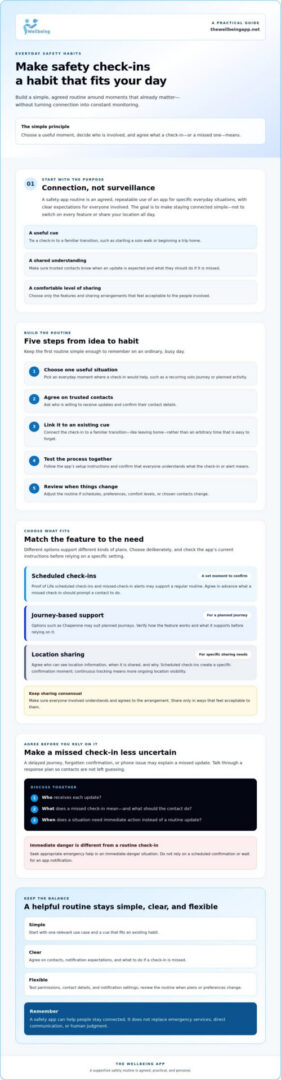
Choose a use case, agree on contacts, set a cue, test the process, and review it when needs change. This keeps the plan manageable and gives trusted contacts a shared understanding from the start.
Choose a check-in cue that is easy to remember
Start with one situation that genuinely fits your life, such as beginning a regular solo journey. Link the check-in to a familiar transition, like leaving home, rather than picking an arbitrary time that’s easy to forget. Keep the first routine simple enough to follow on a busy day. App settings and reminder options differ, so check the app’s current instructions before assuming a particular prompt or schedule is available.
- Choose the situation: Identify when a check-in would be useful, such as during a recurring journey or planned activity.
- Agree on contacts: Ask trusted people if they’re willing to receive updates, and confirm their contact details.
- Set a cue: Tie the check-in to an existing habit or transition. Use only reminder options the app supports.
- Test the process: Follow the setup instructions and confirm that you and your contacts understand what the check-in or alert means.
- Review the routine: Adjust it if your schedule, comfort level, or chosen contacts change.
Agree on contacts and missed-check-in expectations
Before relying on a check-in, talk through what a missed one might mean. A delayed journey, a forgotten confirmation, or a phone issue are all possible, so decide how a contact should respond and how they might try to reach you. Choose people who understand their role and are comfortable taking part.
Then test the setup together. Check that the intended contacts are selected and understand how notifications may reach them. Alert delivery can depend on app settings and phone connectivity, so don’t assume a notification has arrived simply because a check-in was scheduled. Transport Scotland also outlines practical limitations of personal safety apps, a useful reminder to consider how a routine works in real conditions.
For scheduled check-ins, The Wellbeing App’s Proof of Life check-ins can send automated alerts to designated contacts if a scheduled check-in is missed. Review the setup instructions so your routine matches the available settings, and treat the app as a supportive connection tool rather than a guarantee of safety or response.
How to compare safety-app routines without overtracking
Choose a routine based on the kind of reassurance you want, not on how many features an app can turn on. A scheduled check-in confirms a person’s status at an agreed moment. Journey-based support may suit a particular trip, while ongoing location sharing provides visibility over a period of time. Each approach has different privacy implications and contact expectations.
| Approach | User control | Contact expectations | Likely routine | Practical limitations |
|---|---|---|---|---|
| Scheduled check-in | Set a specific check-in moment, if supported by the app. | Contacts know what a missed check-in means and how to follow up. | Confirm status at an agreed time or point in a routine. | Someone must complete the check-in; alerts depend on setup and connectivity. |
| Journey-based support | Use for a defined trip if the app supports the needed workflow. | Contacts understand which journey or update they may receive. | Use for a planned journey rather than every outing. | Exact functions vary by app; confirm how the feature operates before relying on it. |
| Ongoing location sharing | Agree who can see the location and when sharing is active. | Contacts may see location updates during the agreed period. | Share for a specific purpose and duration that everyone understands. | Requires location access and can feel intrusive if boundaries aren’t clear. |
When are check-ins a better fit than continuous location sharing?
Check-ins may suit someone who wants to share a clear status at agreed moments without making their whereabouts continuously visible. Location sharing may make sense for a particular journey when the person sharing understands who can view their location and for what purpose. Preferences can differ within a family, and consent should be revisited if circumstances or comfort levels change. Integrating a safety app into daily routine should preserve that choice, not turn sharing into an unspoken obligation.
More alerts don’t automatically mean more safety. Frequent notifications can become background noise, making it harder for contacts to distinguish a meaningful alert from routine updates. Keep notifications tied to a clear purpose, and agree what each one asks the recipient to do. Location sharing communicates location; by itself, it isn’t emergency response or physical security personnel. Check what a particular service actually provides.
What should users check before relying on alerts?
Review the app’s notification permissions, location access, and relevant battery settings. Phone model, operating system, network availability, and other connectivity conditions can affect how an app behaves or whether an alert is received. Don’t assume every setup works the same way across devices.
Test the agreed process with your contacts before depending on it. Confirm that the intended person understands the alert and knows how to reach you. A calm, tested routine is more useful than enabling extra features without knowing how they work.
How to set up, test, and maintain a daily safety-app routine
A setup is only useful if you and your trusted contacts know how it works. Treat the first day as a shared test, not a promise that the app will cover every situation. Check the app’s current instructions for configuring schedules, contacts, permissions, and notifications, since options vary by service and phone.
A first-day setup checklist for users and trusted contacts
- Review each feature: Understand what it does before enabling it, and choose settings that match your comfort with sharing.
- Check permissions: Review notification and location access, along with any device settings the app says are needed for your chosen features.
- Confirm trusted contacts: Ask each person if they’re willing to participate, verify their details, and explain which notifications they may receive.
- Agree on a response: Decide how contacts should respond to a missed check-in. For example, they might first try calling or messaging before taking another agreed step.
- Run a test together: Follow the app’s setup instructions and confirm that the intended notification reaches the right contact and is understood.
If a check-in is missed, follow the plan you agreed on rather than assuming the worst or ignoring the alert. A contact can try the agreed way to reach the person, then decide what to do next based on the situation. If there’s reason to believe someone is in immediate danger, contact appropriate emergency services. App notifications are a useful signal, not a complete assessment of someone’s wellbeing.
Keep the routine useful as circumstances change
Try the routine at a low-pressure time first. Notice whether the check-in fits naturally, whether notifications are clear, and whether the level of sharing still feels comfortable. Revisit the arrangement if schedules, devices, support needs, or contact preferences change. A trusted contact who can no longer participate should be replaced only after a new person agrees to take on that role.
Plan what you’ll do if a phone battery runs low or connectivity isn’t available. You might agree on a direct call or message as a backup, while remembering that this alternative also depends on the circumstances. Review the app’s settings and test the process again if you change phones or adjust permissions. These small checks help keep integrating a safety app into daily routine practical without adding unnecessary alerts or obligations.
To see whether scheduled check-ins or other available features fit the routine you’ve agreed on, explore The Wellbeing App’s safety features. Check the current setup instructions before choosing a feature or relying on its notifications.
Make The Wellbeing App part of a supportive safety routine
A safety app works best when its features serve a routine you’ve chosen and the people involved understand their roles. The Wellbeing App offers Proof of Life, Chaperone, Night Watch, Location Sharing, and Emergency Alerts through subscription access. Rather than activating everything at once, start with the feature that matches your agreed plan and check its current setup instructions.
Match app features to the routine you want to build
Proof of Life may suit an agreed schedule of check-ins. It supports scheduled check-ins and automated alerts to designated contacts when a check-in is missed. Before setting up a routine, confirm how to configure the schedule and contacts in the app, then make sure recipients understand what a missed check-in means.
Chaperone may be relevant to a planned journey, but confirm its precise workflow before relying on it. The app also includes Night Watch and Emergency Alerts; review their current feature details to understand how each works rather than inferring functionality from its name. Location Sharing supports real-time sharing, so check the available controls and permissions and agree who can see your location and for what purpose.
These features can support connection, but the app isn’t a substitute for emergency services, direct communication, or human judgment. If someone faces immediate danger, seek appropriate emergency help rather than relying solely on an app feature or notification.
Start with a shared plan, then explore the app
Before activation, talk with your trusted contacts about consent, who will receive updates, and how they should respond. Choose only the features that fit the routine and sharing preferences you’ve agreed on. Then test the setup together, including contact details and notifications, and adjust if the process feels unclear or intrusive.
Subscription access includes server-side monitoring of user status and automated notification dispatch. That describes part of the app’s service, not a guarantee that every notification will arrive or that a contact will respond. Check the current app instructions, permissions, privacy information, and supported phone platforms before relying on a feature.
Integrating a safety app into daily routine can be a measured choice: begin with one clear purpose, confirm how the feature operates, and revisit the arrangement as needs change. Explore The Wellbeing App and review its features to decide which, if any, fit the plan you’ve made with your trusted contacts.
Build a Safety Routine That Feels Right for You
A useful safety-app routine doesn’t need constant tracking or a long list of alerts. Start with a moment when a check-in would help, choose a cue that fits your day, and agree with trusted contacts on what a missed check-in means. Testing the routine together can help everyone understand their role.
That’s the practical heart of integrating a safety app into daily routine: choose features intentionally, share only what feels appropriate, and revisit the plan when schedules or preferences change. Proof of Life supports scheduled check-ins and automated alerts to designated contacts if a check-in is missed. For Chaperone, Night Watch, Location Sharing, and Emergency Alerts, review the current workflows so you understand how each feature works before relying on it.
An app can support connection, but it can’t guarantee safety or replace emergency services and human judgment. If you’re ready to see whether the available features fit your agreed plan, explore The Wellbeing App. A small, thoughtful habit can help you and the people you care about stay connected with greater peace of mind.
Frequently Asked Questions
How do I integrate a safety app into my daily routine?
Start with one situation where a check-in would be useful, then connect it to a familiar cue, such as beginning a planned journey. Choose trusted contacts together, agree on what a missed check-in means, and test the setup before relying on it. Review your notification and sharing preferences as circumstances change. A simple, mutually understood habit is easier to maintain than enabling features you don’t need.
Can a safety app send an alert if I miss a check-in?
Some apps can send alerts to designated contacts when a scheduled check-in is missed, but the feature and setup depend on the app. The Wellbeing App’s Proof of Life supports scheduled check-ins and automated alerts to designated contacts if a check-in is missed. Review the current instructions to understand how schedules and contacts are configured, and agree with recipients on how they should respond to an alert.
Is it better to use check-ins or location sharing?
Choose based on the kind of update you want to share. A check-in can confirm your status at an agreed moment, while location sharing makes your whereabouts visible according to the app’s settings. Discuss consent, who can see updates, and the purpose before enabling either approach. Preferences can differ between family members, so choose the option everyone understands and feels comfortable using.
What happens if my phone loses signal during a safety-app check-in?
Without a reliable connection, an app may not be able to send or receive information as expected, but the effect depends on the app, phone, and circumstances. Don’t assume a check-in or alert has gone through. Check the app’s guidance on connectivity and test the process with your contacts. Agree on a backup, such as trying a direct call or message when service is available.
How can I use a safety app without worrying my family?
Set expectations before using the app: explain when you plan to check in, who receives alerts, and what a missed check-in should prompt them to do. Keep the routine proportionate to your needs, and avoid sharing more information than you’re comfortable with. A test can help contacts recognize notifications and follow the agreed plan calmly. Revisit the arrangement if it starts to feel stressful or intrusive.
Do safety apps replace emergency services or a medical alert system?
No. A safety app can support communication or share information, but it doesn’t replace emergency services, professional judgment, or a medical alert system when one is needed. Check the specific app’s features and limitations rather than assuming it provides emergency response or medical monitoring. If someone is in immediate danger, contact appropriate emergency services. Treat the app as one part of a broader, agreed safety plan.