
Safety Solutions for Empty Nesters in 2026: A Practical Guide
What if the most reassuring safety measure isn’t another device, but a plan everyone understands? When children move out, a quieter home can make everyday concerns feel more noticeable. At the same time, frequent calls or tracking can feel intrusive. The best safety solutions for empty nesters support independence while giving trusted people a clear, agreed-upon way to stay connected.
It’s reasonable to want practical steps without turning home or daily outings into a source of worry. This guide will help you build a realistic routine around your needs, preferences, and comfort level, so you can feel prepared without giving up autonomy.
We’ll look at useful home-safety habits, ways to make everyday outings feel more supported, and simple check-in arrangements with people you trust. Scheduled check-ins, such as Proof of Life, can send an alert to designated contacts if a check-in is missed. Location sharing or Chaperone may also suit outings when used by agreement. These tools can complement personal connections and emergency services, not replace them. The goal is a thoughtful, shared plan that brings reassurance while leaving you in charge.
Key Takeaways
- Build safety around practical needs and changing routines, not assumptions about age or ability.
- Learn how home precautions, trusted contacts, and optional digital tools can each play a different role.
- Compare safety solutions for empty nesters with independence in mind, including the trade-offs of check-ins and apps.
- Use a five-step approach to shape a plan, agree on contact preferences, and review what works.
- See how scheduled check-ins and missed-check-in alerts may support a shared routine without replacing personal connections or emergency services.
What Safety Solutions for Empty Nesters Should Actually Address
Good safety planning starts with the person, not a stereotype. Empty nesters can be at many different life stages, have different abilities and health needs, and live in a range of household arrangements. The move to a quieter home doesn’t automatically mean someone is vulnerable. It may, however, change who is around, how days are structured, or who would notice if a routine changed. Practical safety solutions for empty nesters take those circumstances into account while protecting the resident’s independence.
Definition: A safety plan is a person-led set of practical precautions, agreed check-ins, and contact arrangements. It can include devices or apps, but it isn’t any single device or app.
How an empty-nest transition can change everyday routines
Start by noticing what has actually shifted: who is usually home, when the house is empty, how often you go out alone, and whom you’d contact if plans changed. These observations can point to useful adjustments without turning ordinary changes into warning signs. The transition can also bring mixed feelings. Empty nest syndrome is one term for emotional responses some people experience as children leave home. Those feelings deserve care, but they don’t automatically indicate a safety problem.
Consider your own experience. Perhaps you enjoy more time alone, or you’d feel better knowing a friend expects a message after a particular outing. Neither preference is universal. The aim is to create routines that feel supportive, not to add monitoring simply because the household has changed.
Which safety needs belong in a personal plan?
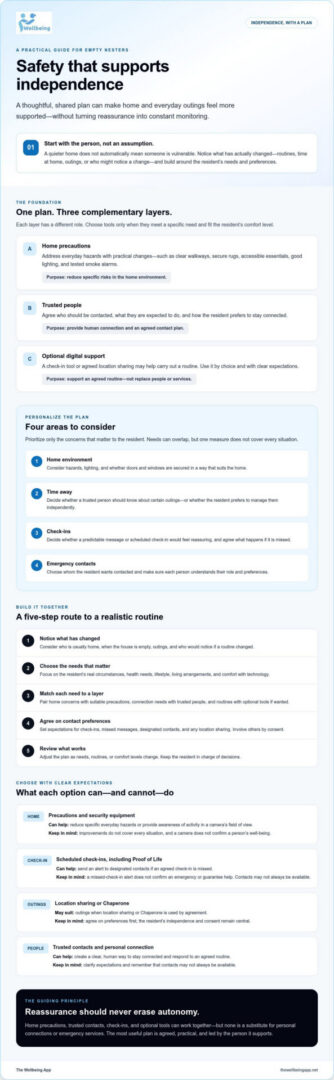
Sort possible concerns into four areas, then prioritize only the ones that matter to you:
- Home environment: Consider everyday hazards, lighting, and whether doors and windows are secured in a way that suits your home.
- Time away: Decide whether a trusted person should know your plans for certain outings, or whether you prefer to manage them independently.
- Check-ins: Decide if a predictable message or scheduled check-in would offer reassurance, and agree on what should happen if it’s missed.
- Emergency contacts: Choose whom you’d want contacted and make sure they understand their role and your preferences.
These needs may overlap, but they aren’t interchangeable. A home precaution can address an environmental concern, but it can’t provide companionship or confirm that a planned check-in happened. Personal-safety support and emotional adjustment also call for different responses. Your health, lifestyle, living arrangements, and comfort with technology all shape what belongs in the plan. Keep the resident in charge of decisions, and involve family or trusted contacts by consent.
How Home Precautions, Check-Ins, and Trusted Contacts Work Together
Each layer answers a different question. Home precautions address the environment, a trusted person offers human connection, and an optional digital tool can help carry out an agreed routine. A camera observes a space, while a check-in communicates a person’s status. Neither should be treated as a substitute for the other.
Layered safety plans combine agreed routines with suitable tools. Choose each one for a specific need and use it with the resident’s consent.
| Need addressed | Who or what is involved | Limit to keep in mind |
|---|---|---|
| Everyday hazards at home | Resident, household changes, smoke alarms, lighting | Improvements reduce specific risks but don’t cover every situation. |
| Awareness of activity around the home | A camera or home-security equipment | It may show activity in its field of view, not confirm a person’s well-being. |
| Connection during time alone | Resident and agreed trusted contacts | Contacts need clear expectations and may not always be available. |
| A scheduled personal check-in | Resident, designated contacts, and an optional check-in tool | A missed-check-in alert doesn’t confirm an emergency or guarantee help. |
Home safety measures that reduce everyday hazards
Walk through the home with the resident’s routines and mobility in mind. Clear frequently used walkways, secure or remove loose rugs, move cords out of paths, and check that halls, stairs, and entrances are well lit. Test smoke alarms and consider whether frequently used items are easy to reach. The Mayo Clinic Health System’s home safety checklist offers additional prompts on lighting, fall prevention, and fire safety. Adapt any changes to the home and the person’s priorities. A useful improvement should fit daily life. These are household precautions, not services provided by a safety app.
Check-ins and trusted contacts for time spent alone
A check-in schedule works best when it’s mutual and specific. Agree on when a message is expected, which contact will receive it, and what that person should do if it doesn’t arrive. For example, the first step might be to try a direct call, followed by another agreed contact or action. Make sure everyone understands the plan and any limits on their availability. With Proof of Life, scheduled check-ins can trigger automated alerts to designated contacts if a check-in is missed. An alert is a prompt to follow the agreed plan, not confirmation of an emergency or assurance that assistance will arrive.
If an agreed digital check-in would make a routine easier to follow, you can explore The Wellbeing App’s safety tools as one optional layer alongside personal contacts and appropriate emergency services.
Do Safety Apps Intrude on Independence? Compare Options and Trade-Offs
They can, especially if introduced as a way to supervise someone rather than support a routine that person has chosen. A safety plan should start with the individual’s concerns and preferences. Some people may prefer a simple habit, while others may welcome a check-in tool for particular situations. No option is automatically right for everyone.
Compare each choice by what it helps with, the effort it takes, and what it can’t do. The best fit is one the resident understands, consents to, and can comfortably maintain.
| Option | Useful for | Effort, privacy, and consent | What it can’t do |
|---|---|---|---|
| Self-managed routine | Remembering to secure the home or message someone after an outing | Low setup; controlled by the resident, but depends on remembering | It won’t notify someone if the routine is missed. |
| Trusted-contact check-in | Creating a predictable point of connection | Requires agreement and follow-through from both people | A contact may be unavailable or miss a message. |
| Home-security tools | Observing activity around a home or helping secure it | May require setup and decisions about who can view information | A camera observes a space; it doesn’t confirm a person’s status. |
| Optional safety app | Supporting scheduled check-ins or agreed outings | Requires setup, suitable permissions, and clear consent about sharing | Alerts don’t confirm an emergency or guarantee assistance. |
How to choose between a routine, device, and safety app
Match the option to the concern. If the goal is simply to let a friend know you got home, a direct message may be enough. If you want a scheduled check-in with an alert to designated contacts when it’s missed, a tool such as Proof of Life may be worth considering. A home camera addresses activity in its view, not whether someone has checked in. Also consider who will set up and maintain the arrangement, and whether it feels easy to use in everyday life.
Privacy, consent, and realistic expectations
Location sharing should be voluntary, understood, and limited to agreed contacts. Decide in advance who can see location information, for what purpose, and when sharing should stop. Continuous tracking shouldn’t be the default. Choose it only if the person knowingly wants it for a clear reason. Consent can be revisited as needs or preferences change.
Before relying on an app, check its permissions, settings, notification process, and what happens if a check-in is missed. Alerts can depend on the service, connectivity, settings, and whether contacts follow through. Technology can support a person-led plan, but it shouldn’t replace clear communication, emergency services, or appropriate in-person help. The right safety solutions for empty nesters preserve choice while making agreed support easier to put into practice.
Create a Practical Empty-Nest Safety Plan in Five Steps
A useful safety plan is specific, voluntary, and reviewed periodically. The resident should lead the decisions, then invite family members or trusted contacts to take part only with their consent. This keeps safety solutions for empty nesters grounded in real preferences instead of assumptions.
- 1. Identify concerns. Name the situations you want to feel more prepared for, such as being away from home, a particular household hazard, or having no one expect a message after an outing. Focus on concerns that matter to you.
- 2. Choose measures. Match each concern to a proportionate step. That might mean changing a household routine, agreeing to contact someone, or considering a digital check-in. Add a tool only if it solves a specific problem and feels comfortable to use.
- 3. Agree on contacts. Ask who is willing and available to participate. Share only the details they need, and agree on the preferred way to communicate.
- 4. Test the routine. Try the check-in at the planned time. Confirm contact details, phone settings, and any chosen tool work as expected before depending on the arrangement.
- 5. Review periodically. Revisit the plan if schedules, health, household arrangements, or preferences change. Keep what still helps and adjust or remove what doesn’t.
Agree on routines and what happens when a check-in is missed
Choose a check-in time that fits naturally into the day rather than creating a string of obligations. For example, someone might prefer to message a trusted contact after an occasional outing, while another person may want a scheduled check-in on days they’re home alone. Be precise about timing and roles: who tries to reach the person first, how they’ll make contact, and which other agreed contact comes next if there’s no reply.
Make sure contacts understand that a missed check-in isn’t proof of an emergency. They should follow the agreed steps and assess the situation, rather than assuming an app or message confirms what has happened. If a service sends an automated alert after a scheduled check-in is missed, treat it as a prompt to use the agreed plan, not a guarantee of assistance.
Test the plan and adjust it over time
Practice the routine once. Check that the right person receives the message or alert, phone notifications are set as intended, and everyone knows what to do. Verify any app’s current permissions and setup details before relying on it. A test can reveal a simple mismatch, such as an outdated contact number or a check-in time that doesn’t fit real life.
If an app-based scheduled check-in might suit your plan, Explore The Wellbeing App as one optional layer. Its Proof of Life feature supports scheduled check-ins and alerts designated contacts if one is missed. Consider it alongside your agreed contact routine, not as a replacement for personal judgment, emergency services, or in-person help.
How The Wellbeing App Can Support a Shared Safety Routine
Once you’ve decided what support would be useful, an app can be considered as one optional part of the plan. The Wellbeing App offers Proof of Life, Chaperone, Night Watch, location sharing, and emergency alerts. These tools don’t replace agreed relationships, home precautions, emergency services, medical care, or in-person assistance. Their suitability depends on the resident’s needs, preferences, and comfort with using them.
Where automated check-ins can fit into a personal plan
Proof of Life supports scheduled check-ins and can send an automated alert to designated contacts if a check-in is missed. This may help put a mutually agreed routine into practice: the resident chooses a check-in schedule, contacts know what an alert means, and everyone understands the steps they’ve agreed to follow. A notification is a prompt to check in, not confirmation of an emergency or assurance that someone will respond.
Before relying on any digital routine, confirm the setup process, app permissions, device compatibility, and which contacts receive alerts. Check how notifications behave under the settings you intend to use. Designated contacts should know their role and be comfortable with it, but the plan shouldn’t assume they’ll always be available. Include an alternative contact or next step if appropriate.
Choose a tool that respects the user’s preferences
The resident should decide whether an app fits their habits and comfort level. Some people may prefer a direct message or call; others may welcome a scheduled check-in. The Wellbeing App also includes Chaperone, Night Watch, location sharing, and emergency alerts, but review the details and settings before use rather than making assumptions. Consider only the features relevant to the plan.
Discuss consent before enabling location or alert features. Agree on who may receive information, what it will be used for, and when sharing is appropriate. Location sharing should be voluntary and limited to contacts the resident has chosen. Preferences can change, so leave room to revisit the arrangement.
For empty nesters considering safety solutions for empty nesters, a digital tool works best when it supports clear expectations without taking control away from the person using it. Treat the app as a complement to a person-led plan, and check current setup and notification details before depending on a feature. Explore safety features from The Wellbeing App to learn more.
Make Your Safety Plan Fit the Life You Want
Thoughtful safety solutions for empty nesters begin with the resident’s own priorities, not assumptions about age or ability. A practical plan brings together suitable home precautions, clear expectations with trusted contacts, and optional tools that fit everyday routines. It should protect privacy and leave the person in control.
Start with one change that feels useful, then agree on who is involved and what happens if a check-in is missed. Review the arrangement as schedules and preferences change. Technology can help support that routine, but it can’t guarantee assistance or replace personal connection and emergency services.
The Wellbeing App includes Proof of Life, which supports scheduled check-ins and automated alerts to designated contacts when a check-in is missed. It also includes Chaperone, Night Watch, location sharing, and emergency alerts. Explore the options at your own pace: Explore The Wellbeing App and choose a check-in routine that feels right.
A small, agreed-upon step can bring reassurance while keeping independence at the center.
Frequently Asked Questions
What are practical safety solutions for empty nesters?
Practical safety solutions for empty nesters combine measures that fit a person’s home, routines, and preferences. They might include clearing walkways, checking lighting and smoke alarms, agreeing on a check-in with a trusted contact, or using an optional app for scheduled check-ins. Start by identifying a specific concern, then choose a proportionate step. A plan should support independence, not assume that every empty nester needs monitoring.
Are empty nesters at greater risk when living alone?
Not automatically. “Empty nester” describes a change in household circumstances, not a person’s age, health, ability, or level of risk. Living alone may mean fewer people are present to notice a changed routine, but that doesn’t make every person less safe. Consider your own living arrangements, daily habits, health needs, and comfort level. If a concern relates to health or mobility, discuss appropriate guidance with a qualified professional.
Can a safety app help an empty nester living alone?
Yes, an app may support a chosen routine, but it’s only one possible layer in a broader plan. The Wellbeing App’s Proof of Life supports scheduled check-ins and automated alerts to designated contacts if a check-in is missed. Contacts can then follow the steps agreed in advance. Before relying on an app, check its setup, permissions, device compatibility, and alert behavior. It doesn’t confirm an emergency or guarantee assistance.
How can families check in without being intrusive?
Ask what kind of contact feels helpful, then agree on a routine together. The empty nester might prefer a message after a particular outing, a call at an agreed time, or less frequent contact. Be clear about who will check in, and avoid requesting location or personal updates beyond what the person has agreed to share. Review the arrangement if it starts to feel burdensome or no longer fits everyday life.
What should happen if someone misses a scheduled check-in?
Agree on the response before starting the routine. For example, a designated contact might first call or message, then try another agreed contact if there’s no reply. A missed check-in or automated alert doesn’t prove that an emergency has occurred. Contacts should follow the agreed steps and assess the situation, using emergency services when appropriate. Make sure everyone knows their role, and don’t assume a contact will always be available.
Do safety apps replace medical alert devices or emergency services?
No. A safety app can support agreed check-ins or provide features such as location sharing and emergency alerts, depending on the service, but it shouldn’t be treated as a replacement for medical care, emergency services, or in-person assistance. These tools serve different purposes. If you’re considering a medical alert device or another service, check its capabilities and limitations separately, then decide how it might fit alongside personal contacts and other precautions.
Is location sharing safe and private for empty nesters?
It can support an agreed plan, but privacy depends on the user’s choices and the feature’s settings. Location sharing should be voluntary, understood, and limited to contacts the person has selected. Agree on why location is being shared, when it’s appropriate, and who can view it. Check permissions and settings before enabling the feature, and revisit consent if preferences change. Continuous tracking shouldn’t be assumed or enabled without informed agreement.