
Low-Cost Family Monitoring Solutions: A Practical 2026 Buying Guide
The cheapest way to keep your family connected may not be the one that gives you the most reassurance. Location sharing can show where someone is, but it cannot confirm they are okay or have checked in. That is why low-cost family monitoring solutions are worth comparing by more than price: consider the check-in process, what happens when someone misses one, and how the tool fits your family’s comfort with sharing information.
It is reasonable to want reassurance without turning family life into constant tracking. Free phone features may cover basic location sharing, while dedicated services can add scheduled check-ins and automated notifications when someone misses one. Before choosing, agree on what you need the tool to do and who will respond to an alert.
This practical 2026 buying guide compares built-in phone options, manual check-ins, and dedicated monitoring services. It explains the trade-offs and helps you match features to each family member’s needs. You will also find a straightforward way to set up and test a check-in plan. The goal is not to monitor every moment, but to choose a shared safety tool that supports connection and personal agency.
Key Takeaways
- Separate everyday coordination from safety monitoring so you choose tools that match the situation.
- Compare low-cost family monitoring solutions by check-in confirmation, location visibility, missed-response alerts, setup effort, and privacy.
- Look beyond the advertised price: review renewal timing, cancellation terms, feature limits, and which users or devices are covered.
- Build a respectful plan by agreeing on its purpose, choosing essential features, setting contacts, and testing alerts together.
- Consider how Proof of Life and other distinct safety features can support different family needs without making monitoring more complicated than necessary.
Low-cost family monitoring solutions: what are you actually comparing?
Family monitoring combines technology with agreed routines to help people check in, share location, or request help. It is not about following every movement. It is about choosing a practical way for family members to stay connected when they are apart.
First, separate everyday coordination from safety monitoring. A shared location or quick text may be enough to coordinate a pickup. Someone walking alone or an older adult living independently may also need a scheduled check-in and a plan for what happens if they do not respond. The lowest upfront cost may not include the alerts, privacy choices, or support that situation calls for.
Most low-cost family monitoring solutions fall into three broad categories:
- Built-in phone tools: These can support basic location sharing or device-safety settings, depending on the phone and the features in use.
- Manual check-ins: A text or call keeps things simple, but someone has to remember to send it and notice if it does not arrive.
- Dedicated monitoring apps: These may combine location sharing with scheduled check-ins and automated notifications to designated contacts.
Which family members and situations need monitoring?
Start with the person and the situation, not the app. A child may need age-appropriate device-safety settings. An older adult living independently may value a regular check-in that confirms they have responded. An adult walking alone might want to share location or send an alert. A household coordinating school, work, and pickups may only need an easier way to stay in touch. Name the specific concern, then compare tools against it.
Location sharing is not the same as a wellbeing check-in
A location pin shows a device’s reported location, not whether its user is okay or has actively checked in. GPS-based systems use positioning technology; a GPS tracking unit offers background on how this technology can be used to determine location. For wellbeing reassurance, a scheduled response provides a clearer signal: the person has completed a check-in. If they miss it, some dedicated services can notify designated contacts, reducing reliance on someone remembering to send a manual text.
Agree in advance on what a missed response means and who should follow up. An app alert can prompt family action, but it does not assess an emergency or replace emergency services. Choose a setup that makes expectations, access, and personal boundaries clear.
Compare low-cost family monitoring options by the reassurance they provide
Price matters, but so does what happens when a check-in does not arrive. Compare each option by the signal it provides, the effort it asks of your family, and the information it shares. This side-by-side view can help you focus on low-cost family monitoring solutions that fit your household’s needs.
| What to compare | Built-in phone tools | Manual check-ins | Dedicated safety monitoring apps |
|---|---|---|---|
| Check-in confirmation | May show location or device status, but does not necessarily confirm that a person responded. | A reply confirms the person checked in, if someone notices when it is missing. | May support scheduled responses that record a completed check-in. |
| Location visibility | Can offer location sharing when enabled and supported. | Only shared if the person chooses to report it. | May combine check-ins with location-sharing features. |
| Missed-check-in alerts | Not necessarily included; this depends on the available tool and settings. | Relies on someone remembering to follow up. | May send automated notifications to designated contacts. |
| Setup effort | Usually involves setting up and reviewing phone features. | Requires an agreed routine and consistent follow-through. | Requires app setup and an understanding of its features and permissions. |
| Privacy considerations | Review who can see shared information and when. | Shares only what people choose to say, but depends on communication habits. | Review permissions, data practices, and who receives alerts. |
| Cost approach | Often free or included with a device. | Costs time and attention rather than a subscription. | Often subscription-based; check which features are included. |
What free and built-in tools can, and cannot, do
Built-in phone tools can be a sensible starting point for household coordination, such as seeing whether someone has left a location or sharing a destination. Features vary by device, operating system, and settings, so review what the tool does before relying on it. Location sharing alone does not show that someone is safe, responsive, or has actively checked in.
When a dedicated check-in app may offer more reassurance
Passive location viewing and a scheduled response provide different signals. Proof of Life supports scheduled check-ins, and a missed check-in can trigger automated alerts to designated contacts. This reduces dependence on a relative remembering to send a text. Review the features included in the subscription and the settings needed for your chosen setup. For children’s tools, UCL discusses potential privacy and security risks of monitoring apps, making transparency and careful permission choices important.
If scheduled check-ins and alerts fit your family’s needs, explore family safety monitoring as one way to build a more structured routine.
How to assess the real cost and value of family monitoring
A useful comparison goes beyond the advertised price. For low-cost family monitoring solutions, weigh the recurring commitment against the reassurance each included feature provides. A plan may cover fewer users or features than you expect, or require a separate service for something your household needs. Review current plan information before deciding, since terms and inclusions can change.
Value also depends on how the system fits your routine. Automated notifications can reduce the need for a family member to remember every follow-up, but they are useful only if check-ins happen consistently and someone knows what to do when an alert arrives. Choose a clear response process, not simply the longest feature list.
A practical checklist for comparing subscription value
Write down your household’s essential needs first. Then compare plans against that list instead of paying for features you are unlikely to use.
- Identify the essentials: Decide whether you need scheduled check-ins, location sharing, alerts to designated contacts, or night monitoring.
- Check who and what is covered: Confirm the included users or devices, and whether the features you need apply to everyone in your household.
- Review the subscription terms: Look at the plan duration, renewal timing, cancellation terms, and any feature limits in current product information.
- Look for separate requirements: Note whether a needed service or component is charged separately instead of assuming it comes with the plan.
Compare only the features that address a real concern. If you need scheduled check-ins and missed-response notifications, a plan built around those functions may be more relevant than one with many unrelated controls.
Avoid paying for monitoring your family will not use
Match the tool to a routine people can follow, such as confirming arrival home or completing an agreed daily check-in. Discuss the process with each family member: they should know what they are expected to do, who receives alerts, and how location information is used. If the routine feels confusing or intrusive, it may not be sustainable.
Before committing, consider whether everyone can participate comfortably. A simple scheduled response with a designated contact may be more useful than a complicated setup that goes unused. Choose features that support your family’s actual habits, and make sure each alert has a clear next step.
Finally, consider the recurring commitment in practical terms: will the service handle check-ins and notifications your family would otherwise manage manually? If so, that convenience may be part of its value. If not, a simpler tool or agreed routine may be a better fit. Revisit the choice if your household’s needs change.
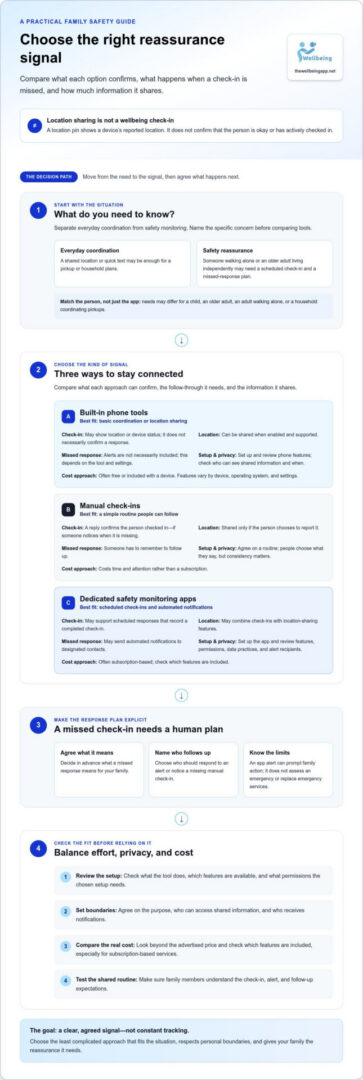
Choose a family monitoring plan that respects privacy and independence
A monitoring plan works best when everyone understands its purpose and has a say in how it is used. That shared agreement helps low-cost family monitoring solutions offer reassurance without making location access or check-ins feel like constant oversight.
Agree on boundaries before enabling monitoring
Start with a direct, age-appropriate conversation about what information will be shared, who can see it, and what the family hopes to achieve. Discuss when check-ins happen, whether location is visible, and who can receive alerts. Make expectations clear, then revisit them as a child gains independence, an older adult’s needs change, or household circumstances shift.
Create and test a simple alert response plan
Use these four steps to make the agreement practical:
- Agree on the purpose. Name the specific concern, such as confirming someone has arrived safely or receiving a scheduled check-in.
- Choose the minimum features. Enable only what supports that purpose, such as check-ins, location sharing, or alerts.
- Set contacts and responsibilities. Choose a primary contact and a backup, and agree who follows up if a check-in is missed.
- Test the alerts together. Confirm that notifications reach the intended contacts and that everyone knows what to do next.
Keep the response sequence calm and specific. For example, a designated contact might first try reaching the person, then notify the backup if there is no response. Decide together what each step means instead of treating one missed check-in as proof of an emergency. An alert can prompt human follow-up, but it cannot guarantee that someone will see it or respond.
Testing matters because a plan that looks clear on paper may leave questions in practice. Make sure each person knows how to complete their check-in, which contact will receive an alert, and how to raise a concern if the arrangement no longer feels comfortable. This keeps the process useful while respecting personal agency.
For a practical example of scheduled check-ins and automated notifications, see how automated check-ins work.
How The Wellbeing App supports low-cost family monitoring
Families do not all need the same kind of reassurance. One person may want to confirm a check-in, while another may prefer location sharing or a way to send an alert. The Wellbeing App brings distinct safety features together so families can choose what fits their agreed plan rather than adding monitoring they will not use.
Proof of Life: scheduled check-ins with automated alerts
Proof of Life is designed for scheduled check-ins. A person completes a check-in, and if one is missed, automated notifications can be sent to designated contacts. This gives family members a clearer status signal than a location pin alone and reduces reliance on someone remembering to send a manual text.
Subscriptions provide server-side monitoring and automated notification dispatch. Families should still agree on who will follow up and what to do if they receive an alert. Notifications do not guarantee a response, prevent harm, or replace emergency services.
Match other safety features to the situation
Each feature can play a different role in a family’s plan:
- Chaperone: A relevant option for someone who wants support during a walk.
- Night Watch: Can be considered for agreed overnight safety monitoring.
- Location Sharing: Helps family members share location as part of everyday coordination or a safety arrangement. It provides location information, not confirmation that someone has checked in.
- Emergency Alerts: A distinct way to send an alert within the family’s safety plan. Agree in advance on who receives it and how they should respond.
Choose only the features that match a specific need, and discuss how each will be used with the people involved. A simple plan might combine a scheduled check-in with location sharing for one family member, while using a different feature for another person’s circumstances. The aim is shared understanding and connection while respecting each person’s comfort and independence.
If these options match the kind of reassurance your family is looking for, explore The Wellbeing App for your family.
Choose a plan that keeps your family connected
The best low-cost family monitoring solutions are not simply the ones with the lowest upfront cost. They match a real family need, make check-ins and alerts clear, and respect each person’s privacy and independence. Compare what built-in phone tools, agreed routines, and dedicated apps actually provide. Then review subscription terms and included features before choosing.
A shared plan matters just as much as the technology. Agree on who can see location, when check-ins happen, who receives alerts, and what to do if someone does not respond. Keep the routine simple, and adjust it as family needs change.
The Wellbeing App offers Proof of Life scheduled check-ins with automated notifications to designated contacts, alongside Chaperone, Night Watch, Location Sharing, and Emergency Alerts. These features support different situations as part of a family-agreed safety plan.
Ready to explore an approach that supports reassurance and personal agency? Explore The Wellbeing App’s family safety features. A thoughtful plan can help your family stay connected with greater confidence.
Frequently Asked Questions
What is the cheapest way to monitor family members?
Free phone features combined with an agreed check-in routine are often the lowest-cost starting point. A family might share location to coordinate pickups and use a text to confirm someone arrived home. This approach does not require a dedicated monitoring subscription, but it relies on people remembering to check in and follow up. If you need scheduled check-ins or automated missed-response alerts, compare the costs and features of dedicated low-cost family monitoring solutions.
Are free family monitoring apps reliable?
Free tools can work for basic needs if they are supported by the family’s devices, configured correctly, and used consistently. Reliability depends on the specific feature: location sharing provides location information, while a manual check-in depends on someone sending and noticing a message. Free options may not include scheduled check-ins or automatic missed-response notifications. Review current capabilities, settings, and privacy controls before relying on a tool.
Can location sharing tell me if a family member is safe?
No. Location sharing can indicate a device’s reported location, but it does not confirm that the person is okay, has seen a message, or has actively checked in. A scheduled response offers a clearer status signal because the person completes a check-in. Families can combine location sharing with an agreed check-in and follow-up plan, but app information should not be treated as an emergency response or a guarantee of safety.
How do scheduled check-ins work in a family monitoring app?
A person is expected to check in at an agreed time or according to a set routine. If the check-in is missed, some apps can send an automated notification to designated contacts. Proof of Life supports scheduled check-ins and automated notifications when a check-in is missed. Agree in advance who receives alerts and what they should do next, since a notification prompts follow-up but does not guarantee a response.
Do family monitoring apps require a monthly subscription?
No, not all family monitoring options require a monthly subscription. Built-in phone tools may be free or included with a device, and manual calls or texts do not require a monitoring plan. Dedicated services may use recurring subscriptions. The Wellbeing App provides subscription-based safety monitoring with server-side monitoring and automated notification dispatch. Review current plan information for applicable terms and included features before choosing.
How can families monitor someone without invading their privacy?
Agree on the purpose and boundaries before enabling monitoring. Discuss what information is shared, who can view a location, when check-ins happen, and who receives alerts. Choose only the features needed for the concern, and make sure everyone understands what a missed response means. Revisit the agreement as someone’s independence or needs change. Clear expectations help monitoring feel like a shared safety plan, not undisclosed or constant tracking.
What should I compare before choosing a family safety app?
Compare the reassurance each feature provides, not just the number of features. Check whether the app supports scheduled check-ins, location sharing, missed-check-in notifications, and the contacts your family needs. Review setup effort, privacy permissions, covered users or devices, feature limits, renewal timing, and cancellation terms. Confirm current details for the devices and settings you plan to use, then choose an option your family can comfortably follow.