
Teen Safety Check-In Apps: Youth Program Buying Guide
More location data doesn’t always make a youth program safer. A safety check-in app for teens can help leaders know when a planned check-in is missed without making constant tracking the price of reassurance. Manual texts can get buried or arrive late. When several teens are checking in at once, it can also be hard to tell who needs a follow-up.
A dependable plan needs more than an alert. Teens, families, and leaders should know when check-ins happen, who receives a missed-check-in notification, and what happens next. Clear expectations support timely action while giving teens a meaningful role in their own safety.
This guide compares common digital check-in approaches and explains what youth programs should weigh, from alerting and oversight to privacy and trust. It also covers how Proof of Life can structure scheduled check-ins and notify designated contacts when a response is missed, while location sharing or Chaperone can complement a plan for specific activities. The goal is a practical, shared process that supports supervision without replacing it or emergency services.
Key Takeaways
- Choose a safety check-in app for teens by prioritizing a clear check-in workflow and useful alerts over constant monitoring by default.
- Set expectations for when teens should respond, who receives alerts, and what happens next if a check-in is missed.
- Compare essential check-in tools with optional features such as location sharing, so the plan fits the activity.
- Build a shared process with teens, families, and program leaders, then test notifications before relying on them.
- Learn how Proof of Life, Chaperone, Night Watch, location sharing, and emergency alerts can support different safety scenarios.
Why youth programs use safety check-in apps for teens
A teen is due back from an off-site activity at 6 p.m., but no arrival message comes through at the agreed time. A leader could send another text, but across a group, messages can be missed, delayed, or difficult to track. A safety check-in app for teens gives programs a consistent way to record expected responses and share a teen’s check-in status with selected contacts.
The value isn’t simply having another app. It’s having a process everyone understands: when a teen should respond, who gets notified if they don’t, and what that person should do next. A clear process helps leaders move from uncertainty to an agreed follow-up while keeping teens and families informed.
What does a teen safety check-in app do?
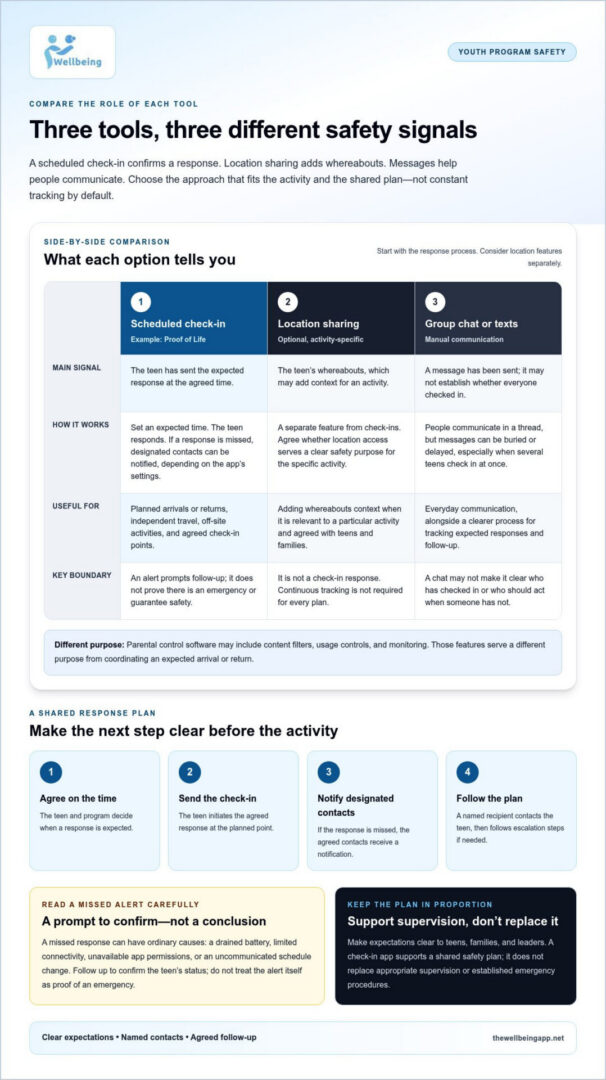
The basic cycle is simple: set an expected check-in time, have the teen send a response, and notify designated contacts if the response is missed. The teen initiates the check-in. Location sharing is a separate feature, and an automated alert is a notification following a missed response. A check-in app supports a safety plan; it can’t guarantee a person’s safety.
That distinction matters. A check-in notification isn’t the same as emergency dispatch, and a messaging thread doesn’t necessarily provide a tracked process with a clear response owner. Location sharing may add context, but it isn’t required for every check-in. Broader tools such as parental control software can include content filters, usage controls, and monitoring. Those features serve different purposes from coordinating an expected arrival or return.
Which youth-program situations may call for check-ins?
Check-ins can fit independent travel to an activity, a teen’s time at an off-site location, or a planned trip home after a program. Before each activity, leaders can explain when a response is expected and which contacts will receive an alert if it’s missed. The appropriate level of oversight depends on the activity and the shared plan. Not every teen or outing needs the same approach.
For example, a program might agree that a teen will check in on arrival and again after reaching home. Another activity might call for a single response at the planned return time. Either way, the expectation should be clear to the teen, family, and responsible leaders before the activity begins.
A group chat can help people communicate, but it may not make it clear whether everyone has checked in or who should act when someone hasn’t. A dedicated check-in process helps clarify those responsibilities. It works best as one supportive layer alongside appropriate supervision and established emergency procedures, not as a replacement for either.
How teen check-in systems handle schedules, missed responses, and alerts
A useful check-in system makes the next step clear before an activity begins. The teen and program agree on when a response is expected, the teen checks in, and designated contacts follow the plan if no response arrives. This sequence makes an alert a prompt for action, not a conclusion about what happened.
For a youth program, a safety check-in app for teens should support a response plan people can follow: who receives the notification, who tries to contact the teen, and when the situation calls for further escalation. An alert can say that a scheduled check-in was missed and identify which one. It doesn’t prove there’s an emergency. The plan should guide a calm attempt to confirm the teen’s status before the next step.
What happens when a teen misses a scheduled check-in?
Depending on the app’s settings, a missed check-in can trigger a notification to designated contacts. The recipient can first use the agreed contact method to find out whether the teen is safe or the plan has changed. If there’s still no response, follow the program’s escalation steps rather than improvising under pressure.
A missed response can have ordinary causes: a drained battery, limited connectivity, unavailable app permissions, or a schedule change that wasn’t communicated. Those possibilities don’t remove the need to follow up. They do help keep the first response measured and focused on confirming the teen’s status.
How do location sharing and check-ins work together?
A check-in communicates status: the teen has sent the expected response. Location sharing communicates whereabouts and may add useful context for a particular activity. They’re different tools. A program can decide whether location access serves a clear, agreed safety purpose instead of treating continuous tracking as the default. Discuss expectations with teens and families, since tracking can affect trust and parent-child relationships.
Proof of Life supports scheduled check-ins and automated notifications to designated contacts when a check-in is missed. It helps structure the agreed process, while supervision and emergency procedures remain essential parts of the overall safety plan.
Explore how Proof of Life check-ins can support a shared safety plan.
Compare teen check-in app features without defaulting to constant tracking
Start a comparison with the response process, not the number of monitoring tools. For a youth program, the essential questions are whether teens know when to check in and whether the right adults can understand and act on a missed response. Location features may add context for some activities, but they’re a separate choice, not a requirement for every plan.
Use this checklist to compare how an option supports the program’s workflow:
| Feature | What to assess | Role in the plan |
|---|---|---|
| Check-in setup | Can the expected time and response be made clear to the teen and responsible contacts? | Essential. The plan needs a defined check-in expectation. |
| Missed-response alerts | Does a notification explain which check-in was missed and what follow-up is expected? | Essential. Clear alerts support a calm, consistent response. |
| Contact roles | Are recipients identified, and is it clear who follows up or escalates? | Essential. Avoid uncertainty about who takes the next step. |
| Location sharing | Can whereabouts be shared for a stated activity or purpose, with clear visibility boundaries? | Optional monitoring. Use only when it fits the agreed plan. |
Which features matter most for a youth program?
Prioritize an understandable schedule, clearly identified alert recipients, and notifications that distinguish a missed response from an emergency. Contacts should be able to tell what happened and what action the program expects. The system should fit existing safeguarding procedures rather than create a parallel process that leaves leaders unsure which steps to follow.
Plan for practical changes, too. Activities run late, plans shift, and a check-in time may need updating. Compare how easily a schedule can be changed or paused and how those changes are communicated to the teen and contacts. A safety check-in app for teens should make the agreed process easier to follow, not harder to manage.
How should a program weigh privacy against oversight?
Make information-sharing expectations explicit: what’s collected or shared, who can see it, and for what agreed purpose. Include teens and families in setting reasonable boundaries, including whether location access is needed for a particular activity. Continuous location access is a distinct choice, not a default requirement.
Check that alerts are understandable and that the plan can adapt when circumstances change. The right balance is one everyone can explain and follow while preserving the program’s established supervision and safeguarding practices.
Set up a teen check-in plan that families and program leaders can follow
A check-in plan works best when everyone knows the routine before an activity starts. Keep the setup practical, with expectations that teens, caregivers, and program leaders can understand and follow.
- Define the activity. Note where the teen is going, how they’ll travel, and when they’re expected to arrive or return.
- Agree on check-in times and responses. Choose times that fit the activity and a response method the teen can use, such as a message or an app check-in.
- Assign contacts and roles. Identify who receives a missed-check-in notification, who follows up first, and who takes over if that person can’t be reached.
- Test the notification process. Before relying on it for an activity, make sure the teen and designated contacts understand how the check-in and notification steps work.
A safety check-in app for teens can support this routine, but it shouldn’t be the entire plan. Write down what happens after a missed response, including the first contact attempt and the next step if the teen remains unreachable. Keep urgent escalation consistent with the program’s established safeguarding policies and emergency instructions.
What should a check-in protocol spell out?
Be specific about when check-ins are due, which responses count, and who is responsible for each follow-up. Explain how concerns move to the next contact so a missed message doesn’t leave leaders guessing. Include a backup plan for a dead battery, weak connectivity, an unavailable phone, or a schedule change. For example, agree in advance how a teen or caregiver can communicate a delay if the usual app response isn’t possible.
How can programs introduce check-ins without eroding trust?
Explain the purpose in plain language before inviting teens to participate: the check-in helps the group follow an agreed plan, not monitor every moment. Make boundaries clear to teens and caregivers, including who receives updates and when the plan applies. Invite questions, then review the process after activities. If a step was confusing or triggered unnecessary notifications, adjust the plan together.
That conversation gives teens a real role in their safety instead of leaving them to guess what adults expect. Keep the process proportionate to the activity, and remind everyone that digital check-ins support, but don’t replace, supervision or emergency services.
Explore Proof of Life scheduled check-ins to structure check-ins and notify designated contacts when a response is missed.
Use The Wellbeing App to support check-ins and shared safety planning
A check-in plan is easier to follow when the digital tool supports the agreed routine without replacing the people responsible for teen safety. The Wellbeing App’s Proof of Life feature is designed for scheduled check-ins, with automated notifications to designated contacts when a response is missed. That gives families and program leaders a clear signal to begin the follow-up steps they’ve already agreed on.
Different activities call for different features. A safety check-in app for teens can be part of a broader plan, but check-ins, location sharing, and urgent alerts serve separate purposes:
- Proof of Life: Structures scheduled check-ins and notifies designated contacts when a check-in is missed.
- Location sharing: Supports real-time sharing of whereabouts when it’s relevant to the activity and agreed boundaries.
- Chaperone: A distinct feature that can complement a plan for activities where it’s relevant.
- Night Watch and Emergency Alerts: Separate tools to consider for safety plans involving night-time concerns or situations where an alert is needed.
These features aren’t interchangeable. A check-in communicates a response, while location sharing provides whereabouts; an emergency alert is a different action again. Choose features based on the activity and shared plan, rather than turning on every option by default. App-based support complements appropriate adult supervision and established emergency procedures. It doesn’t replace either.
Which Wellbeing App features relate to teen safety check-ins?
Start with the specific need. If the plan calls for a response at an agreed time and a notification when that response is missed, Proof of Life supports that check-in workflow. Add location sharing or Chaperone where they fit the activity and the boundaries agreed with teens and families. Night Watch and Emergency Alerts address distinct scenarios, so include them when they make sense for the plan.
What are the next steps for families and program leaders?
Identify who will use the app, which activities call for check-ins, and which contacts should receive notifications. Then review the selected feature workflow together. Make sure teens and caregivers understand what information is shared, who can see it, and how the plan applies. Clear expectations help technology support trust as well as practical oversight.
Explore The Wellbeing App’s safety features and subscription options to see how they can fit into a shared safety plan.
Build a Check-In Plan Teens Can Trust
A dependable youth-program safety plan starts with clear expectations: teens know when and how to check in, and families and leaders know who responds if a check-in is missed. The right safety check-in app for teens supports that process without making continuous location tracking the default. Agree on privacy boundaries, assign alert recipients, and make sure every missed-check-in notification leads to a calm, defined next step.
The Wellbeing App’s Proof of Life supports scheduled check-ins and notifies designated contacts when a response is missed. Chaperone, Night Watch, location sharing, and emergency alerts provide additional tools for distinct safety scenarios. Use the features that fit your shared plan, alongside appropriate adult supervision and established emergency procedures.
Explore The Wellbeing App’s safety features and subscription options to find the right fit for your program’s check-in plan.
Frequently Asked Questions
What is a safety check-in app for teens?
A safety check-in app for teens lets a teen send an agreed status update to selected contacts at a planned time. Depending on its settings, it may notify those contacts if a check-in is missed. This supports communication and a response plan, but a missed alert doesn’t confirm an emergency. An app also can’t replace adult supervision or guarantee that help will arrive.
Are check-in apps appropriate for at-risk youth programs?
They can support a program’s communication plan when expectations, alert recipients, and follow-up steps are clear. Before use, consider the teen’s age and circumstances, privacy needs, and the program’s safeguarding policies. Explain what the app does and how alerts will be handled. It should remain one part of a broader safety approach, not a substitute for trained staff, appropriate supervision, or emergency response.
Can a check-in app alert someone if a teen does not respond?
Some services can notify designated contacts when a scheduled check-in is missed. The alert means a response wasn’t recorded; it doesn’t explain why. The teen’s phone may be unavailable, out of battery, or disconnected, or plans may have changed. Agree in advance on a calm first step, such as trying the planned contact method, then follow the program’s response plan if concerns remain.
How do check-in apps differ from location-sharing apps?
A check-in records a response at an agreed time, while location sharing can show a device’s whereabouts, depending on settings and permissions. Some safety services provide both, but the features serve different purposes. Before using location sharing, agree on what information is shared, who can see it, and when access is appropriate. Continuous tracking isn’t required for every check-in plan.
Do teens need to consent to location sharing?
Consent and applicable requirements depend on the teen’s age, family or program context, and relevant policies. As a practical step, explain in age-appropriate language why location sharing is being considered, who will receive the information, when it applies, and what its limits are. Invite questions from teens and caregivers. Share only the location information needed for the agreed safety purpose, rather than treating access as automatic.
What should a youth program do after a missed check-in?
Follow the agreed protocol instead of assuming a missed check-in means an emergency. The designated contact can try the planned way of reaching the teen, consider whether the schedule changed, and follow the next escalation step if concerns remain. Make sure each contact knows their role before an activity begins. Keep urgent instructions consistent with the program’s safeguarding procedures and emergency guidance.
Can a safety check-in app replace adult supervision?
No. An app can help coordinate check-ins and notify selected contacts, but it can’t supervise an activity, guarantee a response, or ensure help will arrive. Programs should continue to use appropriate staffing, communication, and safeguarding practices. Before using an app as one part of a safety plan, explain its role and limitations to teens, families, and staff so everyone understands what technology can and can’t do.