
Customizing Emergency Alerts for Different Contacts: A 2026 Safety Guide
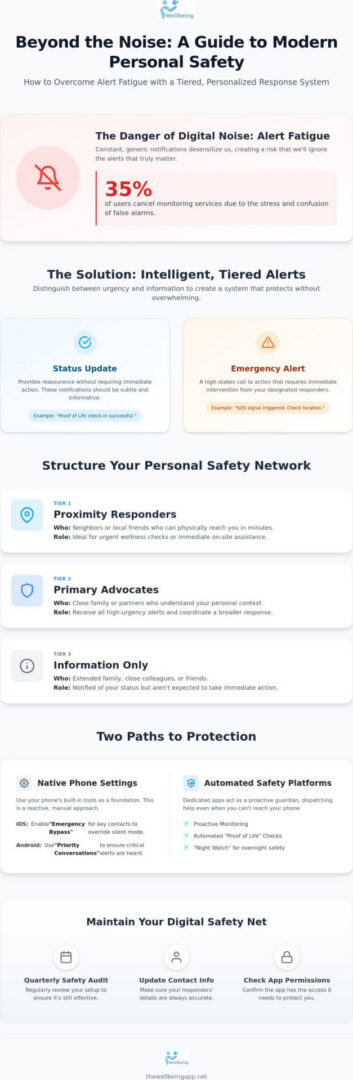
What if the most effective emergency alert wasn’t the loudest one, but the one that reached the specific person best equipped to help you? Customizing emergency alerts for different contacts is no longer just a convenience; it’s a vital layer of modern safety. We’ve all felt the weight of alert fatigue, where a constant stream of generic pings makes us want to silence our phones entirely. It’s a valid fear to worry that a critical notification might be missed while you’re asleep, especially when native phone settings feel like a maze of technical confusion. Since 35% of users cancel monitoring services due to false alarms, the need for a precise, reliable system has never been more urgent.
You deserve a system that acts as a watchful protector, offering the mental tranquility that comes from knowing your circle is prepared. This guide will show you how to build a tiered, personalized response system that ensures the right people receive the right information exactly when it matters most. We’ll explore how to move beyond manual SOS buttons toward proactive monitoring like Proof of Life and Night Watch, turning your device into a compassionate guardian for every solo activity and quiet night at home.
Key Takeaways
- Discover how tiered response logic prevents alert fatigue by ensuring only the most critical notifications break through your digital silence.
- Gain technical confidence by customizing emergency alerts for different contacts through native phone settings like Emergency Bypass and distinct audio cues.
- Organize your personal safety network into specialized circles, matching the urgency of the event with the specific capabilities of your responders.
- Explore how automated features like Proof of Life and Night Watch act as a proactive guardian, dispatching help even when you can’t reach your phone.
- Learn to maintain long-term reliability with a quarterly safety audit that keeps your permissions active and your contact information accurate.
The Science of Alert Fatigue and Tiered Responses
In 2026, our digital environment is louder than ever before. We live in an age of constant pings, from social media updates to delivery notifications, which has created a dangerous psychological threshold. The Science of Alert Fatigue explains that when we’re exposed to a high volume of frequent alarms, we become desensitized to them. For personal safety, this means a generic notification sound is no longer enough. If your phone makes the same noise for a weather update as it does for a family member’s distress signal, your brain may instinctively ignore the very information that matters most. Modern safety standards demand a shift from loud, intrusive noises toward a more sophisticated, intelligent approach.
Designing a safety net that preserves your mental tranquility requires a concept called Tiered Response Logic. This isn’t just about volume; it’s about precision. By customizing emergency alerts for different contacts, you ensure that your digital presence acts as a compassionate guardian rather than a source of anxiety. This structured logic allows you to filter the noise, ensuring that only the most critical indicators break through your focus. It’s the difference between being constantly on edge and feeling a deep sense of harmony, knowing that your safety system is working quietly in the background.
Understanding Urgency vs. Information
Effective safety management begins with distinguishing between a “Status Update” and a true “Emergency Alert.” A status update, such as a “Proof of Life” check-in or a notification that a loved one has arrived at their destination, provides reassurance without requiring immediate action. These should be subtle. Conversely, an emergency alert is a high-stakes call to action that requires immediate intervention. When you are customizing emergency alerts for different contacts, consider these categories:
- Proximity Responders: Neighbors or local friends who can physically reach you in minutes for wellness checks.
- Primary Advocates: Family or partners who need to know the full context of every high-urgency event.
- Information Only: Contacts who should be notified of your status but aren’t expected to coordinate a rescue.
Sending every alert to every contact is a strategic mistake that leads to confusion. It dilutes the importance of the message and can slow down the actual response time when seconds count.
The Psychology of the Responder
Your safety network is only as strong as the people within it. To make your responders effective, they must feel empowered rather than burdened by their role. This starts with clear communication about what different alerts mean and what is expected of them. Empathetic vigilance is the quiet commitment of a loved one to remain subconsciously aware of a partner’s safety without letting that concern disrupt the harmony of their daily lives. By setting up a tiered system, you give your inner circle the gift of focus. They don’t have to worry about every minor movement; they only need to act when the specific, customized alert you’ve designed for them sounds. This creates a culture of trust and collective responsibility, where everyone knows their place in your protective circle.
Native OS Customization vs. Automated Safety Platforms
Your smartphone is a powerful tool for personal protection, but its effectiveness depends entirely on how you configure it. Most users rely on the default settings, which often treat a marketing notification with the same urgency as a family member’s distress signal. By customizing emergency alerts for different contacts, you transform your device from a source of digital noise into a disciplined, watchful protector. This process begins with the built-in features of your operating system, which provide the foundation for a more sophisticated safety strategy.
Maximizing Your Smartphone’s Built-in Tools
In 2026, mobile operating systems have become much better at handling high-priority communications. If you’re using iOS 26.5.2 or later, you can enable “Emergency Bypass” for your inner circle. Open a contact’s card, tap “Edit,” and select “Ringtone.” Switching on Emergency Bypass allows that specific person’s calls and texts to sound even if your phone is on silent or “Do Not Disturb” mode. Android users can achieve similar results through the “Priority Conversations” and “Do Not Disturb” exceptions found in the latest Play Services updates. These settings ensure that your most trusted responders can always reach you, preserving your mental tranquility during rest hours.
Beyond ringtones, consider assigning custom vibration patterns and unique text tones to distinguish safety messages without even looking at your screen. Modern devices also support “Critical Alerts,” a specialized notification category used by safety applications to override system volume settings. Building a robust safety net aligns with official emergency preparedness guidelines, which emphasize having a clear communication strategy before a crisis occurs. These manual adjustments are a great start, but they still rely on one critical assumption: that you are physically able to use your phone.
Why Automation Trumps Manual SOS
The “Incapacitation Gap” is the primary weakness of native SOS features. Traditional emergency tools require you to manually trigger an alarm, swipe a screen, or press a button sequence. If you’re unconscious, separated from your device, or simply in a state of shock, these manual triggers become useless. This is where the 2026 standard for safety shifts toward server-side monitoring. Unlike local device alerts that die with your battery, automated systems reside on a secure server, watching over you even if your phone is offline or destroyed.
Automated check-ins, such as Proof of Life, remove the burden of manual signaling by asking the system to look for you, rather than waiting for you to call for help. If a scheduled check-in is missed, the system initiates a pre-set dispatch logic independently. While manual settings help with customizing emergency alerts for different contacts, they don’t provide the same level of empathetic vigilance as a proactive system. For those who want to move beyond basic settings, automated safety monitoring provides a compassionate guardian that acts when you cannot, ensuring that your silence is never mistaken for safety.
Strategies for Segmenting Your Emergency Response Network
Building a robust safety net isn’t about adding as many people as possible to a list. It’s about intentionality and the preservation of your mental state. When you’re customizing emergency alerts for different contacts, you’re essentially creating a map of trust that matches specific needs with the right people. Your “Inner Circle” should consist of 24/7 responders, individuals who possess the emotional calm to handle high-urgency alerts without panic. These are the people who receive the loudest, most detailed notifications because they are your primary advocates in a crisis.
In contrast, your “Secondary Circle” serves a different, yet vital purpose. This group often includes neighbors or local friends who are perfect for non-medical wellness checks. If you’ve missed a routine check-in but there’s no immediate indicator of danger, a neighbor can check your front door more quickly than a family member living across the country. This geographic logic mirrors the official WEA guidelines, which use location-based targeting to ensure that notifications are relevant and actionable. By segmenting your network, you ensure that help is always appropriate for the situation.
For specific windows of time, such as walking home from a late shift or exploring a new city, you might employ a Virtual Chaperone. This concept allows you to add temporary contacts who only receive status updates for a set duration. It protects your long-term privacy while ensuring you aren’t alone during high-risk activities. This approach fosters a sense of collective responsibility without overwhelming your permanent circle with daily routine data.
Selecting Your Primary Responders
Choosing your primary responders requires an honest assessment of their reliability and proximity. Before adding anyone to your inner circle, have “The Conversation” to explain what an alert means and what you’re asking of them. It’s also wise to include at least one out-of-area contact. In regional emergencies, local contacts might be affected by the same event, but someone further away can maintain the composure needed to coordinate help from a position of safety. This ensures that your protective circle remains functional even when local infrastructure is challenged.
Customizing Information Flow
Safety and privacy should exist in harmony. Not everyone in your network needs your real-time Location Sharing 24/7. You can customize your data flow so that sensitive information, like medical data or home entry codes, only becomes available to your primary responders when a high-urgency alert is triggered. For routine check-ins, use “Quiet Notifications.” These are subtle indicators that tell your circle you’re okay without causing a loud disruption. By managing the flow of information, you prevent responder burnout and ensure that when a real Emergency Alert sounds, it’s treated with the gravity it deserves. This disciplined approach keeps your safety net strong and your relationships healthy.
How The Wellbeing App Automates Personalized Safety
While manual phone settings provide a basic foundation, true mental tranquility comes from a system that doesn’t wait for you to act. The Wellbeing App steps in as a compassionate guardian, bridging the gap between passive tools and active protection. By customizing emergency alerts for different contacts through our automated platform, you ensure that your safety net is always active, even if you’re unable to reach your device. Our proprietary logic handles the complexity of notification dispatch, so you can focus on living your life with confidence.
At the heart of this protection is the Proof of Life feature. Unlike a standard SOS button, this is a proactive check-in system designed to detect silence. If you don’t confirm your status at a scheduled time, the app initiates a pre-defined sequence that you control. This allows for a level of precision that native OS settings simply can’t match, providing a structured path from a gentle reminder to a full-scale response. It’s about collective responsibility, ensuring that your silence is never mistaken for safety.
Configuring Proof of Life Alerts
Setting up your automated alerts begins with defining a “Grace Period.” This is the window of time after a missed check-in where the app will send you a private nudge before involving your network. You can customize the escalation path to match your specific lifestyle. For instance, a five-minute delay might be appropriate for a high-risk solo hike, while an hour is better for a routine evening at home. Automated check-ins provide a digital safety net for seniors, offering them the freedom to live independently while ensuring their loved ones are quietly watching over them.
Specialized Protection: Night Watch and Chaperone
For the hours when you’re most vulnerable, the Night Watch feature provides a dedicated layer of security. It monitors your status during sleep without invading your privacy, ensuring that if something goes wrong overnight, your inner circle is notified immediately. When you’re on the move, the Chaperone feature acts as a virtual companion. By customizing emergency alerts for different contacts for specific commutes or solo travels, you can designate who receives status updates and who is only alerted if you fail to reach your destination safely.
Because our monitoring is server-side, your safety is independent of your phone’s battery life or signal. If your device is lost, stolen, or destroyed, our servers still know you’re missing a check-in and will dispatch help accordingly. This always-on vigilance is the 2026 standard for high-stakes safety management. To begin building your personalized response system, explore the automated features of The Wellbeing App and reclaim your peace of mind.
Maintaining Your Digital Safety Net for Long-Term Reliability
A reliable safety net is never static. It’s a living system that requires periodic attention to ensure it remains a source of mental tranquility rather than a false sense of security. While we’ve explored the technical setup and the logic of tiered responses, the true strength of your system lies in its long-term reliability. Many people treat safety as a “set it and forget it” task, but the most effective protection comes from a disciplined habit of maintenance. This is why we recommend a Quarterly Safety Audit, a simple but essential process to verify that your protective circle is still intact and functioning exactly as intended.
During this audit, you should revisit the logic of customizing emergency alerts for different contacts. Relationships evolve, neighbors move, and your own daily routines might shift. Perhaps a contact who was once your primary responder is now better suited for your secondary circle, or a new friend has become a trusted local advocate. Updating these roles ensures that your alerts always reach the person best equipped to help in the present moment. This maintains the harmony of your social network while prioritizing your welfare, ensuring that collective responsibility remains a practical reality rather than just a concept.
Conducting a Successful Safety Test
Testing your system shouldn’t cause alarm for your loved ones. You can run a “Silent Test” by notifying your contacts in advance and then triggering a test alert through the app. This allows you to verify that their devices are still configured to receive your notifications and that no OS updates have reset their Emergency Bypass or Critical Alert settings. It’s also a great time to ensure that your notification permissions haven’t been accidentally disabled during a routine phone cleanup. These small checks prevent the technical failures that often lead to missed signals, ensuring the technology is ready when it matters most.
Adapting to New Vulnerabilities
Life is full of transitions, and your safety system should be flexible enough to follow you through every change. If you’re recovering from a health event or starting a new fitness routine, you might choose to increase the sensitivity of your Proof of Life check-ins or the frequency of your Night Watch monitoring. Similarly, if you’re embarking on a solo travel adventure, you can add temporary contacts to your Virtual Chaperone for that specific duration. Empower yourself with a system that watches over you with empathetic vigilance. By proactively customizing emergency alerts for different contacts as your needs change, you transform your device into an instrument of personal agency and lasting peace of mind. Start your journey toward proactive safety and build a plan that grows with you.
Empower Your Circle of Protection
True safety in 2026 isn’t just about owning a smartphone. It’s about the logic behind your notifications. We’ve explored how tiered response logic helps eliminate alert fatigue, ensuring your inner circle isn’t overwhelmed by digital noise. By segmenting your network, you protect your mental tranquility while maintaining a robust, reliable safety net. This proactive approach transforms your device from a passive tool into an instrument of personal agency and collective responsibility.
Moving toward automated monitoring removes the heavy burden of manual signaling during a crisis. When you focus on customizing emergency alerts for different contacts, you ensure that your silence is never mistaken for safety. Features like Proof of Life, Night Watch, and Virtual Chaperone provide compassionate, 24/7 server-side protection that stays active even if your phone is lost or powered down. It’s time to build a system that watches over you with empathetic vigilance. Secure your peace of mind with The Wellbeing App today and feel the confidence that comes with true protection. You’ve taken the first step toward a safer future; now let your digital guardian handle the rest.
Frequently Asked Questions
How do I make emergency alerts louder for specific contacts on my phone?
You can make alerts louder by enabling “Emergency Bypass” on iOS or setting “Priority Conversations” on Android. These settings ensure that even if your device is on silent or “Do Not Disturb” mode, the specific ringtone or text tone you’ve assigned will sound at full volume. It’s a foundational step in customizing emergency alerts for different contacts to ensure that critical messages from your inner circle are never missed.
Can I customize emergency alerts for both iPhone and Android users?
Yes, customization is available across both major platforms in 2026. iPhone users on iOS 26.5.2 or later and Android users with the latest Google Play Services can configure bypass settings and unique vibration patterns. This cross-platform compatibility ensures that your entire circle can participate in your safety plan regardless of their preferred device, fostering a sense of collective responsibility and trust within your family.
What is the difference between a native SOS alert and a safety app notification?
Native SOS alerts require you to manually trigger a signal, which isn’t always possible if you’re in shock or incapacitated. Safety app notifications, specifically those from The Wellbeing App, use proactive monitoring to detect silence. If you’re unable to reach your phone, our server-side logic dispatches help automatically. This proactive approach closes the dangerous “Incapacitation Gap” left by traditional, manual emergency buttons.
Who should I choose as my primary emergency contact for automated alerts?
Select individuals who are emotionally calm, physically reliable, and likely to be available when you need them. It’s often best to have a mix of local responders for immediate proximity and one out-of-area contact for regional emergencies where local infrastructure might be compromised. Always have “The Conversation” first to ensure they understand their role and feel empowered within your protective circle rather than burdened by the responsibility.
How does the “Proof of Life” feature prevent false alarms to my contacts?
Proof of Life uses a customizable grace period to protect your responders’ mental tranquility. Before any contacts are notified, the app sends a private nudge to your device. If you confirm you’re okay during this window, the escalation stops immediately. This structured logic ensures that help is only dispatched when it’s truly needed, reducing the risk of alert fatigue and maintaining the reliability of your safety net.
Can I set different emergency alerts for night-time versus day-time?
You can certainly adjust your protection based on the time of day to match your changing vulnerabilities. Customizing emergency alerts for different contacts allows you to use features like Night Watch for high-risk evening hours, providing a dedicated layer of security while you sleep. This ensures a disciplined safety strategy that adapts to your daily rhythm and provides a constant, comforting promise of safety without invading your privacy.
Is it possible to share my location only during an active emergency?
Yes, you can restrict location sharing to specific windows or high-urgency events to preserve your digital independence. By using the Chaperone feature, you can grant temporary access to your location during a late-night commute or a solo hike. This ensures you’re protected by your circle during high-risk activities without compromising your long-term privacy, keeping your safety and personal agency in perfect harmony.
What happens to my emergency alerts if my phone battery dies?
Your safety net remains active through server-side monitoring even if your battery dies or your phone is destroyed. Unlike local device alerts that depend on your hardware, our logic resides on a secure, independent server. If a scheduled check-in is missed, the system initiates your customized alert sequence automatically, providing a compassionate guardian that doesn’t rely on your phone’s power or signal to protect your welfare.