
App to Check on Family During Natural Disasters: A Practical Guide
What if the map shows your family’s last known location, but you still don’t know whether they’re safe? During a natural disaster, calls and messages may go unanswered. An app to check on family during natural disasters can support an agreed check-in plan, but a location indicator is context, not confirmation that someone is okay.
It’s unsettling to wait for a reply when roads, power, or mobile networks may be affected. A clear routine helps everyone know when to check in, who should follow up if a check-in is missed, and what to do next.
This guide explains how scheduled check-ins and location sharing work, what a missed-check-in alert can and can’t tell you, and how to prepare your family before an emergency. You’ll also learn how to pair check-in tools with official information from FEMA and the American Red Cross, so your plan supports communication without mistaking an app for emergency response.
Key Takeaways
- Choose an app to check on family during natural disasters based on whether you need scheduled status updates, location context, or public-safety alerts.
- Agree on who checks in, when they do it, and which contact follows up if an update is missed.
- Build a backup communication plan that accounts for family members’ devices, accessibility, language, and caregiving needs.
- Test the routine before an emergency, then review it when family needs or contact details change.
- Use Proof of Life for structured check-ins and alerts to designated contacts, alongside an agreed response plan for missed check-ins.
What Family Safety Apps Can and Cannot Do in Disasters
A family check-in app helps people share a status, provide location context, or trigger an alert when a scheduled check-in is missed. It turns a vague “let’s stay in touch” into a clearer routine: relatives know when to expect an update and who should follow up if it doesn’t arrive.
A check-in app coordinates updates between people; it isn’t an emergency response service. A missed-check-in alert means the expected update wasn’t recorded. It doesn’t confirm that someone is injured, in danger, or unable to use their phone. They may be safe but busy, without power, or unable to connect.
What does a family safety check-in actually confirm?
A completed check-in communicates a person’s status at that moment, based on what they report or the app records. It isn’t continuous supervision or medical monitoring, and location sharing alone can’t confirm someone’s wellbeing. A shared location offers useful context, but doesn’t establish what’s happening there.
Agree in advance on what each response means. For example, decide whether “safe” means the person is okay where they are, or whether they also need help with transport or supplies. A scheduled Proof of Life check-in gives families clear expectations, while a missed-check-in alert can prompt a designated contact to follow the agreed response plan.
Why is an app only one part of disaster preparedness?
Disasters can disrupt power, cellular service, internet access, or access to a charged device. An app may reduce uncertainty when a check-in goes through, but no app can guarantee contact or confirm safety if someone can’t send an update. Alert timing and delivery can also depend on the app’s configuration and connectivity.
Pair your check-in routine with official emergency information and an offline family plan. Decide where to meet, which out-of-area contact to use, and what to do if phones aren’t working. In the United States, official emergency alerts and evacuation instructions provide public-safety guidance for affected areas. An app to check on family during natural disasters can support your plan, but it shouldn’t replace emergency services or instructions from authorities.
How Scheduled Check-Ins and Missed-Check-In Alerts Work During Disruptions
A scheduled check-in gives each family member a clear time to send an update and gives designated contacts a shared expectation. The process is simple: agree when to check in, submit a status, then follow the response plan if the update doesn’t arrive. For example, someone might report that they’re safe at their current location or say they need help reaching a planned destination.
An automated alert means a check-in was missed; it does not confirm that an emergency has occurred. Alert timing and delivery depend on the app’s configuration and connectivity. A dead battery, disrupted network, or unexpected delay could prevent a check-in or affect when an alert arrives. Name a primary contact who understands what to do, plus a backup in case the first person can’t respond.
What should happen after a scheduled check-in is missed?
Start with a calm follow-up using the contact method your family agreed on, such as a call or text. If there’s no response, try the next agreed route, which might be another family contact or a prearranged meeting point. These steps help avoid treating a notification as proof of danger while ensuring someone takes responsibility for following up.
If available information or the circumstances indicate immediate danger, contact emergency services. Don’t wait for an app notification to decide whether urgent help is needed, and don’t treat a missed check-in alone as a diagnosis of the situation.
How do location sharing and check-ins work together?
Location can help a contact understand where someone may be, but it can’t confirm their condition or whether they need assistance. Before sharing locations, discuss who can see them, when sharing is expected, and how the information will be used. Clear consent and expectations help make location sharing a useful part of the family plan rather than a source of confusion.
The Wellbeing App’s Location Sharing provides real-time location context. Its Proof of Life feature supports scheduled check-ins and automated alerts to designated contacts when a check-in is missed. Together, these features can help relatives coordinate follow-up, but they don’t replace direct communication or emergency response.
Write down your contact order, backup routes, and meeting arrangements so the plan remains useful if devices or networks are unavailable. Ready.gov offers guidance for building a disaster-ready family check-in plan. For families who want structured check-ins, Proof of Life check-ins can be one part of that shared routine.
Check-In App vs. Texts, Location Sharing, and Official Emergency Alerts
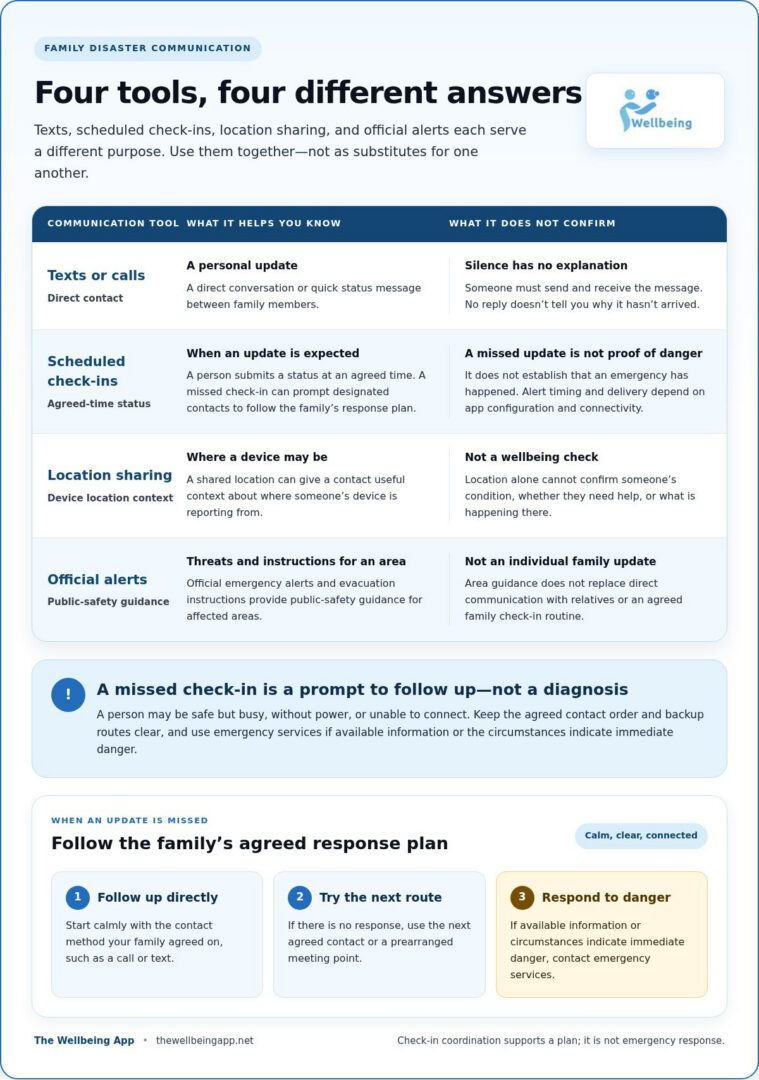
Each communication tool answers a different question. A text carries a personal update, a scheduled check-in clarifies when to expect one, location sharing shows where a device is reporting from, and official alerts warn people about threats in an area. An app to check on family during natural disasters works best as part of a communication plan, not as a replacement for every other channel.
| Tool | Purpose and useful information | Likely limitations |
|---|---|---|
| Texts or calls | Direct conversation or a quick status update between family members. | Someone has to send and receive the message; silence doesn’t explain why there’s no reply. |
| Scheduled check-ins | Prompts a person to submit a status at an agreed time; a missed check-in can prompt designated contacts to follow up. | A missed check-in doesn’t establish that someone is in danger. Timing and delivery can depend on app settings and connectivity. |
| Location sharing | Provides location context that may help family members coordinate. | Location doesn’t confirm a person’s condition, and access can depend on device power, connectivity, and sharing settings. |
| Official emergency alerts | Communicate public-safety warnings and instructions for affected areas. | They’re not personal updates and don’t confirm an individual family member’s status. |
When are texts or calls enough for a family check-in?
Direct messages work well when family members can reach one another and respond. Before an emergency, agree on what counts as a timely reply and what to try next if a call or text goes unanswered. An unanswered message doesn’t tell you whether someone is safe, busy, or unable to connect, so decide in advance when to use a backup contact or check-in method.
What does location sharing add, and what does it leave out?
Location offers context; an explicit check-in communicates status. Discuss consent, who can view location, and when sharing is expected. Battery level and connectivity can affect whether location information updates, while privacy settings determine what others can see. Keep these family updates distinct from public warnings.
Wireless Emergency Alerts (WEA) are public warnings from authorized government alerting authorities for people in targeted areas. They can provide urgent information about threats, but they don’t tell relatives whether a specific person is safe. Use official alerts for public instructions and family channels for personal updates. Ready.gov’s Make a family emergency communication plan resource can help you decide how those channels fit together.
How to Set Up a Disaster-Ready Family Check-In Plan
A useful plan is simple enough for everyone to remember and flexible enough to account for different needs. Decide together how check-ins will happen, who will follow up, and what the family will do if phones or networks aren’t available. An app to check on family during natural disasters can support the routine, but the plan should also work on paper and through other agreed contact routes.
- Choose contacts. Name a primary person to monitor check-ins and a backup who can step in. If helpful, choose an out-of-area contact who can relay messages when family members can’t reach one another directly.
- Set check-ins. Choose realistic times that fit people’s routines. Decide what counts as a completed update, such as confirming “safe,” sharing a need, or reporting a change in plans.
- Agree on responses. Give contacts clear responsibilities and a calm follow-up order. For example, try the person’s usual contact method, then reach the backup contact before taking further steps based on the circumstances.
- Test the plan. Practise sending a check-in, receiving it, and following the backup route. Confirm that everyone understands the process and can use the chosen method.
- Review and update. Revisit the plan when household routines, devices, contact details, caregiving arrangements, or family needs change.
How should families agree on check-in expectations?
Make expectations specific without making the routine burdensome. Choose check-in times people can realistically meet, and define status options in plain language. Make sure primary and backup contacts know who follows up, which method to try first, and what circumstances call for urgent action. Account for accessibility and language needs, and consider whether children, older adults, or people receiving care need help sending or understanding updates.
How can families prepare for weak signals or dead batteries?
Choose a backup route, such as a second contact method or a prearranged meeting place, and make sure each household member knows it. Discuss keeping devices charged and conserving battery when power is limited. Write important names and phone numbers on paper, since a phone’s contacts may not be accessible if its battery runs out.
During a practice run, test both the usual check-in and the fallback steps. Note where people hesitate or lack information, then adjust the plan. A scheduled Proof of Life routine helps clarify check-in expectations and alert designated contacts when one is missed. Set up structured family check-ins as one part of your household plan.
Using The Wellbeing App for Ongoing Family Check-Ins
A family routine works best when everyone knows what an update means and who will act if one doesn’t arrive. The Wellbeing App’s Proof of Life supports scheduled check-ins and sends automated alerts to designated contacts after a missed check-in. Families can align the schedule with everyday routines, then use the same expectations as one layer of their disaster communication plan.
How can Proof of Life support a family check-in routine?
Before relying on alerts, agree on the practical details together: when each person should check in, who receives an alert, and what that contact should do next. For example, the designated contact might first try the family’s agreed way to reach the person, then follow the backup contact plan. Clear roles help an alert prompt a calm, useful response rather than confusion or unnecessary escalation.
A missed-check-in alert signals that the scheduled update wasn’t completed. It doesn’t diagnose danger, confirm an emergency, or dispatch responders. The app’s monitoring runs server-side, but connectivity and notification delivery can still be affected during a disaster. Keep other communication routes and official emergency information in your plan. Don’t treat an alert as a guarantee that a person is safe or that help has been requested.
How should families start using safety monitoring together?
Begin with a family conversation. Explain the purpose of check-ins, decide who will receive updates, and discuss consent and privacy before enabling location sharing. The Wellbeing App’s Location Sharing provides real-time location context, which can complement a status update but can’t tell relatives how someone is feeling or whether they need help. Make sure everyone understands when location is shared and how the family will use it.
Try the routine on an ordinary day. Each person can practise submitting a check-in, while designated contacts learn what a missed-check-in alert looks like and rehearse the agreed follow-up. This low-pressure test gives the family a chance to spot unclear instructions, mismatched schedules, or contact details that need updating before the plan matters most.
Proof of Life can add structure to family check-ins, while Location Sharing can offer helpful context within a consent-based plan. Used alongside backup communication methods and official emergency guidance, these features can make responsibilities clearer without overstating what an app can do. Explore The Wellbeing App as one layer in your family plan.
Make Your Family’s Check-In Plan Ready Before It’s Needed
A calmer disaster response starts with clear expectations. Agree on when family members will check in, who will follow up if an update is missed, and what backup routes to use if phones or networks are unavailable. An app to check on family during natural disasters can support that routine, but it works best alongside official alerts and an offline family plan.
The Wellbeing App’s Proof of Life supports scheduled check-ins and automated alerts to designated contacts after a missed check-in. Its server-side monitoring supports the alert process, while real-time Location Sharing can provide additional context. Neither a missed-check-in alert nor a location view confirms someone’s condition or replaces emergency services.
Start by discussing the plan together, then practise it during an ordinary day so everyone understands their role. Explore The Wellbeing App to add structured check-ins and location context to your family’s routine. A little preparation can help loved ones stay connected with greater clarity and care.
Frequently Asked Questions
Is there an app to check on family during natural disasters?
Yes. An app to check on family during natural disasters may support scheduled status updates, missed-check-in alerts, or location sharing. The Wellbeing App’s Proof of Life supports scheduled check-ins and alerts designated contacts after a missed update. For public warnings and preparedness information, use official sources such as the FEMA app or American Red Cross Emergency App too. These tools serve different purposes, so include them in a shared family communication plan.
Can a family check-in app work if cellular service is down?
It may not be able to send or deliver updates if the necessary connection is unavailable. Server-side monitoring and automated notification dispatch don’t guarantee that a check-in or alert will reach family members during an outage. Plan a backup route, such as a prearranged meeting place or an out-of-area contact, and keep important phone numbers on paper. Follow official emergency instructions if communication services are disrupted.
How do I know if my family is safe during a natural disaster?
Use the plan you agreed on: try the person’s preferred contact method, then follow the contact order or backup route. A direct reply can communicate their status at that moment, while official alerts can help you understand hazards and instructions. Location information may add context, but it can’t confirm someone’s condition. If circumstances indicate immediate danger, contact emergency services rather than relying on an app alert.
What happens if someone misses a scheduled check-in?
If the app is configured for missed-check-in alerts, designated contacts may receive an automated notification. Treat it as a prompt to follow up, not proof that the person is injured or in danger. Try the agreed contact method, then move to the next contact or backup step. Alert timing and delivery can depend on configuration and connectivity, so use your family’s plan to guide a calm response.
Is location sharing enough to confirm that someone is safe?
No. Location sharing can show where a device is reporting from, but it doesn’t confirm the person’s wellbeing or whether they need help. Information may also be unavailable or fail to update if the device loses power or connectivity. Pair location context with a direct status check-in, and agree on consent, who can view the information, and how your family will use it.
How should I prepare a family check-in plan before a disaster?
Choose a primary contact and backup, set realistic check-in times, and agree on what each status means and how contacts should follow up. Identify another communication route, an out-of-area contact if useful, and a meeting place in case devices or networks aren’t available. Write down key contact details, consider accessibility, language, device, and caregiving needs, then practise and review the plan when routines or details change.