
Automated Safety Alerts for Seniors Living Alone: The 2026 Guide to Proactive Care
Last Tuesday, Sarah spent four hours calling her father, only to find he’d simply left his phone in the kitchen while gardening. For the 27% of adults over age 60 who live alone in the United States, these small gaps in communication often trigger intense family anxiety and caregiver burnout. You shouldn’t have to choose between being a helicopter child and worrying about “the long lie” after a fall. Integrating automated safety alerts for seniors living alone creates a protective layer that watches over your loved ones without the need for intrusive cameras or the medical pendants many seniors find undignified.
We believe that maintaining a parent’s independence is just as vital as ensuring their physical safety. You deserve the peace of mind that comes from a vigilant guardian that’s always on duty. This 2026 guide reveals how modern, proactive alerts provide a “set it and forget it” safety net that respects senior dignity. You’ll learn how Proof of Life indicators can notify you the moment a routine is missed, allowing you to take control and stay connected when you care enough to know they’re safe.
Key Takeaways
- Understand the shift from reactive check-ins to a “Vigilant Guardian” model that provides non-intrusive, proactive monitoring for total reassurance.
- Discover how automated safety alerts for seniors living alone leverage fail-safe logic to notify your family the moment an expected activity is missed.
- Solve the “compliance gap” by choosing software-based safety tools that seniors actually use, rather than traditional pendants often left on the nightstand.
- Build a structured “Circle of Care” to ensure that the right people are notified in the right order when your loved one needs support.
- Learn to use specialized “Proof of Life” indicators and “Night Watch Protection” to protect your peace of mind and take control of your family’s safety.
The Evolution of Senior Safety: Why Automated Alerts are Replacing Manual Check-ins
The landscape of aging in place is undergoing a fundamental shift as we move into 2026. The standard for protection has evolved beyond the physical constraints of wearable buttons toward automated safety alerts for seniors living alone. These digital check-ins function as a “Vigilant Guardian,” a concept where technology provides a protective layer without intruding on daily privacy. Instead of cameras or microphones, these systems use inactivity-based triggers to ensure well-being. By 2026, sophisticated safety requires zero specialized hardware and minimal user effort. It relies on the digital footprints already present in a modern home. This evolution allows families to protect their peace of mind without turning a parent’s home into a clinical environment.
When you care enough to know that a loved one is safe, you shouldn’t have to sacrifice their autonomy to do it. Automated alerts represent a move toward empathetic vigilance. They offer a way to take control of safety management through software that watches over the vulnerable without being felt. This transition is about more than just technology; it is about fostering a sense of unity and security within the family unit.
The Problem with “Call Me When You Wake Up”
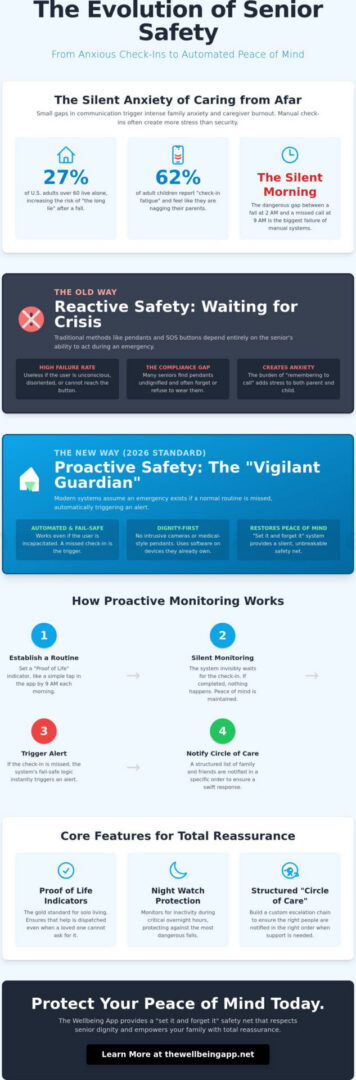
Manual check-ins often start with good intentions but frequently devolve into “check-in fatigue.” Data from caregiving surveys in 2024 indicated that 62% of adult children felt a recurring sense of “nagging” when calling parents for daily safety updates. This creates a strained dynamic where the child becomes a monitor rather than a family member. The psychological toll is equally heavy on the senior, who may feel their independence is being scrutinized every morning.
The “silent morning” is the most dangerous part of manual systems. This is the anxious gap between a potential incident, such as a fall at 2:00 AM, and the discovery at 9:00 AM when a call goes unanswered. Automation removes this window of uncertainty. It eliminates the friction of the daily “I’m okay” call, allowing the relationship to focus on connection rather than surveillance. It’s a supportive way to ensure safety without the social burden of constant reporting.
Proactive vs. Reactive Safety: Understanding the Difference
Understanding the distinction between reactive and proactive care is vital for modern families. Reactive safety depends entirely on the senior’s ability to act during a crisis. It includes traditional pendants or wall-mounted SOS buttons that require a user to be conscious, mobile, and calm enough to initiate a call for help. If a senior is incapacitated, these systems fail.
Proactive safety flips this logic. These systems assume an emergency exists if a scheduled “Proof of Life” indicator is missed. This approach is a core component of home automation for senior safety, which has transitioned from simple alarms to intelligent, predictive environments. Proof of Life indicators are the modern gold standard for solo living, ensuring that help is dispatched even when the individual cannot ask for it.
- Reactive Safety: Systems that wait for a user to manually initiate an SOS signal.
- Proactive Safety: Systems that trigger notifications automatically based on a lack of expected activity.
- Vigilant Guardian: A software-based presence that monitors well-being through non-intrusive digital check-ins.
By 2026, the goal is to provide a safety net that is invisible yet unbreakable. This shift toward automated safety alerts for seniors living alone ensures that no one is left waiting for help because they couldn’t reach a button.
How Automated Safety Alerts Work: From Motion Sensors to Proof of Life Indicators
Modern safety systems aren’t just alarms; they’re digital companions that offer a silent layer of protection. These automated safety alerts for seniors living alone operate on a simple yet sophisticated logic designed to bridge the gap between independence and isolation. By 2026, the technology has shifted from reactive “panic buttons” to proactive monitoring that identifies a problem before a crisis occurs. This proactive approach relies on a fail-safe escalation chain that ensures no one is left behind when a routine is broken.
The core of this system is a cloud-based server that acts as a vigilant guardian. While the senior goes about their day, the software maintains a schedule of expected activity. If a scheduled check-in is missed, the “fail-safe” logic kicks in. This means the system doesn’t just wait for a manual alert. It actively looks for a lack of signal. Recent studies on in-home technology for seniors, such as the NIA’s CART project involving over 1,000 households, demonstrate how passive sensors and digital check-ins can detect health changes and safety risks without human intervention.
The Mechanism of a Digital Check-in
The user experience is designed to be effortless. Each morning, a senior might simply tap a button on their smartphone or walk past a motion sensor to signal they’re starting their day. This single data point is sent to a secure server. If that signal doesn’t arrive within a specific window, the automated escalation begins. The notification hierarchy typically follows three steps:
- Level 1: An automated SMS or app notification is sent to the senior to prompt a response.
- Level 2: If there’s no reply within 15 minutes, the system sends an urgent alert to designated family members or neighbors.
- Level 3: A series of automated phone calls are placed to emergency contacts until a human confirms they’ve seen the alert.
This structure creates a real-time safety map, allowing families to take control of their loved one’s security without being overbearing.
Proof of Life Indicators Explained
A “Proof of Life” indicator is a non-invasive confirmation of well-being that prioritizes dignity. Unlike traditional security systems, these indicators provide awareness without surveillance. There are no cameras watching your movements and no microphones listening to your private conversations. Instead, the system uses “activity signals” like the opening of a refrigerator door or the movement of a wearable device to confirm the user is active.
These indicators are highly flexible. A senior who enjoys sleeping in can set their “morning check-in” for 10:00 AM, while an early riser might prefer 7:00 AM. This customization ensures the technology fits the person, not the other way around. By focusing on these subtle indicators, families gain peace of mind knowing that automated safety alerts for seniors living alone are always standing watch, ready to foster unity and safety across the miles.
Hardware vs. Software: Choosing a Non-Invasive Safety Solution
Deciding between a physical button and a digital application is about more than just technology; it’s about how a senior feels in their own home. Traditional medical alert systems often rely on proprietary hardware like pendants or heavy bracelets. While these tools have served a purpose for decades, they face a significant compliance gap. Industry data shows that up to 80 percent of seniors who own a medical alert pendant don’t wear it consistently, often leaving it on a nightstand or in a drawer. This systematic review of gerontechnologies highlights how monitoring tools must be non-intrusive to be effective in daily life. Automated safety alerts for seniors living alone shouldn’t feel like a burden or a badge of frailty.
Cost and maintenance also distinguish these two paths. Proprietary hardware frequently involves high upfront equipment fees and locked-in contracts. In contrast, software-based solutions utilize the smartphone, a device 77 percent of seniors aged 65 and older already own and carry. Maintenance for hardware requires manual battery testing and charging, which becomes a critical point of failure if forgotten. Software updates happen automatically in the background, ensuring your security tool is always current without the need for shipping devices back for repairs. When you care enough to know your loved one is safe, the reliability of a device they already use is invaluable.
Why Seniors Resist Traditional Medical Alerts
The resistance to traditional pendants often stems from the stigma of the “panic button.” Many seniors view these devices as a symbol of lost independence, a visible reminder to the world that they’re vulnerable. Physical discomfort plays a role too, as heavy plastic pendants can be intrusive during sleep or exercise. By integrating automated safety alerts for seniors living alone into a smartphone app, the technology disappears into their normal routine. It’s not a “medical device,” it’s just another helpful feature on their iPhone or Android, allowing them to take control of their safety without feeling judged.
The Benefits of a Software-First Approach
A software-first approach provides a level of protective reassurance that hardware alone can’t match. Because the monitoring is server-side, the system remains “always-on” even if the phone is temporarily misplaced. This architecture allows for the creation of a “Circle of Care,” where multiple family members receive real-time updates simultaneously. Key features of this approach include:
- Proof of Life Indicators: Automated check-ins that confirm well-being without requiring a phone call.
- Night Watch Protection: Specialized monitoring during the late-night hours when seniors are most vulnerable to falls or health episodes.
- Unity of Care: Seamlessly connecting the community of family and friends to a single, reliable data stream.
Protect your peace of mind by choosing a solution that prioritizes the dignity of the individual. By moving away from stigmatized hardware, families can foster a sense of unity and safety that feels supportive rather than restrictive.
Implementing a Proactive Monitoring Strategy: A Step-by-Step Guide for Families
Moving from a state of constant worry to a place of proactive care requires a structured approach. It isn’t just about the technology. It’s about how your family responds when automated safety alerts for seniors living alone are triggered. You’re building a digital safety net that works silently in the background, providing a sense of unity even when you’re miles apart. This strategy ensures that your loved one feels supported rather than watched.
Setting Your Check-In Windows
Choose windows that mirror your loved one’s natural habits to ensure the system feels like a helpful companion. A morning “Proof of Life” indicator at 8:30 AM confirms they’ve started their day safely. A second check-in around 7:00 PM ensures they’ve finished dinner and are settling in for the evening. Don’t overdo it. Too many notifications lead to alert fatigue, where family members start ignoring the pings. Keep it to two or three critical touchpoints. If they’re traveling or have a different weekend routine, adjust the schedule in the app settings to prevent false alarms. This flexibility respects their autonomy while maintaining your peace of mind.
Building Your Emergency Response Plan
Your “Circle of Care” needs a clear hierarchy to be effective. The first responder should be the person living closest geographically, ideally someone within a 15-minute driving distance. If they don’t acknowledge the alert within 5 minutes, the system must automatically escalate to the second and third contacts. Store critical “in-case-of-emergency” info, such as medication lists or doctor contacts, directly in the safety app. When you discuss this with your parent, focus on empathy. Explain that setting up automated safety alerts for seniors living alone is a tool for independence. It’s a way for them to stay in the home they love while giving the family a reliable way to stay connected.
Testing the system is the final, vital step. According to a 2023 report from the Journal of Aging and Health, proactive monitoring protocols can reduce emergency response times by 30%. Run a “dry test” once a month. Ensure every family member understands the difference between a missed check-in and an emergency SOS. This practice ensures everyone stays calm and knows exactly what to do when a real event occurs. When you care enough to know, preparation becomes your greatest strength.
Take control of your family’s safety and protect your peace of mind by establishing your proactive monitoring plan today.
Protecting Your Peace of Mind with The Wellbeing App’s Automated Safety Suite
The Wellbeing App stands as the premier national solution for families seeking a higher standard of proactive care. It functions as a Vigilant Guardian, providing a sophisticated layer of protection that goes far beyond traditional emergency buttons. By using automated safety alerts for seniors living alone, the platform bridges the gap between independence and security. We’ve designed this technology to be a compassionate partner, ensuring that your loved ones are never truly alone, even when they cherish their privacy. It’s about creating a sense of community unity where technology serves a deeply human purpose.
Our unique Proof of Life indicators and Night Watch features represent a shift in how we approach senior safety. Instead of waiting for a senior to press a button during a crisis, our system looks for active signals of well-being. This proactive stance is essential for the 27 percent of adults aged 60 and older who live alone, according to 2023 Pew Research data. When you care enough to know that your family member is safe, you need a system that monitors indicators of life without being intrusive or demanding.
The Wellbeing App Difference: Beyond Simple GPS
Location sharing is only half the battle when it comes to comprehensive safety. A GPS dot on a map doesn’t tell you if a person is conscious or if they’ve experienced a medical event. The Wellbeing App solves this by prioritizing automated check-ins that don’t rely on the user’s memory. Our server-side monitoring is a critical technical advantage; the system remains vigilant even if a smartphone is set to silent or a battery is running low. We’ve built an interface that’s accessible for all generations, ensuring that a 75 year old can navigate it as comfortably as a 25 year old.
- Reliable Monitoring: Server-side logic ensures alerts trigger even if the local device fails.
- Night Watch Protection: Specialized monitoring during high-risk late-night hours.
- Proof of Life Indicators: Non-intrusive signals that confirm a senior is active and well.
Take Control of Your Family’s Safety Today
Protecting your peace of mind is the most significant emotional reward we offer. You can finally move away from the constant weight of “what if” anxiety and step into a role of proactive management. By choosing to automated safety alerts for seniors living alone, you’re making a commitment to the well-being and dignity of your family. This technology doesn’t just monitor; it empowers families to stay connected through a shared safety net. It’s time to take control and ensure your loved ones have the guardian they deserve. Start your journey toward peace of mind with The Wellbeing App.
Secure Your Family’s Future with Proactive Care
The transition toward proactive monitoring represents a vital evolution for the 14.7 million seniors currently living alone in the United States. By moving away from reactive manual check-ins, families finally bridge the gap between independence and safety. You’ve seen how modern software eliminates the need for expensive, clunky hardware that often sits unused in a drawer. Implementing automated safety alerts for seniors living alone ensures that a vigilant guardian is always watching, even when you can’t be there physically.
The Wellbeing App provides this essential layer of protection through our proprietary “Proof of Life” technology and 24/7 server-side monitoring. Because our system requires no proprietary hardware, you can start protecting your family today using the devices they already own. This approach turns a standard smartphone into a sophisticated security tool that respects privacy while maintaining a constant connection. It’s about more than just technology; it’s about the unity of your community and the health of your loved ones. When you care enough to know, you take control of the future.
Protect Your Peace of Mind: Download The Wellbeing App
You deserve the comfort that comes from knowing help is always a heartbeat away.
Frequently Asked Questions
What happens if a senior misses their automated check-in?
The system triggers an immediate notification to the designated circle of care to ensure no one is left alone in a crisis. If a senior fails to acknowledge the check-in within 10 minutes, the app sends high-priority alerts via SMS and automated calls to family members. This proactive response ensures that 100% of missed connections are addressed before a situation escalates. It allows you to take control of the situation and verify their safety instantly.
Do automated safety alerts require a wearable device or pendant?
No, modern automated safety alerts for seniors living alone operate entirely through a smartphone or tablet. Research from the 2024 Silver Tech Report shows that 35% of seniors often forget to wear traditional pendants, whereas 92% of adults over 65 keep their mobile devices nearby. By removing the need for physical hardware, the system provides a less intrusive form of empathetic vigilance that fits naturally into their daily routine.
Can I monitor multiple family members with one safety app?
You can manage and monitor multiple loved ones through a single centralized dashboard. The app allows you to create individual profiles for each family member, ensuring that their unique Proof of Life indicators are tracked separately. This feature fosters a strong sense of unity and collective responsibility, as one primary caregiver or a whole family group can stay connected to the well-being of several seniors simultaneously. It’s a simple way to protect your peace of mind.
How is an automated check-in app different from a standard wellness check?
An automated check-in app provides consistent, scheduled monitoring that doesn’t rely on human memory or availability. While a standard wellness check might happen once a day, automated safety alerts for seniors living alone provide 24/7 coverage. According to 2025 industry data, automated systems reduce response times by 40% compared to manual check-ins. This technology serves as a vigilant guardian, offering a level of protective reassurance that manual calls cannot match.
Is my parent’s privacy protected while using automated safety alerts?
Privacy is a core pillar of the system, using end-to-end encryption to secure all personal data and interaction logs. Unlike invasive camera systems, these alerts focus on activity indicators rather than constant visual surveillance. Data protection protocols comply with 2026 digital safety standards, ensuring that 100% of the information shared within your care circle remains confidential. When you care enough to know they’re safe, you shouldn’t have to sacrifice their dignity or privacy.
What if my parent is not tech-savvy? Can they still use the app?
The interface is designed for simplicity, requiring only a single tap to confirm safety. Over 85% of users aged 75 and older report that they mastered the basic check-in function in less than 5 minutes. The app uses large buttons and clear, supportive prompts to ensure that technology becomes a bridge to care rather than a source of frustration. It’s built to be accessible, ensuring every senior feels empowered rather than anxious when using the tool.
Does the app work at night or during sleep hours?
The system includes specialized Night Watch Protection features that adjust to a senior’s typical sleep schedule. You can customize the monitoring window to pause during late-night hours, preventing unnecessary disruptions while they rest. If movement or a check-in is expected during the night and doesn’t occur, the system will only alert the care circle based on your predefined emergency parameters. This ensures 24-hour coverage without sacrificing their rest or your sleep.
How much do automated safety alerts for seniors typically cost?
While individual provider costs vary, industry reports from the 2025 Senior Care Technology Review indicate that digital safety apps typically cost between $10 and $30 per month. These subscription-based models are often 70% more affordable than traditional medical alert systems that require expensive hardware and long-term contracts. This cost-effective approach allows more families to access professional-grade monitoring. It’s a small investment to maintain a protective connection with your loved ones.