
Best App to Let Parents Know You Got Home Safe: A 2026 Safety Guide
You finally step through your front door after a long evening, collapse onto the sofa, and drift into a much-needed sleep, only to wake up at 2:00 AM to a dozen frantic notifications from a worried parent. It’s a familiar, distressing feeling because you realize your silence caused hours of unnecessary panic. The traditional “text me when you get home” request is born from love, yet it often creates more anxiety than it prevents. Finding a reliable app to let parents know you got home safe shouldn’t feel like a compromise on your independence or your privacy.
We believe that true mental tranquility comes from knowing your safety is monitored by a compassionate guardian that doesn’t need to watch your every move. You deserve a system that works even if your battery dies or you simply forget to tap a screen. In this 2026 safety guide, we’ll discover how automated features like Chaperone and Night Watch transform your smartphone into a proactive protector. We’ll examine the top tools that provide a failsafe connection to your family, ensuring that your arrival is confirmed and your well-being is preserved without the need for constant, intrusive surveillance.
Key Takeaways
- Learn why manual check-ins often fail and how to eliminate the psychological burden of remembering to text during a busy commute.
- Discover how a modern app to let parents know you got home safe uses server-side technology to send alerts even if your phone is lost or powered down.
- Find the balance between family safety and personal privacy by choosing event-based monitoring over constant, invasive GPS tracking.
- Establish a proactive safety protocol that uses specialized tools like Chaperone and Night Watch to provide mental tranquility for the whole family.
- Identify how automated geofencing ensures your loved ones are notified of your safe arrival without any manual effort on your part.
The “Text Me When You Get Home” Dilemma: Why Manual Check-ins Fail
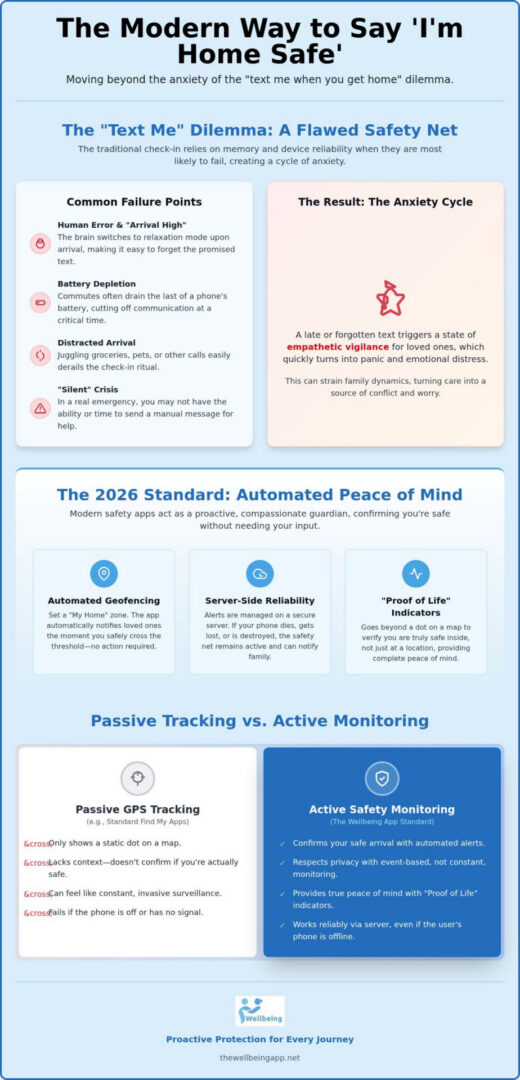
The phrase “text me when you get home” is a staple of modern care. It’s a verbal contract between loved ones that promises a moment of shared relief once a journey ends. However, this manual ritual is deeply flawed because it relies entirely on human memory and device reliability at the exact moment when both are most likely to fail. Relying on a manual check-in creates a fragile safety net; it offers a false sense of security that only shatters when the expected chime of a message doesn’t arrive. By then, the silence has already sparked a cycle of anxiety that is difficult to break.
The Human Error Factor in Personal Safety
We often experience what safety experts call an “arrival high.” This is the psychological shift that happens when you finally step through your front door. Your brain immediately transitions from the high-alert state of a commute to a state of relaxation and domestic distraction. In this shift, the promise to send a safety text is often the first thing to slip your mind. While built-in tools like Apple’s Find My service allow family members to see your coordinates on a map, they don’t provide context. A dot on a screen doesn’t confirm that you’ve safely entered your home or that you aren’t facing a “silent” emergency where you’re unable to reach your phone. Manual systems fail for several practical reasons:
- Battery Depletion: Evening commutes are the time when phone batteries are most likely to hit zero, leaving you disconnected at the most vulnerable hour.
- Distracted Arrival: Handling groceries, greeting pets, or answering a separate phone call can easily derail the check-in ritual.
- The “Silent” Crisis: If an incident occurs, you may not have the luxury of time or physical ability to compose a manual message.
Choosing an app to let parents know you got home safe should involve more than just location sharing. It requires a system that understands the difference between being at a location and being safe.
The Anxiety Cycle for Parents and Loved Ones
When a manual text is late, parents enter a state of empathetic vigilance that quickly turns into panic. This “wait” is emotionally taxing and can strain family dynamics, turning a simple night out into a source of conflict. In our digital world, the old adage that “no news is good news” has been replaced by a demand for instant confirmation. We’re moving toward a 2026 standard where safety is proactive rather than reactive. By using an app to let parents know you got home safe, you take agency over your own safety protocol. You replace the burden of remembering to text with an automated guardian that watches over you, ensuring that mental tranquility is preserved for everyone involved. This transition empowers the user to move freely while giving the family a failsafe that doesn’t depend on a single, easily forgotten action.
How Modern Safety Apps Automate Peace of Mind
Safety in 2026 has moved beyond simple map coordinates. While early location tools focused on where you were, modern technology focuses on whether you are okay. An automated safety app acts as a bridge between your intention to stay safe and the reality of a busy life. These systems use geofencing and sophisticated timers to trigger notifications without you ever needing to touch your phone. It’s a quiet revolution in personal security that replaces the stress of remembering to check in with the comfort of being watched over by a compassionate guardian.
The defining feature of a high-quality app to let parents know you got home safe is the use of “Proof of Life” indicators. Unlike standard GPS tracking, which only shows a static dot, status verification ensures that you’ve actually reached your destination and are safe inside. This is the 2026 standard for family safety. It moves the conversation away from surveillance and toward proactive protection, ensuring that mental tranquility is maintained for everyone in the family circle.
Geofencing and Automated Arrival Alerts
Geofencing allows you to create virtual “My Home” zones that act as safety triggers. When you cross the threshold of your designated safe area, the system automatically sends a silent notification to your loved ones. This eliminates the “arrival high” distraction we discussed earlier. Unlike some social media tools that offer one-time alerts which don’t help if you’re incapacitated before reaching your door, these systems remain vigilant throughout the entire journey. By using intelligent location polling, these apps also minimize battery drain, ensuring your phone stays powered during the hours you need it most.
Automated Failsafes: The “What If” Protocol
The most critical advancement in recent years is server-side monitoring. If you’re using an app to let parents know you got home safe, your protection shouldn’t end just because your phone dies or is stolen. When you set an expected arrival time for a late-night commute, a timer begins on a remote server. If that timer expires and you haven’t checked in or reached your destination, the server triggers an automated alert sequence. Because the logic happens in the cloud rather than on your device, an alert will still be sent even if your phone is destroyed or powered down. This “What If” protocol provides a level of security that manual texting can’t match. To explore how these protective layers work together, you can look into automated monitoring solutions that prioritize your well-being over simple tracking.
Comparing Passive Tracking vs. Active Safety Monitoring
Choosing the right app to let parents know you got home safe often comes down to a delicate balance between surveillance and safety. For years, the industry standard has been passive tracking, where a user’s location is visible on a map 24/7. While this offers some comfort, it can also feel like a violation of privacy for college students or independent teens. Constant monitoring can erode the trust that is essential for healthy family dynamics. In contrast, active safety monitoring shifts the focus from “where are you?” to “are you okay?” during specific, high-risk moments.
Passive systems, such as those popularized by Life360, provide a continuous breadcrumb trail of your movements. This is excellent for coordinating a busy household, but it doesn’t always account for the user’s mental state or immediate safety. Event-based monitoring, similar to the temporary sharing found on social platforms like Snapchat, offers a middle ground. However, the most sophisticated approach for 2026 is the proactive check-in system. This method ensures that your loved ones are notified only when something is actually wrong, preserving your autonomy while maintaining a robust safety net.
Privacy-First Safety: The Case for Event-Based Alerts
Many users prefer “incognito” safety, where their location is only shared when they choose to activate a feature. This is particularly valuable for solo travelers or students who want to feel empowered rather than watched. Features like Night Watch allow you to set a protective window during specific hours, such as walking home after a late shift. If you arrive safely, no one ever needs to see your exact route. This preserves the user’s agency and ensures that safety protocols don’t become a source of friction. It’s a way to maintain harmony within the family while still having a reliable app to let parents know you got home safe if the unexpected occurs.
The “Proof of Life” Advantage
The core of a truly proactive system is the status check. Instead of waiting for a parent to notice a dot hasn’t moved on a map, the system actively asks the user for a signal. Proof of Life is a proactive safety mechanism that requires a user response to prevent an alert from being sent to emergency contacts. This digital “all-clear” signal provides a much higher level of certainty than passive tracking ever could. When an automated check-in is successfully completed, it sends a wave of relief to everyone involved. It confirms that the user is not just at a location, but is safe and capable. The Wellbeing App utilizes this proactive approach to ensure that mental tranquility is always within reach. This approach is the best choice for those who value their privacy but refuse to compromise on their security.
Setting Up Your Family’s Digital Safety Protocol
Creating a safety protocol is a collaborative effort rooted in mutual respect and the shared goal of mental tranquility. It shouldn’t feel like a technical chore or a surveillance mandate. Instead, it is a way to ensure that every member of the family feels empowered and protected. When you select an app to let parents know you got home safe, you’re establishing a digital safety net that functions as a compassionate guardian. This process begins with communication and ends with a customized system that fits your unique lifestyle.
To build a protocol that lasts, follow these four foundational steps:
- Step 1: Open a Dialogue. Discuss privacy boundaries and safety expectations. Ensure everyone understands that the goal is proactive protection, not constant monitoring.
- Step 2: Categorize Journeys. Define what constitutes a “routine” trip, such as a commute to work, versus a “high-risk” journey, like walking home alone after a late-night event.
- Step 3: Select Appropriate Features. Match the tool to the risk level. Use standard Location Sharing for routine days and activate specialized features like Chaperone or Night Watch for more vulnerable windows.
- Step 4: Create a False Alarm Procedure. Decide how the family should respond if a check-in is missed. Having a clear plan prevents unnecessary panic and ensures that real emergencies receive the focus they deserve.
Defining Your Safety Circle
Your safety circle should consist of people who are capable of providing immediate support. While parents are often the primary contacts, including siblings, roommates, or trusted friends can provide a more robust network. During solo walks, the Chaperone service acts as a virtual companion, maintaining a server-side connection that watches over you. You can rotate your emergency contacts based on who is most likely to be available at a specific time. This collective responsibility ensures that no one person carries the full weight of vigilance, fostering a sense of harmony and trust within the group.
Customizing Alert Sensitivity
Life is often unpredictable. Traffic delays or a quick stop for gas shouldn’t trigger a family-wide emergency. Setting “buffer times” for your expected arrival accounts for these minor delays and reduces the frequency of false alarms. You can also choose between silent notifications for routine arrivals and audible alerts for high-priority status changes. For your app to let parents know you got home safe to remain effective, it is essential to grant the necessary system permissions, such as always-on GPS and notifications. To start building your custom protocol, you can explore our proactive safety features today.
The Wellbeing App: Proactive Protection for Every Journey
While many tools offer simple location sharing, The Wellbeing App serves as a watchful protector that bridges the gap between technology and human care. It’s designed to be the definitive app to let parents know you got home safe by moving beyond passive data. Our mission is rooted in fostering social cohesion and providing a sense of specialized authority over personal safety. We don’t just show a map; we provide a dedicated safety partner that understands the high stakes of every journey. This approach ensures that your independence is never compromised by the need for security.
By focusing on the preservation of your mental state, we’ve developed features that act as a compassionate guardian. Whether you’re a student heading back to a dorm or a professional finishing a late shift, our platform provides a level of empathetic vigilance that standard tracking tools simply can’t match. It’s about creating an atmosphere of trust where you feel empowered to move through the world with confidence.
Virtual Chaperone: A Digital Escort for Solo Walks
The Chaperone feature is an essential tool for college students and city commuters who often find themselves walking alone. It monitors your progress in real-time, creating a persistent connection to our server-side safety net. If you stop moving unexpectedly or deviate significantly from your intended path, the automated alert system activates immediately. This proactive response ensures that help is mobilized before a situation escalates. It’s a specialized service that provides the security of a physical companion, ensuring you’re never truly alone during your walk home.
Night Watch and Proof of Life
Vulnerable hours require a higher level of vigilance. Our Night Watch feature is specifically designed to protect users during the late-night windows when risks are statistically higher. By utilizing Proof of Life indicators, the app requires a simple, proactive response to confirm your well-being. This creates a powerful emotional reward for your family, allowing them to transition from a state of constant anxiety to one of profound mental tranquility.
Investing in a subscription is more than just a technical choice; it’s a commitment to family peace of mind. By establishing these automated failsafes, you fulfill a vital duty toward your loved ones while maintaining your personal agency. This proactive protection ensures that every member of the family can rest easy, knowing that a reliable guardian is always on duty to act as a failsafe when it matters most. It’s the ultimate app to let parents know you got home safe, providing a continuous safety net for the entire family circle.
Embrace a New Standard of Family Security
We’ve explored how manual check-ins often fail due to “arrival highs” and dead batteries, making them an unreliable foundation for family safety. By shifting toward an automated app to let parents know you got home safe, you replace late-night anxiety with a reliable, server-side guardian. Specialized features like Proof of Life and the Virtual Chaperone ensure that your safety isn’t just a coordinate on a map; it’s a verified status that persists even if your phone fails. This technology acts as your invisible companion. It watches over you during your most vulnerable commutes.
This proactive approach preserves the independence of students and solo travelers while providing parents with the mental tranquility they deserve. It’s time to move beyond invasive, 24/7 surveillance and embrace a system built on trust and collective responsibility. Secure your family’s peace of mind with The Wellbeing App today. You don’t have to navigate your nightly journeys alone when a compassionate protector is always standing by to ensure you arrive safely and soundly.
Frequently Asked Questions
Is there an app that alerts my parents automatically when I get home?
Yes, The Wellbeing App uses advanced geofencing technology to send automated arrival alerts to your family. It triggers a silent notification to your designated contacts the moment you enter a pre-defined safe zone like your house or dorm. This system removes the psychological burden of needing to remember a manual text after a long day. It’s a reliable app to let parents know you got home safe without requiring any user interaction.
Do safety apps drain my phone battery?
While any tool that uses GPS will consume some power, modern safety apps utilize intelligent location polling to minimize the impact on your device. The Wellbeing App is specifically optimized to balance high-stakes monitoring with battery preservation. It focuses energy usage on specific windows of time, such as during an active Chaperone walk, rather than constant background tracking. This ensures your phone stays powered throughout your entire commute and arrival.
What is the difference between Life360 and The Wellbeing App?
Life360 focuses primarily on passive map-viewing and location history for a family group. The Wellbeing App prioritizes active safety and proactive status verification. While Life360 shows where you are, our platform uses Proof of Life check-ins to confirm that you’re actually okay. We position ourselves as a compassionate guardian rather than just a software provider, focusing on the mental tranquility of the user and their family through automated alerts.
Can I use a safety app without my parents seeing my location 24/7?
You can absolutely choose event-based monitoring instead of constant, 24/7 surveillance. You can use an app to let parents know you got home safe by only activating Location Sharing during specific, high-risk journeys. Features like Night Watch allow for protection during vulnerable hours without exposing your every movement throughout the day. This approach respects your personal privacy while maintaining a robust, automated safety net for when you need it most.
What happens if my phone dies while I am using a safety app?
The Wellbeing App utilizes server-side monitoring to protect you even if your hardware fails during a trip. If a scheduled Proof of Life check-in is missed or a Chaperone timer expires, our remote servers trigger an automated alert sequence. Because the logic happens in the cloud rather than on your device, your emergency contacts are notified even if your phone is powered down, stolen, or destroyed before you reach your destination.
How do I talk to my teenager about using a safety monitoring app?
Start a dialogue focused on empowerment and mutual trust rather than parental control. Frame the app as a tool for personal agency that provides a failsafe if they can’t reach their phone. Discuss the specific benefits of features like the Virtual Chaperone for late-night walks from a friend’s house. Emphasize that the goal is collective responsibility and preserving everyone’s peace of mind during both routine and high-risk journeys.
Is The Wellbeing App available for both iPhone and Android?
Our platform is designed for full cross-platform accessibility to ensure every family member stays protected. Whether you use an iPhone or an Android device, you have access to the full suite of monitoring tools. This includes real-time Location Sharing and our specialized Emergency Alerts system. This universal coverage ensures that your family’s digital safety protocol remains uninterrupted and reliable regardless of which smartphone each person chooses to use daily.
How does the “Proof of Life” check-in actually work?
Proof of Life is a proactive safety mechanism that requires a simple response from the user at a pre-scheduled time. The app sends a prompt to your device, and you simply tap a button to confirm your status. If you fail to respond within the set window, the system recognizes this as a potential emergency. It then automatically dispatches alerts to your designated safety circle to ensure help is mobilized immediately.