
Best Safety Apps for Walking Alone at Night (2026)
If an emergency unfolds on your evening commute, you won’t have time to unlock a screen, launch software, and hold down a manual distress button. Real protection shouldn’t depend on frantic reflexes during high-stress moments, which is why finding the right safety app for walking alone at night is about proactive reassurance rather than reactive panic. You already know the familiar tension of clutching keys between your fingers, just as you know the frustration of invasive trackers that drain your battery and monitor your every move.
True peace of mind comes from quiet, automated vigilance that works reliably in the background. In this guide, you’ll discover how modern personal safety apps protect solo night walks through automated check-ins, chaperone tools, and discreet alerts that preserve your privacy while keeping loved ones accurately informed. We examine the leading options for 2026 so you can choose a dependable digital guardian and reclaim your evening walks with calm confidence.
Key Takeaways
- Understand why server-side automated check-ins provide superior protection compared to manual panic buttons that require unlocking your screen during sudden incidents.
- Learn the essential criteria for selecting a reliable safety app for walking alone at night, focusing on dynamic countdown timers, discreet alerts, and battery conservation.
- Discover the critical differences between default smartphone tracking and specialized pedestrian platforms, especially regarding background refresh rates and location precision.
- Master the pre-walk checklist to properly configure your device permissions and assign clear, supportive roles to your emergency circle.
- See how purposeful chaperone technology transforms nighttime commutes into calm, confident journeys by keeping a watchful presence at your side.
Why Safety Apps Are Essential for Walking Alone at Night
Solo evening walks shouldn’t feel like an exercise in sustained stress. While traditional safety advice tells you to stay alert, constant hypervigilance is exhausting and unsustainable. Choosing a dedicated safety app for walking alone at night transforms your device into an empathetic guardian rather than a reactive megaphone. Modern platforms serve as proactive personal monitoring systems, replacing the anxiety of solitude with steady, digital companionship.
Standard phone calls often fall short during evening transit across quiet streets or dimly lit corridors. Pretending to talk on the phone distracts your situational awareness, while ordinary text messages fail to provide dynamic accountability. As outlined in modern mobile security discussions, a contemporary personal safety app operates quietly in the background. It respects your personal space while ensuring trusted contacts remain informed, allowing you to move through your community with tranquil confidence.
The Reality of Solo Night Walking Risks
Navigating suburban sidewalks or deserted commercial districts involves distinct physical risks. Low-visibility areas, poorly lit crossings, and sudden isolation create moments where immediate help is out of reach. In transit emergencies, delayed communication is often the primary compounding factor. When no one realizes you have stopped moving or drifted off course, valuable minutes slip away. Digital guardianship eliminates this silent gap by maintaining active awareness throughout your entire journey.
Moving Beyond Reactive 911 Dialing
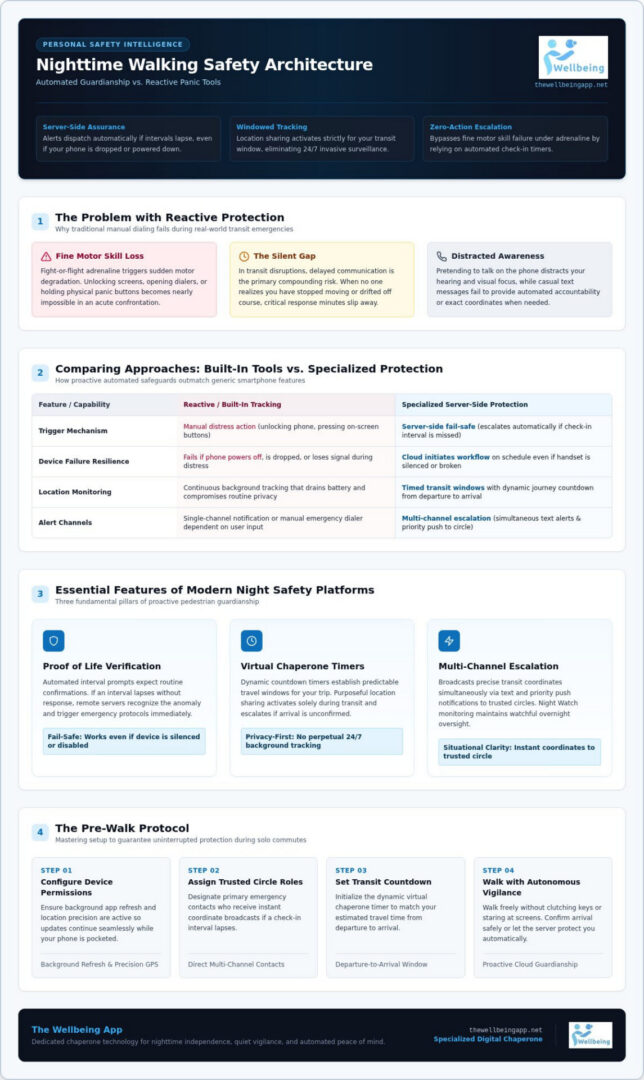
Relying on a manual phone call assumes you have the time, composure, and physical freedom to react. In reality, sudden fight-or-flight adrenaline triggers severe fine motor skill decline. Unlocking a screen, finding a dialer, or trying to explain your location becomes nearly impossible during a sudden confrontation. An automated safety app for walking alone at night bypasses these physical hurdles entirely. Pre-programmed parameters and server-side check-ins initiate emergency workflows on your behalf, guaranteeing that protection never falters even if you cannot touch your screen.
Key Features to Look for in a Nighttime Walking Safety App
Navigating evening routes safely requires far more than a simple panic button on a glass screen. While campus and civic guidelines emphasize basic rules for personal safety like staying attentive to surroundings, modern software must act as a reliable partner when unexpected obstacles arise. The most effective safety app for walking alone at night integrates intelligent safeguards that function effortlessly without demanding your constant, focused attention.
Automated Check-Ins and Proof of Life Verification
Most basic tracking tools fail in moments when you cannot physically reach your handset. Prioritize platforms offering automated interval prompts and server-side Proof of Life verification. Instead of relying on you to launch software during distress, the cloud architecture expects routine check-in confirmations during your journey. If an interval lapses without confirmation, the remote server recognizes the anomaly immediately. This fail-safe structure dispatches alerts even if your device is silenced, dropped, or powered down.
Virtual Chaperone and Timed Route Tracking
A capable safety app for walking alone at night should provide structured journey monitoring. Dynamic Chaperone countdown timers establish predictable travel windows for your trip from departure to arrival. Rather than subjecting you to invasive continuous tracking, purposeful Location Sharing activates specifically during your transit window. If you don’t confirm your safe arrival before the timer expires, the platform initiates an automated escalation pathway to ensure you are never left unaccounted for on quiet sidewalks.
Emergency Alert Escalation Protocols
When an unexpected disruption occurs, multi-channel notification paths ensure help is summoned without delay. Comprehensive Emergency Alerts broadcast precise coordinates simultaneously via text and priority push notifications to your trusted circle. For broader protection beyond active transit, dedicated Night Watch monitoring maintains watchful overnight oversight. Setting up specialized digital chaperone tools gives your loved ones immediate situational clarity while protecting your autonomy and peace of mind.
Comparing Night Safety Apps: Built-In Tools vs. Specialized Protection
Many pedestrians assume built-in smartphone utilities offer adequate cover for evening travel. While activating native operating system tools feels effortless, passive dot-watching cannot replace dedicated personal security. Default tools often broadcast continuous coordinates without situational context, draining battery reserves and forcing friends to stare at maps. A specialized safety app for walking alone at night bridges this gap by replacing invasive, all-day tracking with focused, journey-specific guardianship.
Native OS Tools vs. Dedicated Security Platforms
Built-in utilities like Apple Find My or Google Location Sharing excel at locating misplaced keys or coordinating casual weekend meetups. However, they place an unfair operational burden on your loved ones. For native tools to detect trouble, someone must actively monitor a glowing dot for unexpected deviations. If your movement halts or you take an unplanned detour, native utilities trigger no automated inquiries. Dedicated pedestrian platforms operate with active vigilance. They conserve device battery through dynamic background refresh rates, preserve everyday privacy with trip-specific monitoring windows, and intervene with automated alerts when scheduled check-ins lapse.
Hardware Panic Buttons vs. Cloud-Connected Software
Physical panic accessories, personal alarms, and Bluetooth clickers present distinct practical challenges. Peripheral fobs run on small batteries that deplete without warning, cause frustrating false alarms inside pockets, or end up left behind on the counter. A safety tool left at home offers zero protection on an unlit sidewalk. Unified cloud platforms utilize the smartphone you already carry and keep charged throughout the day. By relying on server-side redundancy rather than separate keychains, a dedicated safety app for walking alone at night provides reliable protection without requiring extra hardware or complicating your daily routine.
How to Set Up Your Safety App Before Walking Alone at Night
A safety app for walking alone at night is only as reliable as your pre-departure setup. Waiting until you are on a poorly lit corner to launch your tools creates needless distraction when your eyes should be on the path ahead. Taking two minutes before leaving your office, gym, or restaurant establishes an uninterrupted layer of digital companionship for your entire commute.
Follow this practical preparation routine before stepping outdoors:
- Audit connection health: Send a quick test check-in while still connected to reliable Wi-Fi or cellular networks.
- Calibrate alert triggers: Choose silent notifications if you prefer subtle verification, or audible chimes if you want noticeable reassurance along quiet streets.
- Lock in your duration: Set realistic walking timers with a modest two-minute buffer to account for crosswalks or minor delays.
Configuring Device Permissions for Unfailing Performance
Modern mobile operating systems aggressively suspend background tasks to conserve battery. To ensure continuous communication, adjust your location access to “Always Allow” rather than “While Using App.” Disable power-saving modes that throttle network refreshing, and grant critical alert permissions so emergency notifications bypass system-level “Do Not Disturb” profiles during unexpected delays.
Organizing Your Trusted Emergency Circle
Technology coordinates the flow of information, but community provides the response. Assemble a compact circle of two or three dependable individuals who maintain active phone availability during your typical transit hours. Brief them ahead of time so they understand precisely what automated notifications mean and know which steps to take if a check-in lapses. To establish proactive guardianship before your next evening walk, explore The Wellbeing App and configure your personal protection circle today.
The Wellbeing App: Your Dedicated Chaperone for Nighttime Independence
Personal safety is fundamentally about protecting your mental tranquility and reclaiming your freedom to move through the world without persistent unease. Designed as a compassionate digital guardian for solo pedestrians nationwide, The Wellbeing App moves beyond reactive panic buttons to offer proactive reassurance. Rather than imposing intrusive surveillance or demanding constant screen taps, it functions as an attentive companion for your evening routines. Whether you are returning from late transit or heading out for an evening jog, this safety app for walking alone at night keeps you connected to those who care most.
Proactive Protection Through Chaperone and Night Watch
At the heart of the platform is the Chaperone feature, a structured travel companion that safeguards your walk using responsive countdown timers. When you set out, Chaperone holds space for your designated transit window. If your safe arrival isn’t confirmed before the timer lapses, server-side systems immediately escalate into action, notifying designated contacts with precise Location Sharing details and automated Emergency Alerts. For extended peace of mind after hours, the dedicated Night Watch feature delivers continuous overnight monitoring. Combined with periodic Proof of Life check-in confirmations, the system verifies your well-being quietly so your hands stay free and your attention remains focused on the sidewalk ahead.
Empowering Your Everyday Personal Independence
True security shouldn’t require surrendering your personal autonomy or making anxious, hurried phone calls during every walk home. By shifting the burden of vigilance from your shoulders to intelligent server-side systems, you preserve both privacy and mutual reassurance with your family. Dependable digital guardianship operates seamlessly across the country through accessible recurring subscriptions, ensuring reliable coverage wherever your path leads. To enjoy calm confidence on your evening commute, explore The Wellbeing App and discover how proactive digital care restores independence to every step.
Step Out with Confidence on Every Evening Journey
Evening transit should never feel like a test of nerves. Selecting the right safety app for walking alone at night means trading the exhaustion of hypervigilance for quiet, dependable reassurance. By replacing reactive panic buttons with automated check-ins, you ensure that protection remains active even if your phone disconnects or drops out of reach. Specialized Chaperone countdown timers and dedicated Night Watch monitoring deliver continuous family reassurance without compromising your personal privacy or draining your battery.
Personal safety isn’t about letting fear dictate your routine; it’s about moving through the world with calm self-reliance and the steady backing of those who love you. As a trusted nationwide subscription service, modern digital guardianship keeps you anchored without getting in your way. When you’re ready to experience true peace of mind on every sidewalk, start your proactive safety monitoring with The Wellbeing App today.
Frequently Asked Questions
What is the best safety app for walking alone at night?
The best safety app for walking alone at night is one that provides proactive, server-side monitoring rather than relying solely on manual panic triggers. The Wellbeing App excels by pairing dynamic Chaperone countdown timers with scheduled Proof of Life check-ins. If you don’t confirm your arrival, the system alerts your designated emergency contacts with precise coordinates, ensuring complete peace of mind without requiring you to constantly stare at your screen.
Can a safety app alert my emergency contacts if my phone battery dies?
Yes, if the platform relies on server-side tracking rather than device-only software. When you initiate a timed transit session, the cloud server expects a safe check-in by a specific time. If your battery drains, network connectivity drops, or the phone turns off, the server detects the missing confirmation. It then automatically dispatches Emergency Alerts with your last known location to your trusted circle, ensuring you are never left unaccounted for during unexpected outages.
How do virtual chaperone features work during evening commutes?
Virtual chaperone tools establish a structured safety window before you depart. You enter an estimated transit duration based on your intended route. As you travel, the app quietly monitors the countdown in the background. If you reach your destination safely, you simply tap to conclude the session. If the timer lapses without confirmation, the software immediately escalates the alert to your emergency contacts, sharing your path and current status without delay.
Do personal safety apps call the police automatically during an alert?
Most safety applications prioritize notifying your personal emergency circle rather than immediately contacting local emergency dispatchers. This direct circle approach prevents disruptive false alarms from minor transit delays while keeping trusted family members informed. Platforms like The Wellbeing App deliver instant multi-channel notifications via text and phone alerts to designated guardians, allowing them to coordinate quick assistance or contact local emergency services if genuine danger arises.
Will running a safety tracking app drain my phone battery on long walks?
A purpose-built safety app for walking alone at night is engineered for battery efficiency, unlike standard mapping platforms that run heavy display graphics. Modern safety software utilizes optimized background refresh protocols, requesting GPS coordinates only at scheduled check-in intervals or when geofence thresholds change. This trip-specific monitoring ensures your phone retains ample power throughout your evening commute while maintaining an active, unbroken link to your protective circle.
What happens if I forget to turn off my walking safety timer?
If a timer expires before you disable it, modern safety systems initiate a brief grace period before escalating notifications. The app issues a prominent audio and visual warning on your device, giving you a chance to enter your PIN or dismiss the alert. If you don’t respond within that window, the server recognizes the silence as an emergency, instantly notifying your contacts with your coordinates and active alert status.
Can safety apps send distress alerts without unlocking the phone screen?
Yes, advanced personal security software bypasses lock screens through automated fail-safes and remote server protocols. Instead of requiring you to unlock your screen during sudden confrontations, server-side timers automatically dispatch alerts if you fail to check in. Additionally, many platforms integrate with lock-screen widgets or physical side-button press combinations, enabling discreet distress activation without exposing your phone display to passersby or struggling with complex touch gestures.