
Elderly Parent Not Answering? A Peace of Mind Protocol
It starts with the third unanswered call, a silent house, and a heart rate that won’t stop climbing. You’ve tried the landline and the cell phone, but the silence on the other end feels heavy with “what-ifs.” Knowing exactly what to do when elderly parent not answering phone is the difference between a controlled response and a paralyzing panic attack. We understand that this fear isn’t just about a missed connection; it’s about the deep responsibility you feel for someone who once looked after you.
You shouldn’t have to live in a state of constant anxiety that drains your mental tranquility. While it’s natural to feel guilt for not being physically present, relying on manual check-ins is an outdated safety model that often fails during a real crisis. This article provides a structured emergency protocol for the current silence and a long-term strategy to ensure their safety without being intrusive. We will explore how to move from reactive worry to proactive harmony using a “Virtual Chaperone” approach. You’ll learn how to implement automated indicators like Proof of Life to ensure you’re always connected, even when the phone stays on the hook. By the end, you’ll have a clear path to restore your peace of mind and protect theirs.
Key Takeaways
- Establish a structured 60-minute response plan that varies communication channels and respects their daily routine to prevent immediate panic.
- Gain clarity on what to do when elderly parent not answering phone by identifying common technical or sensory hurdles before deciding to escalate.
- Define your “Point of No Return” to distinguish between a gentle family wellness check and the necessity of a formal police welfare visit.
- Shift from a stressful reactive model to proactive safety monitoring to end the cycle of caregiver burnout and parental resentment.
- Explore how automated features like Proof of Life act as a virtual guardian, protecting your mental tranquility while honoring your loved one’s agency.
Immediate Response Protocol: The First 60 Minutes
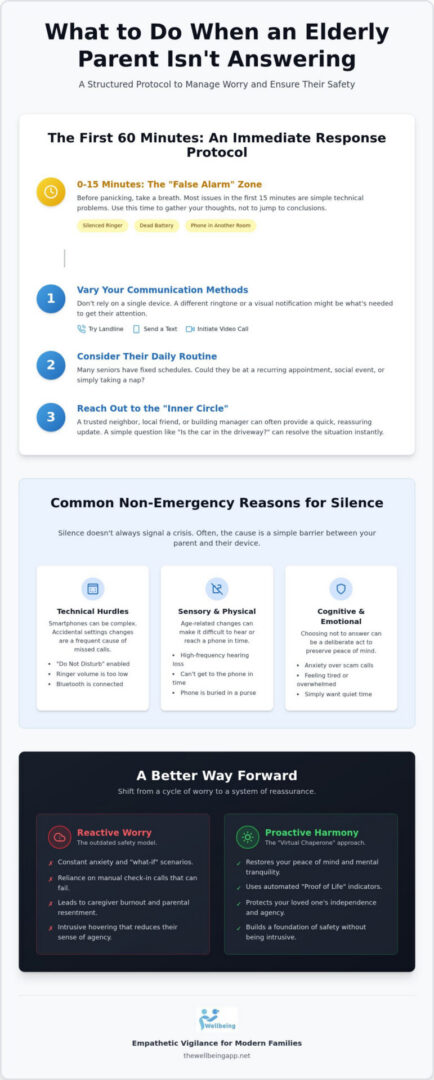
When the phone rings out for the third time, your mind often jumps to the worst case scenario. This is why a structured protocol is essential. Knowing what to do when elderly parent not answering phone involves a series of escalating checks designed to preserve your mental tranquility while ensuring their safety. Instead of letting fear dictate your actions, follow this rhythmic escalation path during the first hour of silence.
- Step 1: Vary your communication methods. Don’t rely solely on a cell phone that might be buried in a coat pocket. Try the landline, send a text, or initiate a FaceTime call. Sometimes the different frequency or visual cue of a tablet ringing is enough to catch their attention.
- Step 2: Check the time and routine. Is it currently nap time, or is their favorite game show on? Many seniors stick to rigid schedules. If it’s a Tuesday morning, they might be at a recurring doctor appointment or a community center event you’ve forgotten about.
- Step 3: Reach out to the Inner Circle. Contact a trusted neighbor, a local friend, or building management. A quick “Is the car in the driveway?” can resolve a crisis in seconds.
- Step 4: Review recent activity. If you have shared location data or smart home logs, check for recent movement. Seeing that the front door opened an hour ago provides immediate reassurance that they are active.
The 15-Minute Rule: De-escalating Your Own Anxiety
The first fifteen minutes of silence are the most prone to panic-driven decisions. This is the “False Alarm” zone where most issues are caused by silenced ringers, dead batteries, or a phone left in another room. Take a breath and wait. Use this time to gather your thoughts rather than calling emergency services immediately. Identifying these technical frictions early prevents unnecessary stress for both you and your loved one. Remember that your goal is empathetic vigilance, not intrusive hovering.
Contacting Local “First Responders” (Non-Police)
Before you decide to request a police welfare check, lean on your established neighbor network. A discreet door knock from a friend next door is much less jarring than a patrol car appearing in the driveway. If they live in a managed building, the superintendent or HOA contact can often perform a quick check of the common areas. These community connections act as a vital bridge, offering a compassionate eye when you cannot be there in person. Building these relationships before an emergency occurs creates a foundation of collective responsibility and safety.
Common Reasons Why Elderly Parents Stop Answering the Phone
Silence doesn’t always signal a fall or a medical crisis. Often, it’s a result of mundane life events or technology acting as a barrier rather than a bridge. While your first instinct might be to worry, understanding the common hurdles seniors face can help you refine your approach. Knowing what to do when elderly parent not answering phone starts with troubleshooting these everyday obstacles before escalating to a full emergency response.
Sensory decline is a primary culprit. As we age, high-frequency sounds often become harder to distinguish. If a phone is in another room or buried in a purse, the ringer might simply be inaudible to them. Physical limitations also play a significant role. A senior might hear the phone perfectly well but cannot physically reach it before the fourth ring sends the caller to voicemail. This delay often leads to missed connections that fuel unnecessary anxiety for family members.
Cognitive fatigue and emotional factors are equally important. Scam call anxiety is at an all-time high, with many seniors being coached to never answer numbers they don’t recognize. If they’re feeling overwhelmed, tired, or simply deep in a book, they may choose to ignore the device entirely. This is why having a more consistent, automated way to confirm well-being, such as proactive safety monitoring, is so beneficial for your mental tranquility.
The “Do Not Disturb” Trap
Modern smartphones are powerful but notoriously complex. It’s incredibly easy for a senior to accidentally swipe the screen and toggle “Do Not Disturb” or a “Sleep” focus mode without realizing it. When this happens, the phone won’t ring, and every call goes straight to voicemail. You can mitigate this by configuring an “Emergency Bypass” for your specific contact number in their phone settings. This ensures your calls always ring through, even when the rest of the world is silenced. It’s a simple technical fix that provides immediate protective reassurance.
Hearing Loss and Ringer Volume
Standard ringtones often rely on high pitches that are difficult for those with age-related hearing loss to detect. Switching their device to a low-frequency, high-decibel ringer can make a massive difference in audibility. You should also consider enabling visual alerts. Most modern phones can be set to flash the camera light when a call comes in. This provides a clear visual indicator that supplements the auditory ringer, ensuring they don’t miss a call even if they are in a noisy environment or another room. These small adjustments help maintain harmony and connection without the frustration of missed calls.
When to Escalate: Conducting a Compassionate Wellness Check
The moment you decide to escalate is often the most difficult part of the entire process. It’s the point where internal worry turns into external action. Identifying this “Point of No Return” is a personal decision, but it usually occurs when you have exhausted all the logical explanations and communication channels discussed in previous sections. If your parent has a history of falls or medical instability, your window for waiting might be shorter. For others, it might be a missed evening call that stretches into the next morning. Knowing what to do when elderly parent not answering phone involves a delicate balance between respecting their independence and fulfilling your duty to ensure their well-being.
A family wellness check is often the first, gentlest step. This involves a neighbor or local friend laying eyes on the residence or the person. A police wellness check is a formal request for local authorities to visit the home. While it sounds intense, officers are trained to handle these situations with care. To make this process smoother, keep a “Safety File” ready for such moments. This file should include their full medical history, a list of current medications, and the location of a hidden key or the code to a smart lock. Providing this information to dispatchers immediately can prevent a forced entry and reduce the overall stress of the encounter.
Calling the Non-Emergency Line vs. 911
If there is no immediate evidence of a life-threatening emergency, you should call the local police non-emergency number. This tells the dispatcher that you need a safety check rather than a full, siren-blaring response. Save 911 for situations where you suspect a fire, a medical crisis, or if you can see them through a window and they aren’t responding. When you request a police welfare check, officers will knock, announce themselves, and attempt to make contact. If you’ve shared a door code or key location, they can enter safely without damaging the property. This structured approach preserves both the home and your parent’s dignity while providing you with the necessary answers.
Minimizing the “Intrusion Trauma”
Having the police show up at the door can be deeply rattling for a senior. It’s important to explain the check afterward without sounding accusatory or frustrated. Frame the event as a direct result of your love and concern rather than their “failure” to answer the phone. Use this event as a catalyst for a productive conversation about future safety. It’s the perfect time to discuss shifting from a reactive model to a proactive one. Instead of waiting for the next silence to trigger a police visit, you can introduce monitoring indicators that offer a consistent proof of life. This turns a frightening experience into a moment of empowerment, allowing you to protect your mental tranquility while honoring their agency.
Beyond the Phone Call: Shifting to Proactive Safety Monitoring
The manual cycle of calling and waiting is the primary source of “missed call panic.” When you are stuck wondering what to do when elderly parent not answering phone, you’re operating in a reactive safety model. This approach relies on a crisis occurring before a response begins. Shifting to a proactive model changes the dynamic entirely. Instead of waiting for silence to trigger fear, you use automated indicators that provide consistent proof of life throughout the day. This transition preserves your mental tranquility and ensures that safety is a constant state, not just a response to a ringing phone.
Relying on manual check-ins often leads to a cycle of caregiver burnout and parental resentment. For the adult child, the responsibility feels like a heavy weight that never lifts. For the parent, the frequent “just checking in” calls can feel like an intrusion on their independence or a lack of trust in their abilities. Technology allows us to step back from this dynamic. Automated alerts can inform you that they’ve started their day or completed a routine check-in, allowing your personal conversations to focus on connection rather than surveillance.
Why Medical Alert Buttons Often Fail
Traditional medical alert systems often fail due to the human element. Many seniors feel a significant stigma attached to wearing a plastic pendant or bracelet, leading them to leave the device on a nightstand or in a drawer. Even if they are willing to wear it, a “reach” problem exists. If a fall occurs in the bathroom while the button is in the bedroom, it provides no protection. This is why app-based monitoring is becoming the preferred choice for active seniors. It utilizes a device they already carry and value, integrating safety into their daily life without the visual marker of frailty.
The Benefits of Automated Check-Ins
Server-side monitoring is a sophisticated way to ensure safety without requiring a manual button press. Features like Night Watch provide a protective layer during the most vulnerable hours, automatically triggering an alert if a scheduled check-in is missed. This ensures that silence is detected by the system before it ever reaches your awareness, allowing for a faster and more structured response. By implementing automated safety monitoring, you fulfill your sense of duty toward your loved ones while empowering them to live with agency. It transforms safety from a shared burden into a shared effort, rooted in harmony and trust.
The Wellbeing App: Your Partner in Empathetic Vigilance
The persistent stress of wondering what to do when elderly parent not answering phone shouldn’t be your daily reality. While earlier sections of this guide provided an escalation protocol for moments of silence, the ultimate goal is to prevent those moments from causing panic in the first place. The Wellbeing App acts as a compassionate guardian, bridging the gap between your need for reassurance and your parent’s need for autonomy. It replaces the heavy weight of manual monitoring with a sophisticated, server-side system that watches over your loved ones with empathetic vigilance.
By moving safety into the background of daily life, we foster an environment of trust rather than one of constant questioning. This technology isn’t just about alerts; it’s about the preservation of your mental state and the restoration of harmony within the family. When the burden of “checking in” is shared with a reliable digital partner, you can focus on the quality of your relationship rather than the logistics of their safety. This shift from reactive worry to proactive harmony is the foundation of modern caregiving.
Proof of Life: The End of the “Missed Call” Anxiety
The Proof of Life feature is specifically designed to eliminate the “missed call panic” that haunts so many families. Unlike manual check-ins that can feel like nagging, this feature provides automated indicators that your parent is active and safe. Because the monitoring is server-side, it continues to function even if your own phone is silenced or you are asleep. If a scheduled check-in is missed, the app immediately sends automated alerts to the entire designated family network. This collective responsibility ensures that no single person carries the full weight of monitoring, and no silence goes unnoticed for long.
A Compassionate Guardian in Your Pocket
For seniors who remain active and mobile, the Chaperone service offers virtual protection while they are out and about. It works in tandem with real-time location sharing and emergency alerts to provide a comprehensive safety net that follows them wherever they go. For those living alone, Night Watch offers specialized monitoring during the most vulnerable late-night hours. These features provide a sense of specialized authority and protection without the need for intrusive physical hardware.
Setting up the service is simple and requires no proprietary devices or complex installations. The app-based model uses the technology they already own, making it a non-intrusive addition to their daily routine. It’s an instrument of empowerment that allows you to fulfill your sense of duty while honoring their personal agency. Protect your peace of mind with The Wellbeing App today.
Restoring Harmony and Collective Safety
Managing the silence of an unanswered call is one of the most taxing experiences a family member can face. By establishing a structured 60-minute protocol and understanding the common sensory or technical hurdles seniors encounter, you’ve already taken the first steps toward a more disciplined response. However, the most lasting gift you can give yourself and your loved one is a shift from reactive panic to proactive, empathetic vigilance.
Instead of perpetually wondering what to do when elderly parent not answering phone, you can choose a model that prioritizes mental tranquility. The Wellbeing App provides a watchful protector in your pocket, offering automated Proof of Life monitoring and Night Watch 24/7 protection without the need for bulky hardware or intrusive pendants. This approach ensures safety is a shared effort, empowering your parent to maintain their agency while keeping the entire family connected through automated alerts.
Start Your Proactive Safety Plan with The Wellbeing App
You deserve to feel secure in their safety, and they deserve to feel empowered in their home. Let’s move forward together with confidence and care.
Frequently Asked Questions
How long should I wait before worrying if my elderly parent doesn’t answer?
You should typically wait 15 to 60 minutes while attempting different communication methods before escalating your response. Most missed calls are false alarms caused by silenced ringers, dead batteries, or routine activities like naps. Establishing a structured response window protects your mental tranquility and prevents unnecessary panic. If you are familiar with their daily routine, you can better judge when a period of silence becomes a genuine safety risk.
What is a police wellness check and how do I request one?
A police wellness check is a formal request for local law enforcement to visit a residence to ensure a person is safe. You request one by calling the non-emergency line of the police department where your parent resides. Explain your concerns clearly and provide their address. This is a standard procedure used when family members are unsure of what to do when elderly parent not answering phone and local contacts are unavailable.
My parent refuses to wear a medical alert button; what are the alternatives?
App-based safety tools are the most effective alternative to physical pendants or bracelets. Many seniors reject the visual stigma of hardware but are comfortable using their smartphones. Features like Proof of Life provide automated monitoring without requiring the user to wear a device. These server-side solutions watch over their well-being in the background, ensuring they have a protective guardian without sacrificing their personal style or dignity.
Can I remotely check if my parent’s phone is dead or on silent?
You can use shared location services or “Find My” applications to see the device’s last known battery level and location. While you can’t always toggle their silent mode remotely, seeing that their phone is at a low battery percentage often provides immediate reassurance that the silence is technical rather than medical. Setting up an “Emergency Bypass” in their contacts list beforehand ensures your calls will ring even if the phone is set to silent.
What is “Proof of Life” monitoring and how does it work?
Proof of Life is an automated, server-side monitoring feature that confirms a user’s well-being through scheduled check-ins. Unlike reactive buttons, it proactively looks for a signal of activity at set intervals. If a user misses a check-in, the system automatically dispatches alerts to their designated family network. This provides continuous protection and mental tranquility, ensuring that silence is addressed by a virtual guardian before it turns into a crisis.
What information should I have ready before calling emergency services for my parent?
You should have their legal name, date of birth, current address, and a summary of their medical history ready for the dispatcher. It is also vital to provide information on how responders can enter the home, such as a hidden key location or a smart lock code. Knowing what to do when elderly parent not answering phone includes being prepared with these details to ensure a swift, non-destructive entry by emergency personnel.
How can I make my parent’s phone easier for them to hear and answer?
You can improve audibility by selecting low-frequency ringtones and increasing the ringer volume to the maximum setting. Enabling the “LED Flash for Alerts” feature provides a visual cue that a call is coming in, which is helpful for those with hearing loss. Additionally, you can simplify the answering process by enabling “Auto-Answer” for specific contacts or using voice-activated assistants to help them pick up calls hands-free.
How do I talk to my parent about their safety without making them feel like they are losing independence?
Frame the conversation around your own need for peace of mind rather than their perceived limitations. Use language that emphasizes empowerment and collective responsibility. Explain that automated tools like a virtual Chaperone are meant to preserve their independence by preventing unnecessary intrusions. Focusing on how technology protects the family’s mental tranquility helps them see safety measures as a shared effort to maintain harmony rather than a loss of personal agency.