
Introducing Tech to Tech-Averse Parents: A Guide
You’ve just finished your third “just checking in” call of the day, and the tension in your father’s voice is unmistakable. He feels hovered over, while you’re simply trying to quiet the constant hum of anxiety that comes with him living alone. You want him to be safe, but you’re tired of the “nagging” cycle and the wall of resistance he puts up whenever a new device is mentioned. It’s a delicate balance to learn how to introduce technology to tech-averse parents without making them feel like they’re losing their personal agency.
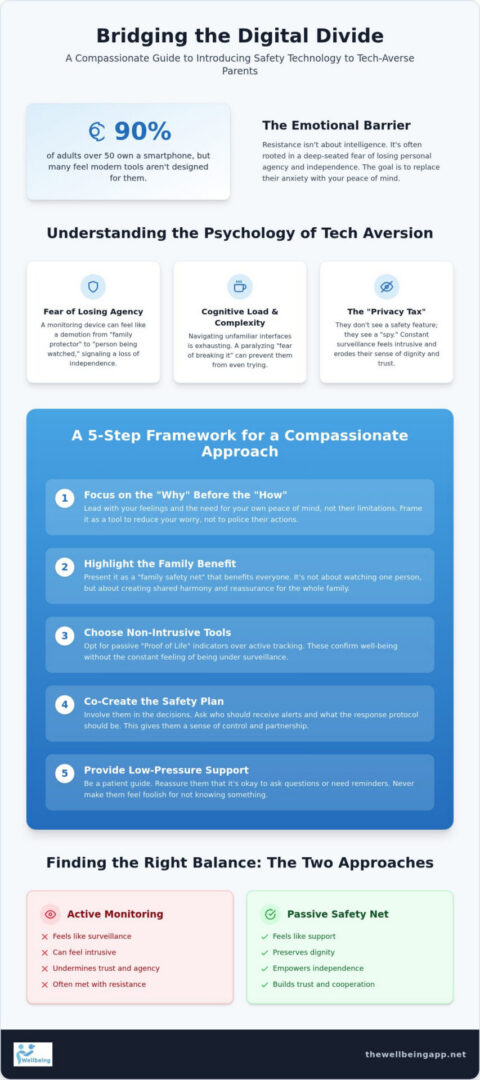
Statistics show that 90% of adults over 50 now own a smartphone, yet many still feel that modern tools aren’t designed with their needs in mind. This guide will show you how to bridge that digital divide using empathy-led strategies that prioritize their independence and your peace of mind. You’ll learn how to frame technology as a non-intrusive family safety net rather than a surveillance system. We’ll explore ways to move toward a state of mental tranquility, where your loved ones feel empowered by their tools and you finally feel a sense of calm reassurance.
Key Takeaways
- Understand the psychological barriers to tech adoption, including the “privacy tax” and the fear of losing personal agency through constant surveillance.
- Master a compassionate framework on how to introduce technology to tech-averse parents by focusing on the “why” and the collective benefit to the whole family.
- Learn practical teaching techniques like the “See One, Do One, Teach One” method to build your parents’ confidence without using confusing technical jargon.
- Discover the vital difference between intrusive active tracking and passive safety nets that preserve a senior’s dignity and independence.
- Explore how non-intrusive tools like “Proof of Life” indicators and “Night Watch” provide a gentle guardian for your household and restore your mental tranquility.
Understanding the Psychology of Tech-Aversion in Seniors
Resistance to new tools rarely stems from a lack of intelligence. Instead, it’s often rooted in a deep-seated fear of losing personal agency. For a parent who has spent decades as the family’s primary guardian, the sudden introduction of a monitoring device can feel like a demotion. They don’t see a safety feature; they see a “spy” that signals the end of their independence. When you are exploring how to introduce technology to tech-averse parents, you aren’t just teaching buttons. You’re managing a complex emotional transition.
Cognitive load plays a significant role in this process. Modern interfaces are built on “digital intuition” that assumes a lifetime of swipes and pinches. For seniors, the mental energy required to navigate a complex app can be exhausting. This is often compounded by a paralyzing “fear of breaking it,” where the user believes one incorrect tap might cause irreversible damage. Research into technology adoption among older adults suggests that these psychological barriers are just as impactful as physical accessibility. Our primary goal is to replace that anxiety with a sense of mental tranquility.
The Identity Shift: From Protector to Protected
Validating your parent’s lifelong role is the first step toward acceptance. They’ve been the watchful protector for years, and accepting help feels like a surrender of that status. You can bridge this gap by reframing technology as a tool that extends their ability to live independently. It’s not about you watching them; it’s about providing a family safety net that allows them to stay in their own home longer. When tech is presented as an instrument of empowerment, the vulnerability of aging becomes easier to navigate. It shifts the narrative from “being watched” to “being supported.”
Digital Literacy vs. Digital Intuition
What looks “obvious” to a digital native can be a riddle to a tech-averse user. Icons like the “hamburger menu” or “cloud” symbols don’t always translate across generations. Many seniors have had negative experiences with over-complicated hardware that left them feeling foolish. By 2026, even though 90% of adults over 50 own a smartphone, many still stick to basic functions to avoid confusion. Setting realistic expectations for the learning curve is essential. We must prioritize clarity over cleverness, ensuring that the indicators we use are human-centric and easy to grasp at a glance. Understanding how to introduce technology to tech-averse parents requires patience and a focus on these intuitive gaps.
A 5-Step Framework for Introducing New Safety Technology
Success when learning how to introduce technology to tech-averse parents requires a shift from technical instruction to emotional connection. You aren’t just setting up an app; you’re building a bridge of trust that respects their history as the family’s protector. This framework moves from the abstract “why” to the practical “how” while keeping their dignity at the center of every conversation.
- Step 1: Focus on the “Why” before the “How”. Explain the emotional motivation behind the tool. Understanding the psychology of tech-aversion helps you realize that logic rarely wins an argument fueled by a fear of losing independence.
- Step 2: Demonstrate the benefit to the family collective. Frame safety as a shared responsibility that brings harmony to the entire household.
- Step 3: Opt for non-intrusive “Proof of Life” check-ins. Choose systems that confirm well-being without the stigma of active, constant surveillance.
- Step 4: Co-create the safety plan rather than dictating it. Involve them in deciding who receives alerts and what the response protocol should be.
- Step 5: Provide ongoing, low-pressure support. Be a patient guide, ensuring they never feel foolish for asking a question or needing a reminder.
By following these steps, you transform a potentially tense encounter into an opportunity for empowerment. You’re not just adding a gadget; you’re reinforcing a family safety net that protects their lifestyle.
Framing the Benefit: “For My Peace of Mind”
Approaching a parent with a list of their physical limitations is often a recipe for resistance. Instead, lead with your own feelings and the concept of mental tranquility. When you say, “I worry about you,” it can sound like a critique of their ability to cope. When you frame the discussion around “family safety net” or “community unity,” it emphasizes that this is a collective effort to keep everyone connected. I’m not asking you to do this because you’re incapable, but because I want us both to feel a sense of security and harmony every day.
Choosing the Right Features for Beginners
The most effective tools are those that work quietly in the background without demanding constant attention. Manual check-in texts are often forgotten, which leads to unnecessary panic for the family. Automated indicators provide a more reliable solution. Features like “Night Watch” are specifically designed for those living alone, offering a silent guardian during the hours when help is hardest to reach. If they enjoy evening strolls, “Chaperone” services provide the confidence to stay active without feeling monitored. You can explore these non-intrusive options through specialized family safety tools that prioritize personal agency over intrusive tracking.
Practical Teaching Techniques for Tech-Averse Parents
Once you’ve established the “why,” the focus shifts to the “how.” Teaching a new skill to a senior requires a specialized approach that respects their pace and preserves their dignity. The “See One, Do One, Teach One” method is particularly effective when you are learning how to introduce technology to tech-averse parents. First, you demonstrate the action while they watch. Then, they perform the task with your guidance. Finally, they explain the process back to you. This cycle ensures the information moves from short-term memory into long-term confidence, providing them with a sense of personal agency.
Language is your most powerful tool during this process. Technical jargon like “automated monitoring” or “server-side handshakes” should be replaced with human-centric terms. Instead of explaining background data flows, talk about a “Check-in” or a “Family safety net.” Focus exclusively on high-impact features like Proof of Life indicators. These tools provide the necessary reassurance without overwhelming the user with unnecessary choices. To provide a permanent anchor for their mental tranquility, create a physical “cheat sheet.” This printed card should list simple emergency procedures and basic app icons, serving as a reliable safety net when you aren’t there to help.
Reducing Cognitive Load
Success often depends on what you do before the first lesson. Reducing the cognitive load means customizing their device to be as intuitive as possible. Increase the font size, simplify the home screen to show only essential apps, and set up one-button Emergency Alerts. Too many pings lead to “app fatigue,” which causes users to ignore even the most critical indicators. By limiting notifications to only what is strictly necessary for their well-being, you ensure that every alert carries weight and importance. This structured approach leads the user from a problem to a solution with logical ease.
The Power of Positive Reinforcement
Every successful interaction with a device is a victory against tech-aversion. Celebrate these small wins to build digital confidence. It’s vital to normalize mistakes; reassure them that errors are a natural part of the learning curve. One of the biggest hurdles in how to introduce technology to tech-averse parents is the belief that they might accidentally “break” the device. Remind them constantly that the system is robust. They can’t break it by clicking the wrong button, and you are always there as their watchful protector to help them reset. This atmosphere of trust and safety allows them to feel empowered rather than anxious.
Active Monitoring vs. Passive Safety: Finding the Balance
Choosing the right level of oversight is the most critical decision when you are exploring how to introduce technology to tech-averse parents. Many families instinctively reach for high-visibility tools like indoor cameras or constant GPS tracking. However, these “always-on” solutions often impose a heavy “privacy tax” on seniors. They feel that their dignity is the price they must pay for safety. This sense of being under a microscope can lead to resentment and eventual abandonment of the tool altogether.
Passive safety offers a more compassionate middle ground. Instead of watching their every move, automated systems can simply confirm that everything is proceeding as normal. This shift reduces the constant anxiety for the family while eliminating the need for “nagging” daily phone calls that can disrupt a parent’s day. By prioritizing non-intrusive indicators, you foster a sense of collective responsibility rather than a dynamic of surveillance.
When is “Always-On” GPS Too Much?
For a healthy, independent adult, constant location sharing can feel like an unnecessary leash. The psychological impact of feeling “tracked” often outweighs the perceived safety benefits. It can make a parent feel fragile or incapable. A more respectful approach involves scheduled check-ins or geo-fencing that only sends an alert in a genuine emergency. This allows them to maintain their personal agency while knowing a safety net is in place if they ever wander or need assistance. This balance is essential for maintaining harmony and trust within the household.
The Role of Automated “Proof of Life” Indicators
Proof of Life technology serves as a non-intrusive status check that respects a senior’s privacy. Unlike traditional monitoring, automated server-side monitoring provides 24/7 vigilance without requiring a human to watch a screen. It looks for indicators of normal activity and only alerts designated contacts if a scheduled check-in is missed. Proof of Life is a proactive protection tool that empowers vulnerable users to live independently while ensuring their well-being is confirmed through silent, reliable indicators.
This method preserves mental tranquility for both the parent and the child. You no longer have to wonder if they’re okay, and they no longer have to feel like they’re being managed. It creates a space where safety and independence coexist perfectly. If you’re ready to move beyond intrusive tracking and embrace a more empathetic approach, you can get started with our family safety net today.
The Wellbeing App: A Gentle Guardian for Your Family
Learning how to introduce technology to tech-averse parents often feels like walking a tightrope between safety and intrusion. The Wellbeing App was designed specifically to remove that tension, acting as a compassionate guardian rather than a restrictive monitor. By focusing on the emotional rewards of connection and harmony, we’ve created a platform that parents actually want to use because it protects their lifestyle. It transforms the digital divide into a bridge of mutual support, ensuring that your loved ones feel empowered to move through their day with confidence.
Mobility is a cornerstone of independence, and features like Night Watch and Chaperone are built to support it. Night Watch provides a silent safety net during the evening hours, offering reassurance to those living alone without the need for invasive cameras. Similarly, the Chaperone feature acts as a virtual companion for seniors who enjoy staying active, providing virtual accompaniment during walks or errands. These tools aren’t just software; they’re instruments of proactive safety management that preserve the user’s mental state while giving the family peace of mind.
Features Designed for Simplicity and Trust
The core of our system is the user-friendly interface governing the Proof of Life indicators. We understand that for tech-averse users, every extra button is a potential barrier. That’s why we’ve prioritized a “set it and forget it” model for automated safety monitoring. Once the schedule is established, the app runs quietly in the background. It only steps in when an indicator is missed, sending automated alerts to designated contacts within your family safety net. This approach fosters community unity, making safety a shared effort rather than a one-sided burden.
Starting the Journey Toward Peace of Mind
Taking the first step doesn’t have to be a high-stakes decision. We’ve ensured low friction for families starting this journey, allowing you to experience the mental tranquility that comes with reliable, non-intrusive protection. Proactive protection is more than just a technical choice; it’s a profound duty of care we owe to those who once looked after us. By choosing a system that values personal agency, you’re not just buying an app, you’re investing in the preservation of your family’s harmony. Now is the time to bridge the gap and provide the security your household deserves. Protect your parents’ independence with The Wellbeing App.
Restoring Harmony Through Compassionate Technology
The journey of bridging the digital divide is about more than just apps; it’s about honoring the dignity of those who raised us. By moving from a model of surveillance to one of empathetic support, you can replace the friction of daily “check-in” calls with a silent, reliable safety net. We’ve explored the psychological barriers seniors face and a framework for how to introduce technology to tech-averse parents that prioritizes their personal agency and long-term independence.
The key is choosing tools that work quietly in the background. With automated server-side monitoring and Proof of Life indicators, we provide 24/7 reliability without ever making a loved one feel managed or watched. As a compassionate guardian for your household, The Wellbeing App ensures that safety remains a shared family effort rooted in trust rather than anxiety. You can finally trade your constant worry for a lasting state of mental tranquility.
Preserve your family’s mental tranquility; start with The Wellbeing App today. You deserve the peace of mind that comes from knowing they’re safe, and they deserve to live their lives with uninterrupted independence. It’s time to build a future where everyone feels empowered and protected.
Frequently Asked Questions
What is the best way to explain an app to a senior who hates technology?
Start by focusing on the emotional reward rather than the software features. When learning how to introduce technology to tech-averse parents, describe the app as a “Virtual Chaperone” or a “family safety net.” Use familiar analogies that relate to their everyday life and household routines. Avoid technical security terminology and instead emphasize how the tool preserves the harmony and connection of the entire family while reducing daily anxiety.
How do I handle the “I don’t need help” objection from my parents?
Reframe the conversation to focus on your own needs for mental tranquility. Instead of highlighting their potential frailty, explain that having a safety net in place allows you to feel calm and supportive throughout your busy day. By making the request about your well-being, you remove the stigma of “needing help” and turn the technology into a gift of peace and harmony for the whole household.
Is it better to use a tablet or a smartphone for tech-averse parents?
A smartphone is typically the superior choice because it remains with the parent throughout the day. This portability is essential for features like Chaperone or Location Sharing during their afternoon walks. However, if vision is a primary concern, a tablet offers a larger interface for easier navigation. The best device is the one that fits seamlessly into their existing routine without increasing their cognitive load or frustration.
What are Proof of Life check-ins and how do they work?
Proof of Life check-ins are non-intrusive status indicators that confirm a user’s well-being at scheduled intervals. Unlike constant tracking, this system uses automated server-side monitoring to look for a simple confirmation. It’s a proactive protection tool that empowers seniors to live independently. If a check-in is missed, the system automatically notifies designated family members to ensure a timely and caring response from the people they trust most.
Can I monitor my parents without making them feel like they are being watched?
Passive safety tools are the key to monitoring without the “surveillance” stigma. By choosing Proof of Life indicators instead of indoor cameras, you respect their privacy while maintaining empathetic vigilance. This method provides a “Virtual Chaperone” that only alerts you when something is truly wrong. It allows your parents to maintain their personal agency while you enjoy the reassurance of a silent, reliable guardian in the background.
What happens if my parent misses a scheduled check-in on the app?
The system triggers a structured notification flow to your designated family contacts. If a scheduled indicator isn’t received, Emergency Alerts are sent immediately to ensure the group can respond. This automated process removes the need for constant “nagging” calls, as you only intervene when the system signals a potential issue. It provides a disciplined approach to safety that prioritizes the senior’s dignity and the family’s collective peace.
How can technology actually increase a senior’s independence?
Technology increases independence by providing a “family safety net” that allows seniors to stay in their own homes longer. When you understand how to introduce technology to tech-averse parents, you give them the confidence to pursue their daily routines without constant supervision. Features like Night Watch provide a sense of security that empowers them to live on their own terms while knowing a safety net is always active.
Are safety apps more reliable than manual check-in texts?
Automated safety apps are significantly more reliable because they don’t depend on a senior’s memory. Manual check-in texts are often forgotten, which can lead to unnecessary panic and family friction. An automated system provides a constant, uninterrupted safety net that works quietly in the background. This reliability ensures that your mental tranquility remains preserved, as the system handles the routine vigilance for you with 24/7 server-side monitoring.