
Lone Worker Safety Check-In App: The 2026 Guide to Virtual Protection
What if the most effective way to protect those you care about isn’t by watching their every move, but by listening for their silence? It’s a common fear for anyone who works solo or lives by themselves; that sudden realization when a text goes unanswered and the silence feels heavy with “what-ifs.” You shouldn’t have to choose between your privacy and your personal security. When searching for a reliable safety app for living alone, the goal isn’t just to have a digital shadow, but to achieve true mental tranquility through a compassionate guardian.
We understand that manual check-ins are often unreliable and traditional safety hardware is frequently too expensive for everyday use. This guide will show you how automated technology provides a proactive safety net that works even if your phone is damaged or lost. You’ll discover how features like Night Watch and Proof of Life act as a virtual chaperone, ensuring that your guardians are alerted the moment a check-in is missed. We’ll explore the transition from invasive tracking to interaction-based validation, showing you how to leverage server-side monitoring to maintain your independence while staying connected to a watchful, always-on protector.
Key Takeaways
- Understand how proactive status validation transforms your smartphone into a digital safety net that reaches out to you first.
- Discover why a safety app for living alone provides more reliable protection than traditional hardware by leveraging the device you always have with you.
- Learn about the fail-safe nature of server-side monitoring, which ensures alerts are dispatched even if your phone is destroyed or loses signal.
- Identify high-risk windows in your daily routine to implement a personalized safety protocol that empowers both you and your emergency contacts.
- Explore how specialized features like Chaperone and Night Watch offer a virtual partner for moments when you need an extra layer of empathetic vigilance.
What is a Lone Worker Safety Check-In App?
A lone worker safety check-in app functions as a sophisticated digital safety net, operating quietly in the background of your daily life. Unlike traditional security measures that wait for you to call for help, these apps utilize scheduled intervals to monitor your status automatically. It’s a fundamental shift from reactive emergency calls to proactive status validation. Instead of hoping you can reach your phone during a crisis, the system expects a signal from you. If that signal doesn’t arrive, the app initiates a pre-determined response plan. This creates a protective loop that ensures you’re never truly alone, even when physical colleagues or family members aren’t nearby.
Many people rely on manual “I am okay” texts to reassure loved ones, but these often fail due to safety fatigue and simple human error. We forget to send them, or our phones die, causing unnecessary panic for those waiting on the other end. A dedicated safety app for living alone removes this burden of constant manual communication. It acts as a watchful protector, staying vigilant so you don’t have to. By automating the check-in process, the technology preserves your mental tranquility and allows you to focus on your tasks or your rest, knowing that a compassionate guardian is keeping track of the clock for you.
The Evolution of Personal Safety Monitoring
The industry has moved far beyond physical logbooks and verbal sign-outs. Modern lone worker safety principles now prioritize real-time digital indicators of wellbeing. In 2026, the gold standard is server-side monitoring rather than local, device-only alerts. This means the countdown happens on a secure remote server. If your phone is destroyed or loses signal in a dead zone, the server still knows your check-in is due. When the timer hits zero without a response, automated alerts are dispatched immediately. This evolution significantly reduces response times, as the system doesn’t need a functioning device to trigger an alarm; it only needs the absence of your “all clear” to know something is wrong.
Common Scenarios for Solo Safety Apps
These tools are essential for anyone navigating high-risk windows throughout their day. Home health care and social workers often enter private residences where the environment is unpredictable. Real estate agents frequently conduct solo property showings in empty houses, making them vulnerable to unexpected situations. For individuals using a safety app for living alone, the technology provides a daily wellness check-in that offers peace of mind to distant family members. Whether you’re working a late shift or simply enjoying your independence at home, having a virtual partner ensures that if your voice goes silent, your safety net speaks up for you.
How Automated ‘Proof of Life’ Monitoring Works
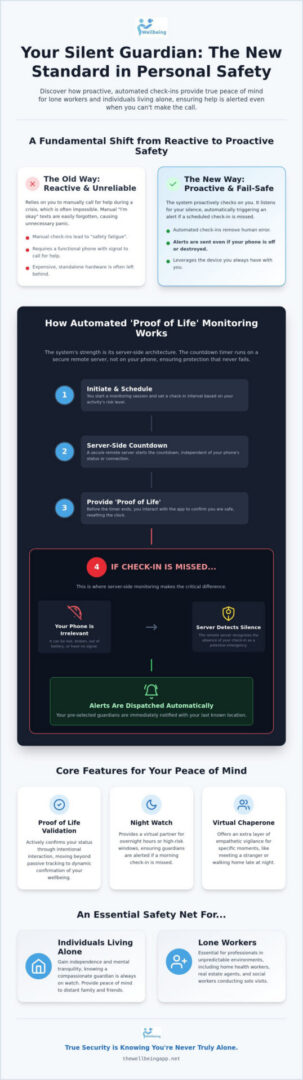
Proof of Life is the active validation of user status through intentional interaction. It’s the core mechanism of a modern safety app for living alone, moving beyond the passive collection of data to a dynamic confirmation of wellbeing. When you initiate a monitoring session, the app establishes a scheduled status check. You choose the interval based on your comfort level; perhaps every hour while working in the garden or every thirty minutes during a late-night commute. This interaction creates a rhythmic pulse of safety between you and the system, ensuring that your voice is always heard, even in silence.
The true strength of this approach lies in its fail-safe, server-side architecture. Traditional alerts often rely on the phone itself to send a distress signal. However, if a device is destroyed or the battery dies, that signal never goes out. With server-side monitoring, the countdown happens on a secure remote server. If you don’t confirm your status by the deadline, the server recognizes the silence as a potential incident. It doesn’t matter if your phone is broken or in a signal dead zone; the protection continues because the system is waiting for your all-clear to stop the clock.
The Check-In Workflow and Escalation
Effective safety protocols require matching your check-in frequency to the risk level of your current task. This aligns with broader safety management practices, such as those found in OSHA’s ‘Working Alone’ standard, which emphasizes the need for regular accounting of individuals. Before an alert ever reaches your emergency contacts, the app enters a silent alert phase. It nudges you with a notification or a gentle vibration, giving you a chance to reset the timer. If you miss this window, the system initiates its escalation protocol, instantly notifying your chosen guardians that a check-in was missed.
Why GPS Location Data is Not Enough
Knowing where someone is doesn’t mean they’re okay. A GPS dot on a map is a static piece of information; it can’t tell your family if you’ve had a fall or if you’re simply focused on a project. Proof of Life adds the missing layer of human status validation. It’s also significantly less invasive than constant live-tracking. Instead of sharing your every movement, you’re only sharing your wellbeing at specific moments. This preserves your personal privacy while ensuring help is dispatched if you can’t ask for it yourself. If you’re ready to experience this level of automated peace of mind, choosing a service that prioritizes interaction over surveillance is the first step toward true mental tranquility.
App vs. Hardware: Choosing the Right Safety Framework
Selecting the right framework for protection often comes down to a choice between specialized hardware and the device already in your pocket. For those seeking a safety app for living alone, the decision isn’t just about cost; it’s about accessibility and empowerment. Proprietary badges often carry a heavy surveillance stigma, making users feel like they’re being tracked rather than protected. In contrast, an app-based approach places the agency back into your hands. It transforms your phone from a social tool into an instrument of personal safety management, ensuring that your protection is a choice you make every day.
This shift toward software-driven solutions reflects a broader industry alignment with safety standards. Even the OSHA regulation for working alone emphasizes the necessity of regular accounting for personnel, regardless of the specific tool used. However, the flexibility of a subscription service allows for seamless scaling as your team grows or your personal needs change. You aren’t locked into a fleet of expensive, aging devices that require physical maintenance. Instead, you benefit from a system that evolves with you, providing a compassionate guardian that is always as modern as your current smartphone.
The Friction of Physical Safety Devices
Dedicated hardware often introduces unnecessary friction into a daily routine. There is the initial purchase price, the ongoing cost of battery replacements, and the inevitable charging requirements that clutter your space. Perhaps the most significant flaw is the “forgotten device” problem. Workers and individuals may leave a safety badge on a nightstand or in a vehicle, but they almost never leave their smartphones behind. Software updates also ensure that your safety innovations happen in real-time. You don’t have to wait for a new hardware cycle to benefit from the latest indicators of wellbeing or enhanced automated alerts.
Leveraging the Smartphone as a Guardian
Your smartphone is already equipped with sophisticated biometric security, such as FaceID or fingerprint scanning, which allows for seamless, secure check-ins without fumbling for a button. By integrating with existing location sharing and emergency alert features, a safety app for living alone creates a unified ecosystem of protection. Features like Night Watch offer the distinct advantage of 24/7 proactive coverage without requiring extra gear. This streamlined approach ensures that your path to mental tranquility is as simple as possible, keeping you connected to your loved ones through the one device that is always by your side.
Implementing a Safety Protocol: A Practical Checklist
True protection is more than just a digital download; it’s a commitment to a consistent safety habit. While a safety app for living alone provides the technical framework, your personal protocol ensures that help is never more than a missed check-in away. This process begins by recognizing that safety is a shared effort between you and your chosen community. By setting clear expectations and understanding your environment, you transform a passive tool into a proactive shield that preserves your mental tranquility throughout the day.
Step 1: Personal Risk Assessment
Every routine has high-risk windows where vulnerability increases. For a real estate agent, this might be a solo property showing in a remote area; for a late-night commuter, it’s the walk from the train to the front door. Identify these moments and match your check-in frequency to the level of anxiety or risk involved. You should also account for cellular dead zones where signals might be intermittent. Defining what constitutes an emergency for your specific situation is vital. Is it a missed check-in during a walk, or an unanswered Night Watch prompt during your sleep? Knowing these parameters helps you choose the right mode of protection.
Step 2: Training Your Guardians
Your emergency contacts, or guardians, are the final link in your safety chain. It’s essential to frame the app as a benefit for your collective wellbeing rather than a tool for surveillance. Every guardian needs to understand their duty toward you when they receive an automated alert. They should know how to trigger an emergency alert instantly if they suspect something is wrong. Set clear expectations for their response: should they call you first, or contact local authorities immediately? This clarity removes hesitation during critical moments, ensuring that your protective circle acts with confidence and speed.
Before relying on your protocol, conduct a dry run to ensure the escalation chain works exactly as intended. Use this checklist to finalize your setup:
- Select at least two reliable guardians who understand the importance of their role.
- Use Chaperone for active, high-anxiety moments like walking through a dark parking lot.
- Enable Night Watch for 24/7 coverage during your most vulnerable hours of rest.
- Test the silent alert phase to ensure you can reset your timer before it escalates to your guardians.
By following these steps, you empower yourself to live independently without the weight of constant worry. If you’re ready to build your own proactive safety net, you can start your journey toward mental tranquility today with a system designed to watch over you when it matters most.
The Wellbeing App: A Compassionate Guardian for Solo Safety
The Wellbeing App isn’t just a software solution; it’s a mission rooted in community unity and empathetic vigilance. We believe that true safety comes from the knowledge that you’re never truly alone, even when you’re physically solo. By positioning ourselves as a watchful protector, we provide a proactive safety net that prioritizes your mental tranquility over simple data tracking. This human-centric approach ensures that every user feels empowered and supported, rather than monitored. It’s about fostering social cohesion and collective responsibility, where the technology serves as a bridge between you and the people who care about your welfare most.
Our specialized features are designed to address specific high-risk windows with surgical precision. The Chaperone feature acts as a virtual partner for those high-anxiety moments, such as walking to your car after a late shift or entering an unfamiliar property. It provides a constant, reassuring presence that’s ready to escalate at a moment’s notice. For total coverage, Night Watch ensures that your protection doesn’t stop when you sleep. It maintains a silent, server-side vigil during your most vulnerable hours, ensuring that if you don’t check in as expected in the morning, your guardians are notified immediately. This level of care provides an emotional reward that traditional security tools simply can’t match: genuine peace of mind for both the user and their loved ones.
The Wellbeing Difference: Mental Tranquility
We’ve intentionally moved away from the cold, industrial security jargon that often dominates this industry. Instead, we use language centered on wellbeing, harmony, and interpersonal connection. This focus on proactive care significantly reduces the anxiety often associated with personal security. Our subscription model is built for simplicity, making it accessible for individuals and families who need a reliable safety app for living alone without the complexity of corporate contracts. We prioritize your agency, ensuring that you’re always the one in control of your safety protocol, while we remain the steady, always-on partner in the background.
Starting Your Journey to Proactive Protection
Setting up your digital safety net is a seamless process that takes only minutes. From the initial download to your first Proof of Life check-in, the interface is designed to be intuitive and friendly. Location Sharing integrates perfectly with our automated alert system, providing your guardians with the exact information they need only when an incident is triggered. This balance of privacy and protection is what sets us apart. You can secure your peace of mind with The Wellbeing App today and join a community dedicated to the preservation of safety through compassionate, technologically sophisticated care.
Embracing a Future of Proactive Peace of Mind
True safety isn’t about being watched; it’s about being heard. We’ve explored how a modern safety app for living alone replaces the anxiety of “what-ifs” with the certainty of interaction-based validation. By choosing a framework that leverages the device you already carry, you eliminate the friction of proprietary hardware while gaining the robustness of server-side monitoring. These systems ensure that your protective net remains intact even if your phone is lost or damaged. This approach turns your smartphone into an instrument of empowerment rather than a tool for surveillance.
You deserve to move through your day with confidence and rest through your night with tranquility. It’s time to shift from reactive emergency calls to a proactive guardian that values your personal agency and mental state. Our empathetic, human-centric design is built to support your independence while keeping your loved ones informed. You can protect your peace of mind with The Wellbeing App today. Experience the harmony of technologically sophisticated care and sincere, empathetic vigilance. Stay safe, stay connected, and let your community be your shield.
Frequently Asked Questions
What happens if my phone battery dies or I lose signal during a check-in?
Your protection remains active because of our server-side architecture. Unlike local alerts that depend on your device, our system runs a countdown on a secure remote server. If your battery dies or you enter a signal dead zone, the server still expects your check-in. When the timer expires without a response, automated alerts are dispatched to your guardians. This ensures your safety net doesn’t fail just because your technology does.
Is a safety app better than a wearable medical alert button?
A smartphone app is often a more reliable choice because it’s the one device you’re least likely to forget. While wearable buttons are useful, they’re reactive and often require a separate hardware purchase. A safety app for living alone provides proactive features like Chaperone and Night Watch that a simple button cannot match. You get a comprehensive digital guardian without the burden of maintaining extra physical hardware or paying for proprietary devices.
How do I convince employees or seniors that this is not just surveillance?
The conversation should focus on personal agency and empowerment rather than monitoring. Explain that the app only shares information during high-risk windows or when a check-in is missed. It’s designed to preserve mental tranquility for the user and their loved ones, not to track every movement. Emphasize that the user remains in control of the protocol, choosing when to activate features like Chaperone to stay safe during vulnerable moments.
Can the app automatically call emergency services (911)?
The app is designed to notify your personal circle of guardians immediately when an incident is detected. These designated contacts receive automated alerts and real-time location data so they can assess the situation. This approach ensures that the people who know you best are the first to respond. While the app doesn’t replace a direct 911 call, it provides a vital layer of communication for those times when you can’t reach your phone.
What is the difference between Proof of Life and standard GPS tracking?
Standard GPS tracking tells people where you are, but Proof of Life tells them you’re okay. GPS is a passive data point that doesn’t account for your physical wellbeing. Proof of Life is an active status validation that requires your interaction. It’s the difference between seeing a dot on a map and receiving a confirmation of safety. This makes a safety app for living alone far more effective for preventing missing person incidents.
How much does a lone worker safety check-in app usually cost?
Most lone worker safety solutions operate on a recurring subscription model. This allows you to access premium server-side monitoring and automated alert dispatch without high upfront costs. These fees typically cover individual or family access to the full suite of protective tools. Because there’s no proprietary hardware required, you can start your journey to proactive protection immediately. You’ll find that subscription plans offer flexible options for both personal use and professional teams.
Can I use the app for personal safety when walking home at night?
You can and should use the Chaperone feature as a virtual partner during late-night walks. This mode provides an extra layer of empathetic vigilance when you’re feeling vulnerable. You set the check-in frequency to match the length of your journey, and the app stays active until you’re safely inside. It’s an instrument of empowerment that helps you maintain your independence while ensuring your guardians are ready to help if your silence is detected.
Does the app work in areas with poor cellular reception?
The app’s server-side monitoring is specifically designed to handle intermittent signal issues. If you enter an area with poor reception and cannot complete a scheduled check-in, the system recognizes the missed status. Because the countdown happens on our secure servers, the alert process initiates even if your phone cannot send a signal. This fail-safe mechanism ensures that a loss of connectivity is treated as a potential safety incident, keeping you protected in every environment.