
Personal Safety App for Women Living Alone: 2026 Apartment Safety Checklist
What if the strongest part of your apartment safety plan isn’t an app at all? A personal safety app for women living alone can help keep trusted people informed, but it can’t check your lock, charge your phone, or guarantee help will arrive. It’s reasonable to want clear answers about everyday precautions, location privacy, and whether a digital check-in will work when you need it.
This guide brings those questions together in a practical way. You’ll learn how to build manageable arrival and check-in routines, what to review before sharing your location, and how to assess an app’s permissions, contact settings, and subscription terms. The aim is a plan that supports your confidence without asking you to rely on technology alone.
We’ll start with a renter-conscious apartment checklist, then look at what scheduled check-ins and other app features can and can’t do. You’ll also consider common failure points, including a low phone battery or weak data connection, and ways to keep trusted contacts part of your plan. Small, repeatable habits can help you feel more prepared at home.
Key Takeaways
- Use a simple before-arrival, entry, at-home, and leaving checklist to make apartment safety part of your routine.
- Compare a personal safety app for women living alone by who receives alerts, what location access it needs, how it handles connectivity, and how clearly it explains subscription terms.
- Know the difference between scheduled check-ins, emergency alerts, professional monitoring, and physical security before choosing a tool.
- Build a flexible plan around your routines and trusted contacts, then consider whether offerings such as Proof of Life, Chaperone, Night Watch, Location Sharing, or Emergency Alerts fit your needs.
Personal safety when living alone: start with a calm apartment routine
Wanting a few dependable habits at home isn’t a sign that living alone is unsafe. It’s a way to feel more prepared and make everyday decisions easier. A personal safety app for women living alone may support communication, but you can start with familiar steps: decide how you’ll secure your home, set boundaries for visitors, and make sure trusted contacts know how to reach you.
Layered personal safety brings together practical precautions, trusted communication, and informed use of tools, without treating any one measure as a guarantee. The overview of personal safety apps describes common functions such as alerts and location sharing, as well as privacy considerations. Digital features are most useful as one part of a plan that reflects your preferences and daily life.
Try this compact starter checklist:
- Entry: Check that your door and accessible windows are secured with the building’s existing hardware.
- Visitors: Set a boundary for unexpected guests. If you’re unsure who’s at the door, you can choose not to open it.
- Readiness: Keep your keys, phone, and essential contacts easy to reach when you arrive or leave.
- Communication: Choose a trusted person and agree on when you’ll check in and what to do if you miss it.
Which apartment routines can help you feel more prepared?
Make each routine easy to repeat. Before leaving, gather your keys and phone. When you return, secure the door and check accessible windows using the hardware already in place. For visitors, decide in advance what feels comfortable, such as arranging a time or declining an unexpected visit. Avoid posting travel plans or details about your absence publicly in real time. These habits support awareness and choice, but they can’t promise complete protection.
How can trusted contacts support a living-alone safety plan?
Ask the people you trust whether they’re comfortable receiving check-ins or alerts, then agree on what each message means. For example, decide whether a missed check-in should prompt a call or text first, and what the next step might be. Keep the arrangement voluntary and specific: share only the information needed, revisit it together if circumstances change, and respect each person’s privacy. Clear expectations can reduce confusion without making anyone feel responsible for constant monitoring.
For a digital check-in, confirm who receives notifications and what happens if you don’t respond. Don’t assume an alert replaces direct contact or emergency services. In the sections ahead, we’ll look at app features and limitations so you can decide whether they complement your routines.
How a personal safety app for women living alone can support check-ins
A personal safety app is a digital tool that may help you check in, share selected information, or send alerts to chosen contacts. Features vary, so focus on what the app actually does and how it fits your plan. A scheduled status check-in, for example, asks you to confirm you’re okay at an agreed time. That is different from an emergency call, professional monitoring, or physical security.
An app can support communication, but it can’t guarantee a person’s safety. A missed-check-in notification depends on the feature being configured, your phone being accessible and able to connect, and your chosen contact seeing and responding to the alert. Before relying on a feature, find out what triggers a notification, who receives it, and what that person has agreed to do.
What should you check before choosing a safety app?
Assess practical details alongside the feature list. Can you set or change check-ins easily? Can you choose alert recipients? Does location sharing offer controls that match your comfort level? Read the privacy policy and review app permissions, especially whether background or continuous location access is requested and why. Check that the app works with your device, read the subscription terms, and find out which features may depend on connectivity.
Keep an offline plan, too. If your phone loses power or reception, a digital check-in may not go through. Decide how you’ll contact someone another way, and make sure your trusted contact knows what a missing update means. The Maryland People’s Law Library offers a safety-planning resource with considerations for home, which can complement planning around an app’s limitations.
How do scheduled check-ins and chaperone features differ?
A scheduled check-in is a prompt or status update tied to a time and a contact plan. Chaperone tools generally relate to sharing or monitoring during a trip, but the name alone doesn’t confirm how a particular app works. Review the feature’s behavior, notification timing, and location permissions before using it. The Wellbeing App lists Proof of Life, Chaperone, and Location Sharing among its subscription offerings. Proof of Life supports scheduled check-ins and alerts designated contacts when a check-in is missed.
If those features sound useful, review The Wellbeing App’s subscription offerings and confirm current permissions, settings, and terms before enrolling. Treat an app as one communication option, not a replacement for your judgment, an agreed contact plan, or practical precautions.
Compare apartment safety apps by privacy, reliability, and limits
Compare what an app lets you control, not just how many features it lists. For a personal safety app for women living alone, ask practical questions: Can you choose when to check in? Who receives an alert? Does a feature need location access? What happens if your phone can’t connect? Use this framework to compare options without assuming every app works the same way.
| What to compare | Questions to ask |
|---|---|
| Check-in control | Can you set, change, or cancel check-ins? What counts as a missed check-in? |
| Alert recipients | Can you choose trusted contacts, update the list, and understand what they’re expected to do? |
| Location permissions | Is location access optional? Who can view your location, when does sharing begin, and how do you stop it? |
| Connectivity and access | What happens if the phone is off, the battery is empty, or the data connection is unavailable? |
| Cost transparency | Are subscription terms, included features, and renewal details clear before you enroll? |
An app is one layer of a plan, not a substitute for working locks, practical routines, or your own judgment. It also isn’t automatically an emergency-dispatch service or a way to prevent harm. A check-in alert can prompt communication only if the feature is configured, the alert can be sent, and a contact receives and acts on it. A dead battery, weak connection, or unavailable contact can interrupt that chain. Plan for a backup, such as asking a contact to try another way to reach you.
Is location sharing necessary for every safety app user?
No. Choose whether to share based on your comfort and the situation, rather than assuming continuous tracking is required. Before enabling it, check who can see your location, when sharing starts, and how to stop it. Discuss boundaries with contacts, too. The Wellbeing App lists Location Sharing among its offerings, but confirm current permission controls and feature behavior before use.
What should you ask about missed check-ins and alerts?
Find out how a missed check-in is defined and what notification sequence is configured. Confirm which contacts receive alerts and whether you can update that list. The Wellbeing App’s Proof of Life supports scheduled check-ins and alerts designated contacts when a check-in is missed. Test the settings with consenting contacts so everyone understands what an alert means. A test doesn’t guarantee future delivery or response.
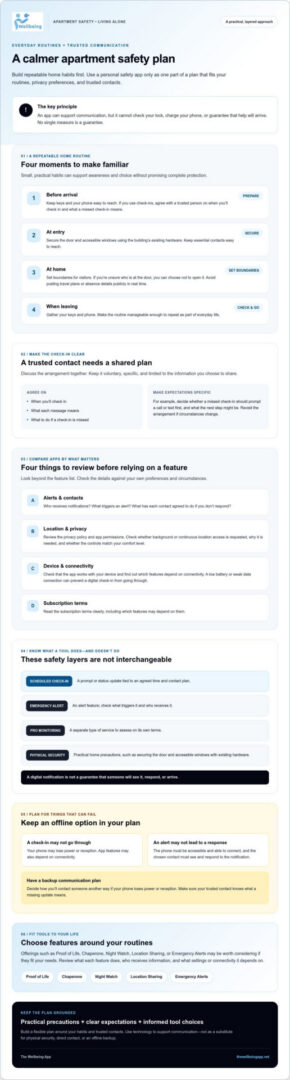
Apartment safety checklist for women living alone
A useful checklist should fit your real routine, not add pressure or suggest that any single step removes every risk. Save the short version below, adjust it to your apartment and comfort level, and share it with a trusted contact if that would help.
Apartment checklist
- Before arrival: Have your keys ready and notice your immediate surroundings. If something feels wrong, don’t confront anyone. Move toward a place where you feel safer and contact appropriate help.
- Entering: Go inside, secure the door with the existing hardware, and keep your phone accessible.
- At home: Check that accessible windows are secured as appropriate. Decide how you’ll handle unexpected visitors, and keep trusted contacts and relevant building-management details easy to find.
- Leaving: Take your keys and phone, secure the door and windows, and avoid sharing plans about your absence publicly in real time.
- Optional check-in: Agree on a time, contact, and follow-up plan that suits you. Define what a missed check-in means rather than assuming silence signals an emergency.
What should you do before and after arriving home?
Have your keys ready before you reach the door to make entering feel more settled. Take a moment to notice what’s around you, but don’t approach or challenge anyone if a situation feels uncomfortable. If it fits your routine, message a trusted person after you arrive. If you feel in immediate danger, prioritize getting to a safer place and contacting appropriate help.
How can you prepare contacts and emergency information?
Save the phone numbers of trusted contacts and relevant building-management details somewhere you can access easily. Agree on a reasonable follow-up for a missed check-in, such as trying a call or message before taking another step. Keep the plan specific and voluntary, and update it if contact details or preferences change. If you’re in immediate danger in the United States, call 911.
A personal safety app for women living alone may support an agreed check-in, but your routine should still make sense if your phone is unavailable or a notification doesn’t arrive. If optional scheduled check-ins would suit your plan, explore The Wellbeing App’s check-in offerings and review current settings and subscription details before enrolling.
Build a personal safety plan with tools that fit your life
A useful plan is one you can follow without adding stress to your day. Bring together routines that already work for you, people who have agreed to stay in touch, privacy choices you’re comfortable with, and optional technology. A personal safety app for women living alone can support communication, but it should fit around your decisions rather than make them for you.
How can you set up a check-in plan that feels comfortable?
Choose a check-in time that matches a real part of your routine, then agree on the details with the contact who’ll receive it. For example, you might check in after a regular journey or at the end of an activity. Decide together what happens if you miss the check-in: should they try a call or message first, and what would prompt another step? Make the plan clear, voluntary, and manageable for both of you.
Review the arrangement when your schedule, contacts, or comfort with location sharing changes. If you use an app, check that its settings still match what you agreed. A missed-check-in notification is a prompt for communication, not proof that something is wrong or a guarantee that help will arrive. Keep another way to contact your trusted person in mind in case your phone is unavailable.
When might The Wellbeing App be one useful layer?
The Wellbeing App offers subscription access to Proof of Life, Chaperone, Night Watch, Location Sharing, and Emergency Alerts. Proof of Life supports scheduled check-ins and alerts designated contacts when a check-in is missed. Chaperone, Night Watch, Location Sharing, and Emergency Alerts are listed offerings; review their current workflows and settings rather than inferring how they operate from their names.
Configured contact notifications can help keep agreed-upon people informed, but they don’t guarantee delivery or response, replace emergency services, or provide physical security. Before deciding whether the service fits, review the features, location permissions, contact settings, and subscription terms. Consider what information you’re comfortable sharing and whether each tool supports a specific part of your plan.
Start with one small step: confirm your check-in plan with a trusted contact, or review an app’s settings before enabling a feature. If you’d like to explore the available options, review The Wellbeing App’s features and subscription details at your own pace.
Make your safety plan your own
A steady apartment routine, clear visitor boundaries, and an agreed check-in plan can help you feel more prepared without making safety feel overwhelming. A personal safety app for women living alone may add a communication option, but it works best alongside practical habits, trusted people, and privacy choices that feel right to you.
If scheduled check-ins would be useful, The Wellbeing App’s Proof of Life supports check-ins and notifications to designated contacts after a missed check-in. Chaperone, Night Watch, Location Sharing, and Emergency Alerts are also listed offerings. Review current feature behavior, permissions, contact settings, and subscription terms before deciding whether they fit your needs. No app can guarantee safety or replace direct communication and appropriate help.
Choose one manageable next step, such as agreeing on a check-in plan with someone you trust. To learn more about the available features, Explore The Wellbeing App’s safety features. Your plan can grow with you, one thoughtful choice at a time.
Frequently Asked Questions
What is the best personal safety app for women living alone?
There isn’t one best app for everyone. The right personal safety app for women living alone should fit your routine and comfort with sharing information. Compare check-in controls, alert recipients, location permissions, connectivity requirements, and clear subscription terms. The Wellbeing App offers subscription access to Proof of Life, Chaperone, Night Watch, Location Sharing, and Emergency Alerts. Proof of Life supports scheduled check-ins and alerts designated contacts after a missed check-in.
Can a safety app alert someone if I miss a check-in?
Yes, some apps can notify designated contacts after a missed check-in if the feature is configured. The Wellbeing App’s Proof of Life supports scheduled check-ins and alerts designated contacts when a check-in is missed. Check how the app defines a missed check-in, who receives notifications, and what contacts have agreed to do. Delivery and follow-up can depend on settings, phone access, connectivity, and whether contacts see and respond to an alert.
Is location sharing safe when you live alone?
Location sharing can be useful if you choose who sees your location and understand when sharing is active. Before enabling it, check the app’s permissions, whether background access is requested, and how to stop sharing. Agree on boundaries with each contact rather than assuming continuous tracking is needed. If you only want to share during a particular activity, look for controls that let you match sharing to that purpose.
How can I make my apartment safer when I live alone?
Build simple habits around arriving, entering, staying home, and leaving. Keep keys and your phone easy to reach, secure doors and accessible windows using the building’s existing hardware, and decide how you’ll handle unexpected visitors. Save trusted contacts and relevant building-management details where you can find them quickly. If it suits your routine, agree on a check-in time and a clear follow-up plan with someone you trust.
What happens if my phone loses signal during a safety check-in?
If your phone can’t connect, a check-in or alert may not be sent or received as expected. The exact behavior depends on the app, its settings, and the device, so check the provider’s current guidance rather than assuming it will send later. Keep your phone charged when possible, and agree on another way to check in, such as a call or text when you have service.
Do personal safety apps replace locks or emergency services?
No. An app can support check-ins, location sharing, or communication with chosen contacts, but it doesn’t replace apartment precautions, your judgment, or emergency services. Keep using the locks and hardware already available in your home, and make a plan with trusted people. A missed-check-in notification isn’t an emergency response. If you’re in immediate danger in the United States, call 911.