
Reducing Caregiver Stress with Technology: A Comprehensive Guide to Peace of Mind in 2026
Did you know that an estimated 53 million Americans are currently serving as unpaid family caregivers in 2026, with 40 percent reporting high levels of emotional stress? It’s a heavy weight to carry, especially when you’re caught between the constant urge to check in and the desire to respect your loved one’s privacy. You likely feel the weight of check-in fatigue every single day, wondering if you’re calling too much or not enough. Reducing caregiver stress with technology isn’t about installing intrusive cameras that strip away a senior’s dignity. Instead, it’s about finding a watchful protector that handles the routine safety checks for you.
We believe that your peace of mind shouldn’t come at the cost of your loved one’s independence. This guide will show you how modern, automated safety tools can lift that mental burden by providing reliable emergency alerts and seamless monitoring. We’ll explore how features like Proof of Life check-ins and Night Watch protection offer a supportive safety net that feels like a shared effort, not an intrusion. By the end of this article, you’ll discover a way to ensure safety that empowers both you and your family, allowing you to focus on the relationship rather than the risks.
Key Takeaways
- Identify the specific triggers of check-in fatigue to transition from a state of constant anxiety to one of calm, automated vigilance.
- Understand the critical difference between intrusive surveillance and proactive protection as a means of reducing caregiver stress with technology.
- Learn how automated indicators like Proof of Life can respect a senior’s dignity while providing you with a reliable, real-time window into their safety.
- Discover how to establish a Night Watch that remains active even when your phone is off, ensuring that emergency alerts always reach their destination.
- Master the steps to audit your own stress points and implement a hardware-free safety net that fosters independence and family harmony.
The Hidden Toll of Caregiving: Why Stress Management is Critical in 2026
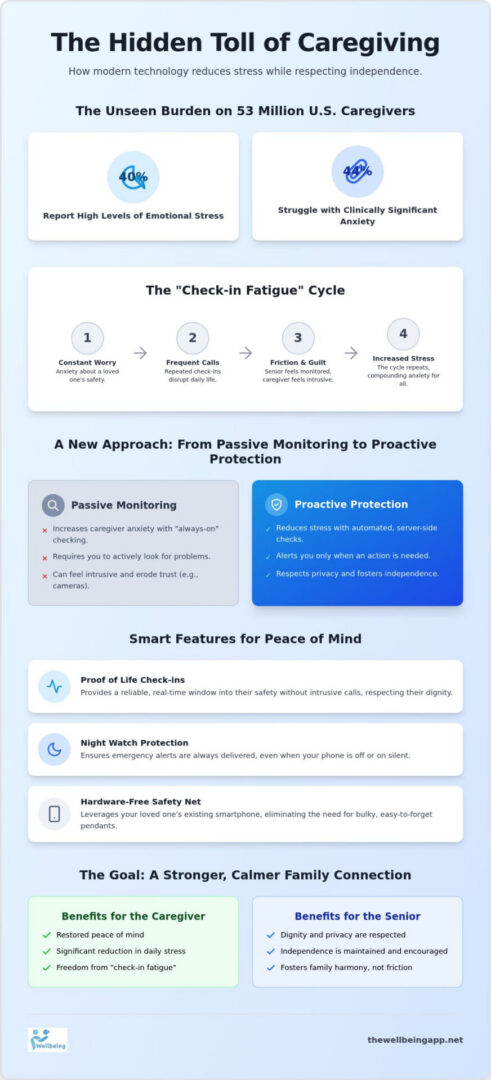
The weight of caregiving in 2026 isn’t just about physical tasks. It’s the silent, vibrating phone in your pocket and the constant mental tally of when you last heard from your parent. This state of “always-on” anxiety creates a heavy cognitive load that rarely resets. The Hidden Toll of Caregiving is a documented reality for approximately 53 million Americans who provide unpaid care today. Statistics show that 40 percent of these individuals experience high levels of emotional stress, while nearly 44 percent struggle with clinically significant anxiety. This isn’t a failure of character. It’s a natural response to a role that demands constant vigilance without the right tools.
Reducing caregiver stress with technology begins by acknowledging that manual check-ins often backfire. When you call or text multiple times a day, you aren’t just checking for safety; you’re unintentionally reminding your loved one of their vulnerability. This creates a cycle of guilt for the caregiver and a sense of lost autonomy for the senior. In 2026, family dynamics are shifting toward “Empathetic Vigilance.” This is a philosophy where we use automated indicators to stay informed without being intrusive, preserving the bond between family members.
Recognizing the Signs of Caregiver Burnout
Burnout often starts in the quiet hours. You might find yourself staring at the ceiling at 3:00 AM, paralyzed by the fear of a midnight fall you won’t hear about until morning. For many in the “Sandwich Generation,” the pressure to balance child-rearing with elderly care leads to social withdrawal and a profound sense of isolation. A key driver of this exhaustion is decision fatigue. In a caregiving context, decision fatigue is the cumulative mental exhaustion caused by making hundreds of small, high-stakes choices daily, such as whether a missed text warrants an emergency drive across town.
The Communication Paradox: Why Constant Calling Fails
Frequent check-ins often create a “Communication Paradox” where more contact leads to more friction. To a senior, a fifth “just checking in” call of the day can feel like a surveillance tactic rather than an act of love. This tension is compounded by the frustration of missed calls. A forgotten phone on a kitchen counter can trigger a full-scale panic for a caregiver, only to result in a non-emergency explanation later. By reducing caregiver stress with technology, families can move away from reactive, high-stress checking. The goal is to transition to proactive, automated indicators that provide peace of mind in the background, ensuring safety remains a supportive foundation rather than a source of conflict.
Decoding Caregiver Tech: From Passive Monitoring to Proactive Protection
Technology in 2026 has evolved from simple gadgets into sophisticated, automated safety nets. This shift is essential because the old way of monitoring often felt like a full-time job for the caregiver. A comprehensive meta-analysis on Decoding Caregiver Tech confirms that these modern tools are highly effective at lowering the emotional burden on families. We now view caregiver tech as a spectrum. On one end, you have basic GPS trackers; on the other, you have integrated systems that act as a watchful protector. The most significant advancement is the move from passive monitoring to proactive protection.
Passive monitoring, such as cameras or basic motion sensors, requires you to actively check a feed to ensure everything is okay. This often increases anxiety because it forces you to remain “always-on.” Proactive protection flips the script. These systems use automated indicators and server-side monitoring to watch for trouble so you don’t have to. If an expected action doesn’t happen, the system sends Emergency Alerts immediately. This is a cornerstone of reducing caregiver stress with technology. It allows you to step back from the role of a constant observer and return to being a supportive family member.
Medical Alert Systems (PERS) vs. Safety Apps
Traditional medical alert buttons have long been the standard, but they have clear limitations. Seniors often forget to wear them, or the batteries die without notice. In 2026, software-based solutions are replacing these bulky hardware pendants. A smartphone app is less stigmatizing and much more reliable. Features like the Proof of Life indicator provide a daily wellness standard that doesn’t require a call center middleman. When an alert is triggered, it goes directly to the family circle, ensuring a faster, more personal response. Transitioning to an app-based system is a practical way of reducing caregiver stress with technology while respecting a loved one’s desire to avoid “old age” gadgets.
Location Sharing and Geofencing
For seniors who value their mobility, Location Sharing acts as a “Virtual Chaperone.” It provides a layer of safety during walks or trips to the store without the need for constant check-in calls. By setting up “Safe Zones” through geofencing, you can receive a notification only if your loved one wanders outside their usual routine. This targeted approach reduces wandering-related anxiety while maintaining a privacy-first mindset. It’s about empowering your loved one to stay active while you maintain a sense of mental tranquility. If you’re ready to build this kind of supportive environment, you can explore the features of The Wellbeing App to see how automated vigilance can transform your daily life.
Privacy vs. Protection: Choosing Tech That Respects Independence
One of the biggest obstacles to reducing caregiver stress with technology is the “Big Brother” hurdle. Many seniors view traditional surveillance, such as indoor cameras or constant tracking, as a threat to their autonomy. They don’t want to feel watched in their own living rooms or judged for their daily habits. This resistance often leads to a standoff where the caregiver is anxious and the senior is defensive. Research into assistive technology for caregivers suggests that the most effective tools are those that provide protection without stripping away a person’s dignity.
Choosing “invisibly protective” tech means opting for features that run silently in the background. Instead of a lens following their every move, an automated system simply looks for a signal of wellness. The Proof of Life feature is a perfect example of this philosophy. It doesn’t record every private moment; it simply confirms that the user is active and safe at key intervals. This shift in perspective provides a massive psychological benefit. It reinforces the senior’s sense of agency because they remain the master of their space while still having a reliable safety net in place.
The Ethics of Monitoring: A Framework for Families
Starting the “Safety Conversation” requires a delicate touch. It shouldn’t sound like a list of rules or a bid for control. Instead, frame it as a shared effort toward collective tranquility. Comparing the intrusiveness of cameras to automated app check-ins usually helps ease the tension. While cameras provide a constant feed, an app-based check-in only activates if a wellness indicator is missed. Proof of Life indicators empower rather than track, giving your loved one the freedom to live their life while providing you with the assurance you need.
Addressing Technology Resistance in Seniors
To overcome resistance, the technology must be senior-friendly. This means a simplified user interface with large icons and clear, empathetic prompts. We advocate for a “Set it and Forget it” model. This approach reduces the senior’s technical burden, making the app a quiet companion rather than a technical chore. Consider the case of a family where the father refused a wearable button but embraced automated check-ins. The shift removed the daily friction of “did you wear your pendant?” and replaced it with a harmonious routine. By reducing caregiver stress with technology that feels supportive rather than restrictive, the family was able to focus on their relationship again.
Building Your Digital Safety Net: A Step-by-Step Implementation Guide
Creating a safety net doesn’t require professional installation or complex hardware. It starts with a simple audit of your daily anxieties. What specific moment triggers that tightening in your chest? For many, it’s the silence between 8:00 AM and the first phone call of the day. By reducing caregiver stress with technology, you can replace that silence with a structured flow of information that confirms your loved one is safe without you having to ask. This proactive approach transforms your phone from a source of “check-in” fatigue into a tool of mental tranquility.
Once you’ve identified your stress points, the next step is selecting a core platform that acts as a watchful protector. This platform should handle daily wellness checks automatically, allowing you to step back from the role of a constant monitor. It’s about establishing a collective responsibility within the family. By assigning specific roles for emergency alert responses, you ensure that the burden of safety is shared among several people rather than falling solely on your shoulders.
Step 1: Assessing Daily Activity Needs (ADLs)
Effective monitoring begins by identifying “high-risk” times in your loved one’s schedule. These are the moments when a fall or medical event would be most dangerous if left undetected. Common high-risk periods include the morning wake-up window and evening walks. You should tailor the frequency of Proof of Life checks to match these routines. For an active senior, a check-in after a daily walk might be enough; for someone more vulnerable, more frequent indicators may be necessary. This customized approach ensures the technology supports their specific lifestyle without being a burden.
Step 2: Configuring the Emergency Response Chain
A reliable safety net needs a tiered notification system. You must decide who gets the alert first. Perhaps a nearby neighbor is the primary contact for immediate physical checks, while you remain the lead for medical decisions. It’s vital to use a system that features server-side monitoring. Unlike “Find My Phone” services that rely on your device being active, server-side alerts ensure that emergency notifications go out even if your own phone is switched off or out of battery. Features like Night Watch provide this 24/7 coverage, watching over your loved one while you sleep so you can wake up refreshed. You can start building your personalized safety net today by downloading The Wellbeing App to access these automated features.
By reducing caregiver stress with technology that is both sophisticated and caring, you reclaim your own personal agency. You’re no longer just a monitor; you’re a partner in your loved one’s independence.
The Wellbeing App: Reclaiming Your Peace of Mind Through Automated Vigilance
The Wellbeing App represents the final step in your journey from constant anxiety to a state of mental tranquility. It’s designed to be more than just a tool; it’s a compassionate guardian that lives on the smartphone your loved one already carries. By reducing caregiver stress with technology, we’ve replaced the intrusive “where are you?” phone calls with a sophisticated system of automated indicators. At the heart of this experience is the Proof of Life feature, which handles routine wellness checks throughout the day. If a check-in is missed, the system takes over, ensuring that you’re only alerted when your attention is truly needed.
For many families, the most difficult hours are those spent apart during transit or late at night. The Chaperone service acts as a virtual companion, providing a layer of safety for seniors as they move through their community. Whether they’re walking to a neighbor’s house or taking a bus to an appointment, you can maintain a sense of connection without hovering. When the day ends, Night Watch takes over. This feature is specifically designed to address the common fear of overnight falls, providing 24/7 protection that remains vigilant even while you sleep. It’s a proactive safety net that honors your loved one’s independence while fulfilling your sense of duty.
We believe that server-side monitoring is the gold standard for modern caregiving. Unlike standard apps that might fail if your phone battery dies or you lose signal, our server-side technology ensures that Emergency Alerts are dispatched regardless of your device’s status. This technical robustness is a central pillar of reducing caregiver stress with technology, as it removes the “single point of failure” that often plagues manual monitoring routines.
Why Families Choose The Wellbeing App Over Traditional Hardware
Traditional hardware pendants are often left on nightstands or in drawers because they feel like a badge of frailty. The Wellbeing App removes this stigma by utilizing the existing smartphones that seniors already use and enjoy. This approach offers several distinct advantages for the modern family:
- Universal Access: Every family member can join the safety circle, creating a collective responsibility for wellness.
- Real-Time Location Sharing: Understand where your loved one is during their daily routines without needing to ask.
- Zero Proprietary Hardware: No expensive base stations or wearable buttons that require constant charging and maintenance.
- Proactive Indicators: The system looks for signs of life rather than waiting for a user to press a panic button.
Getting Started with Your National Safety Plan
Setting up your digital safety net is a simple, five-minute process that yields immediate emotional rewards. You can begin by configuring your first Proof of Life schedule, tailored to your loved one’s specific morning and evening routines. Once the schedule is set, you can invite other family members and trusted neighbors to create a “Community of Care.” This tiered response system ensures that if an alert is triggered, the right person is notified at the right time. You don’t have to carry the burden of vigilance alone. Start your journey toward mental tranquility with The Wellbeing App today and discover how automated safety management can restore harmony to your family life.
Embracing a Future of Shared Safety and Mental Tranquility
The journey toward effective caregiving in 2026 isn’t defined by how many times you call, but by the quality of the peace of mind you maintain. We’ve explored how moving from intrusive surveillance to proactive protection allows you to honor your loved one’s independence while fulfilling your protective duty. By reducing caregiver stress with technology, you transition from a role of constant, anxious monitoring to one of calm, empathetic vigilance. This shift is essential for preserving both your own well-being and the dignity of those you care for.
Reliability is the foundation of this new approach. With 24/7 server-side monitoring and automated Proof of Life indicators, you can trust that safety is managed even when your own phone is off. As a trusted national safety tool, our mission is to foster social cohesion and family harmony through sophisticated, human-centric design. You don’t have to carry the mental load of caregiving alone. It’s time to reclaim your personal agency and focus on the relationship that matters most. Protect your family and your peace of mind, download The Wellbeing App today. You deserve the tranquility that comes from knowing your loved ones are safe, supported, and free.
Frequently Asked Questions
How does technology actually reduce caregiver stress?
Technology reduces caregiver stress by automating the routine tasks that otherwise lead to mental exhaustion and decision fatigue. By using automated indicators, you shift from reactive panic to proactive awareness. This transition is a core part of reducing caregiver stress with technology; it allows you to focus on the emotional quality of your relationship rather than the mechanics of constant monitoring.
What is a ‘Proof of Life’ check-in and how does it work?
A Proof of Life check-in is an automated wellness indicator that confirms a loved one is active and safe at scheduled intervals. The app prompts the user to acknowledge their well-being, and if they respond, the system silently updates the family circle. It works entirely in the background, removing the need for intrusive phone calls while maintaining a constant, reliable digital safety net.
Is an app better than a medical alert necklace for seniors?
An app is often superior to a physical necklace because it utilizes the smartphone a senior already carries, eliminating the stigma of “old age” hardware. Unlike pendants, which are frequently left on nightstands or run out of battery unnoticed, an app-based system is always with the user. It provides more comprehensive protection through features like real-time Location Sharing and automated wellness prompts.
How can I monitor my elderly parents without being intrusive?
You can monitor your parents without being intrusive by opting for automated wellness indicators instead of constant video surveillance. This approach respects their privacy while ensuring their safety. By using features that only alert you if a scheduled check-in is missed, you provide a supportive safety net that honors their independence and avoids the “Big Brother” feeling of traditional monitoring.
What happens if a loved one misses a scheduled check-in on the app?
If a loved one misses a scheduled check-in, the system immediately triggers Emergency Alerts to the designated family circle. Because the monitoring happens on the server side, these alerts go out even if the caregiver’s phone is switched off or out of battery. This ensures a reliable response chain where the right people are notified the moment a wellness indicator is not met.
Can technology help with long-distance caregiving across the country?
Technology is a vital tool for long-distance caregiving, as it provides real-time data and safety confirmations regardless of your physical location. Features like Location Sharing and automated check-ins give you a window into your loved one’s daily routine from thousands of miles away. It bridges the distance by creating a shared sense of safety and reducing caregiver stress with technology through collective responsibility.
Is The Wellbeing App difficult for seniors to use daily?
The Wellbeing App is designed with a “Set it and Forget it” model to ensure it remains accessible for seniors of all technical abilities. The interface is simplified with large icons and empathetic prompts, requiring minimal daily interaction. This design philosophy reduces the technical burden on the senior, making the app a quiet, supportive companion rather than a complex or frustrating chore.
What is the ‘Night Watch’ feature and who is it for?
Night Watch is a specialized feature designed for overnight protection, specifically addressing the common fear of falls or emergencies that occur while everyone is asleep. It’s for caregivers who experience anxiety over “midnight phone calls” and for seniors who live alone. This feature provides 24/7 peace of mind by ensuring that help is always just an automated alert away, even in the dark.