
Solo Traveler Safety Apps: What Works Without Cell Service?
Can a solo traveler safety app still protect you when your phone has no cell service? It depends on what you expect it to do. GPS may still show your position on a downloaded map, but sending a check-in, sharing your live location, or alerting a trusted contact may need internet access. Those differences matter when you’re planning a hike, crossing a remote area, or simply trying to reassure someone at home.
It’s natural to want one app to cover every possibility, especially when a missed check-in could leave loved ones worried without telling them whether you’re safe. But connected monitoring and offline navigation aren’t the same thing, and an app’s features can behave differently when cellular data or Wi-Fi drops. Scheduled check-ins and automated notifications can be useful parts of a plan, but don’t assume they’ll work without a connection.
This guide compares common safety app features, explains how connectivity affects check-ins, alerts, location sharing, and maps, and helps you assess options against your trip, device, and expected coverage. You’ll also learn how to create a practical backup plan, so your safety routine doesn’t depend on one app or connection.
Key Takeaways
- A solo traveler safety app can support check-ins, location sharing, or alerts, but no single tool guarantees safety.
- Separate offline tools, such as downloaded maps, from connected features like live location sharing and automated alerts.
- Before relying on an app, check its connectivity requirements, offline behavior, privacy settings, and battery impact.
- Agree with trusted contacts on check-in times and what they should do if you miss one, including who to contact next.
- Proof of Life, Chaperone, Night Watch, Location Sharing, and Emergency Alerts may support a safety plan; verify how each works without a connection.
Solo Traveler Safety Apps: What Protection Do You Need on a Trip?
A safety app can help coordinate support, but no single tool guarantees your safety. The term solo traveler safety app covers software with features such as check-ins, location sharing, or alerts to trusted contacts. Those tools can make it easier to follow a plan, but what they can do depends on the feature, your device, and whether it can connect to a network.
Some travel apps help you navigate with maps or saved information. Others send updates to people you trust. Those functions aren’t interchangeable: an offline map may help you find your way, but it won’t necessarily tell someone where you are. A connected monitoring service may share your status or send a notification, but its operation can depend on internet access.
In brief: “An offline resource keeps useful information accessible on your device; a connected monitoring service communicates your status to other people through a network.”
Which solo-travel situations can a safety app support?
Think about ordinary moments you might want to plan for: arriving late at your accommodation, walking alone to a meeting point, or taking a route where you expect to lose signal. A check-in or location-sharing feature can help a trusted contact know what you planned and when to expect an update.
Agreeing on the details beforehand makes follow-up clearer. For example, tell your contact when you’ll check in and what they should do if they don’t hear from you. That shared plan gives both of you a practical reference point without treating an app as a substitute for your own judgment or preparation.
What should an app promise, and what should it not promise?
Read feature descriptions carefully. An alert that notifies designated contacts is not automatically an emergency-response service, and a notification app is not physical security. Check what triggers an alert, who receives it, and whether the feature needs cellular data, Wi-Fi, background permissions, or location access. Verify these details for your specific phone and the app version you plan to use.
No app can guarantee a signal, assistance, or a particular response time. If you’re considering communication beyond cellular coverage, research separate options such as a Satellite Emergency Notification Device (SEND), which uses satellite communication. Don’t assume a phone safety app includes or connects to such a device. The right plan combines tools you understand with clear instructions for the people supporting you.
What Happens to Safety App Features Without Cell Service?
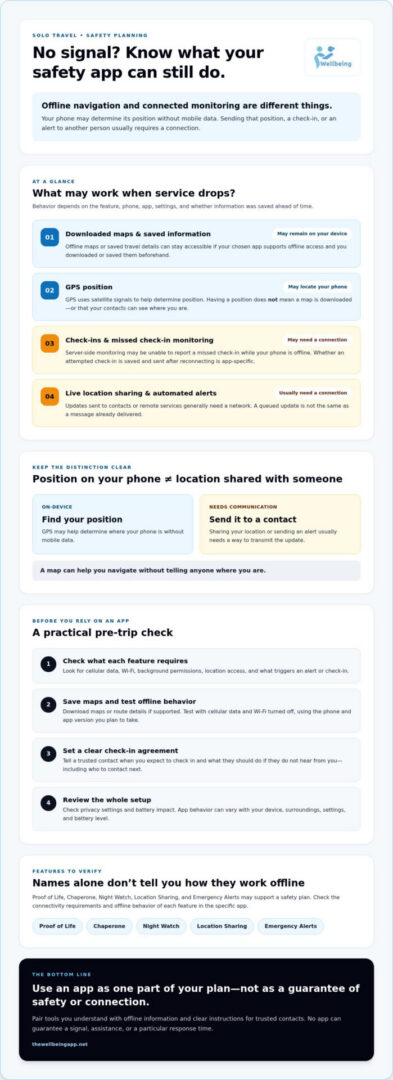
When your phone loses cell service, app features don’t all stop in the same way. An offline map or saved travel details may remain available on the device, while live location sharing and automatic contact alerts may be unable to send updates. The key difference is whether a feature works with information already stored on your phone or must communicate with a server or another person.
Remember: “Locating a device does not, by itself, deliver its location to your contacts.” Your phone may be able to determine its position without mobile data, but sharing that position usually requires a way to transmit it.
Can GPS work when mobile data is unavailable?
GPS uses signals from satellites to help determine a device’s position. Mobile data or Wi-Fi, by contrast, can load maps, search results, route details, and other online information. A phone might establish a position while offline, but that doesn’t mean its map app has the area downloaded or that it can send your coordinates to someone else.
Before a trip, download maps or route information if your chosen app supports offline access. Test what remains available with cellular data and Wi-Fi turned off. Results can vary with the phone, app, surroundings, settings, and battery level, so check the manufacturer’s and app developer’s guidance rather than assuming GPS or a map will behave the same on every device.
Which safety features need a working connection?
Features that communicate with contacts or remote services generally need a connection. That can include live location sharing, server-side check-in monitoring, and automated alerts. If a check-in is missed while the phone is offline, the app may not be able to report it to its server at that moment. Whether a check-in is saved and sent later is app-specific, so verify this before relying on it.
A queued check-in is not the same as an alert already delivered. Your contact may not know an update was attempted until the phone reconnects, if the app supports sending it later. The Wellbeing App includes scheduled check-ins and automated notifications to designated contacts after a missed check-in, but its behavior without cellular service or Wi-Fi isn’t confirmed. Check the app’s documentation for connectivity requirements, offline storage, location permissions, and what happens after service returns.
- Offline resources: Maps, routes, or saved information may work if downloaded and supported.
- Positioning: GPS may determine location without mobile data, depending on device conditions and settings.
- Communication: Sharing that location or sending an alert generally requires a working connection.
If you’re considering scheduled check-ins or location sharing for a trip, review The Wellbeing App’s safety features and confirm their connectivity requirements before you travel.
How to Compare Solo Traveler Safety Apps and Offline Backups
A useful comparison starts with your actual trip, not a “best app” label. Consider where you expect coverage, whether your phone supports the app, and what kind of support would help you feel prepared. A city day trip with dependable data has different needs from a remote hike or a journey with long stretches offline.
Use this checklist to separate documented features from details you’ll need to confirm in the app’s current product information:
| Feature | What to check | Why it matters |
|---|---|---|
| Check-ins | Are they scheduled, and what happens if you miss one or have no connection? | Server-side monitoring and contact notifications may need data access. |
| Location sharing | Does it share live updates, a single location, or only a last known position? | Location services on your phone don’t guarantee that contacts receive updates. |
| Alerts | Who receives them, what information is included, and how are they sent? | Know whether an alert reaches designated contacts or another service. |
| Offline access | Can you use maps, routes, or saved details without internet? | Downloaded information may remain accessible even when connected features stop updating. |
| Privacy | Review permissions, data sharing, retention, and subscription terms. | Choose what you’re comfortable sharing and with whom. |
| Battery use | Check whether background location or frequent updates affect battery life. | A drained phone can interrupt both navigation and connected features. |
For example, The Wellbeing App’s supplied information confirms scheduled check-ins, location sharing, server-side monitoring, and automated notifications to designated contacts after a missed check-in. It doesn’t confirm how those functions behave without cellular service or Wi-Fi. Treat offline storage, delivery after reconnection, device compatibility, and battery impact as questions to verify, not assumed capabilities.
Which questions should you ask before choosing an app?
Check what happens if your phone loses data, runs out of power, or can’t access location. Ask who receives an alert, what details they see, and what response you’ve agreed on. Review privacy settings, permissions, data sharing, and subscription terms before signing up. Then test the setup with a trusted contact while you still have reliable coverage.
How do offline tools compare with connected monitoring?
Downloaded route information and a written itinerary can remain available on your device or in your bag without app delivery. Live sharing and server-monitored check-ins, by contrast, depend on the app’s connection requirements. Pair them rather than treating one as a replacement for the other: save key directions, share your plan with someone you trust, and use a connected feature only after verifying how it works for your phone and route. The right choice is the one that fits your needs and the conditions you expect.
How to Build a Solo Travel Safety Plan Before You Lose Signal
A little preparation can make a coverage gap easier to manage. Before departure, decide how you’ll keep useful information accessible, how a trusted person will know you’re okay, and what they should do if an update doesn’t arrive. Use these steps to build a plan around your trip rather than relying on a single app or connection.
- 1. Map expected coverage gaps. Note where you may be offline, such as a remote trail or a long transfer. Check whether your route or accommodation information can be saved for offline access in advance.
- 2. Set a realistic check-in schedule. Choose times you can meet, taking travel and time differences into account. Tell your contact what a missed check-in means and how long they should wait before following up.
- 3. Agree on an escalation plan. Name the person who will check in first and an alternate contact if they can’t reach you. Share the best way to contact you and what details they should have on hand.
- 4. Prepare offline information. Save essential addresses, booking details, route notes, and contact numbers somewhere accessible without an app connection. Keep a written itinerary with your trusted contact, and carry a copy if that suits your plans.
- 5. Check your phone and power plan. Review location permissions, background activity, and notification settings for the features you intend to use. Charge your devices before setting out and consider a suitable backup power source for your itinerary.
- 6. Test the workflow. Make a test check-in and confirm that the intended contact receives the expected update. If the route includes areas without service, check the app’s documentation for what happens to check-ins and alerts offline; don’t assume they’ll be delivered later.
- 7. Confirm your contingency options. Review local emergency procedures before travel. If you’re considering satellite features, confirm that your specific device supports them and understand how they work before depending on them.
Make the plan clear to your contacts
Share the itinerary, expected check-in times, and next steps in plain language. Confirm that contact details are current and that the right notification permissions are enabled. A missed alert can cause unnecessary worry if nobody knows whether to wait, message you, or contact the alternate person.
A solo traveler safety app can support this plan, but a written itinerary and a trusted contact provide a separate reference if the phone is unavailable. Neither guarantees assistance, so match your preparations to the trip and the connection you expect. To review connected check-in options, explore The Wellbeing App’s safety features.
How The Wellbeing App Can Fit Into a Solo Traveler’s Safety Plan
A solo traveler safety app can help make a check-in routine more consistent, as long as you understand what it does and what it depends on. The Wellbeing App includes Proof of Life, Chaperone, Night Watch, Location Sharing, and Emergency Alerts. These features can be considered alongside your itinerary, trusted contacts, and offline preparations, not as a replacement for them.
Where can Proof of Life and Chaperone fit into a travel routine?
Proof of Life supports scheduled check-ins, which can give you and a designated contact an agreed way to confirm your status. The supplied information also describes automated notifications to designated contacts after a missed check-in. Before a trip, agree on when you’ll check in and what your contact should do if an update doesn’t arrive.
Chaperone may be worth reviewing for a planned solo journey, but check its current feature details rather than assuming how it works or what it monitors. The same care applies to Night Watch, Location Sharing, and Emergency Alerts: their availability is confirmed, but the supplied information doesn’t establish every feature’s behavior in different situations or without a connection. Contact notifications should not be mistaken for emergency-service dispatch.
What should you confirm before relying on the app?
Check the app’s current requirements for cellular data, Wi-Fi, server access, location permissions, and notifications. Confirm that your device and operating system support the functions you plan to use, and understand whether background settings affect location updates. Offline behavior is unconfirmed, including whether a check-in can be stored without service and delivered later. Don’t count on an alert reaching contacts during a coverage gap unless the app’s documentation confirms it.
- Confirm the contact plan: Identify who receives missed-check-in notifications and make sure their details are current.
- Agree on follow-up: Tell contacts what a missed check-in means, when they should try to reach you, and who to contact next.
- Test before departure: Check that notifications and permissions work as expected while you have a connection.
- Keep an independent backup: Share your itinerary and retain essential information offline so your plan doesn’t rely on the app alone.
The Wellbeing App’s scheduled check-ins and designated-contact notifications may complement a traveler’s preparation, but they aren’t confirmed as offline protection. Review the limits as carefully as the features, then explore The Wellbeing App’s safety features and current requirements to decide whether they fit your trip.
Travel With a Plan That Goes Beyond Your Phone
A solo traveler safety app can support your routine, but peace of mind comes from knowing what each feature depends on and having another way to share your plans. Before you leave, confirm which tools need a connection, agree on check-ins and follow-up with trusted contacts, and keep essential trip details accessible offline.
The Wellbeing App’s Proof of Life supports scheduled check-ins, and its platform offers location sharing and automated notifications to designated contacts. How these features work without cellular service or Wi-Fi isn’t confirmed, so review current requirements before relying on them during a coverage gap. A clear contact plan and independent backup can complement connected tools.
Explore The Wellbeing App’s safety features and decide whether they fit your trip and connectivity needs. With thoughtful preparation, you can travel with greater confidence while keeping your safety plan realistic and in your hands.
Frequently Asked Questions
Can a safety app work without cell service?
Some features may work offline, but connected safety functions often need internet access. A downloaded map or saved itinerary may remain available on your phone, while live location sharing, server-monitored check-ins, and contact alerts may not send without data or Wi-Fi. Check the app’s documentation for offline storage and what happens after service returns. A solo traveler safety app shouldn’t be your only plan for a coverage gap.
Can GPS track your location without internet?
Often, a phone can use satellite signals to estimate its position without mobile data, but the exact behavior depends on the device and conditions. GPS positioning isn’t the same as loading an online map or transmitting your location to someone else. Download route information in advance if your map app supports it, and test offline access before departure. Check your device settings and app guidance, too.
What happens if I miss a safety app check-in while offline?
If the app relies on a server to monitor check-ins, it may not register or report a missed check-in while your phone is disconnected. Some apps may store an update for later delivery, but don’t assume that happens. Confirm whether offline check-ins are queued, when they’re sent after reconnection, and what contacts receive. Agree on a separate follow-up plan so a connectivity gap doesn’t leave loved ones guessing.
Is an offline map enough to keep a solo traveler safe?
No. An offline map can help with navigation, but it doesn’t share your location, notify a contact, or arrange assistance. Save route details and important addresses before you go, then pair them with a written itinerary and agreed check-in plan. Consider the trip’s conditions and your expected coverage. These preparations can make your plan more resilient, but none guarantees safety or assistance.
Do safety apps automatically contact emergency services?
Not necessarily. Check exactly what an app’s alert feature does and who receives the notification. Some tools are designed to notify designated contacts, which is different from contacting emergency services or dispatching a response. The Wellbeing App’s supplied information confirms automated notifications to designated contacts after a missed scheduled check-in, but does not confirm emergency-service dispatch. Review current feature details before relying on any alert.
How can I share my location when my phone has no signal?
Without a working connection, your phone generally can’t transmit a new location through ordinary cellular or internet-based sharing. It may still determine its position, but that doesn’t deliver the coordinates to your contacts. Check whether your device supports satellite communication and confirm how that feature works before travel. Otherwise, share your route and expected check-in times in advance, and agree on what contacts should do if you’re overdue.
How do I choose a safety app for solo travel?
Choose based on your route, expected connectivity, device, and the support you want. Compare check-ins, location sharing, alerts, offline access, privacy controls, and battery use. Verify who receives notifications, what information they see, and whether features need data, Wi-Fi, location permissions, or background access. Test the app with a trusted contact before departure, then keep offline directions and a written itinerary as separate backups.