
The Best Hiking Safety App for Solo Hikers: Beyond the SOS Button
What if your phone is smashed in a fall or tucked away in a pocket you simply cannot reach? For many of the 63.4 million Americans who hit the trails each year, the SOS button feels like a security blanket, but it is one that requires you to be conscious and mobile to use. You likely value your independence and the quiet of the wilderness, yet you have probably felt that pang of guilt knowing your loved ones are worrying back home. Finding a reliable hiking safety app for solo hikers is about more than just navigation; it is about ensuring someone knows you are okay even when you cannot tell them yourself.
We understand that your safety is a shared responsibility, and true peace of mind comes from knowing a fail-safe system is in place. In this guide, you will discover how passive safety technology and automated check-ins provide a protective layer that works even if your device is damaged or your battery is low. We will look at how features like Proof of Life and automated alerts transform your smartphone into a watchful protector. This approach lets you maintain your solo independence while providing the harmony and security your family deserves.
Key Takeaways
- Understand the critical “incapacitation gap” and why passive safety technology is the only reliable fail-safe when you are unable to physically trigger an SOS.
- Learn how server-side monitoring acts as a compassionate guardian, ensuring emergency alerts reach your contacts even if your phone is destroyed or loses power.
- Discover why the right hiking safety app for solo hikers must prioritize battery efficiency through automated status monitoring rather than constant, power-draining GPS pings.
- Establish a robust safety protocol by defining your “Trip Intent” and setting custom “Proof of Life” intervals that adapt to the difficulty of your specific trail.
- Empower yourself to explore the wilderness with total independence while providing your loved ones with the gift of mental tranquility and lasting reassurance.
The Solo Hiker’s Dilemma: Why Active Safety Isn’t Enough
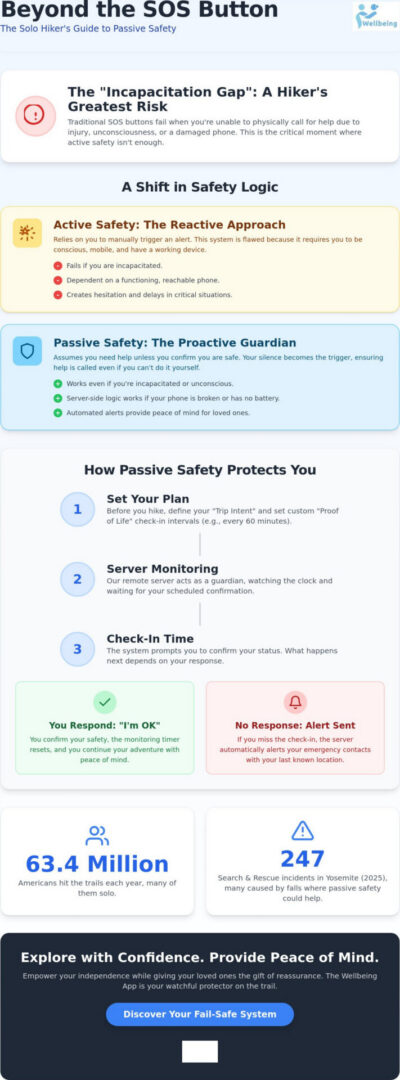
Safety in the wilderness is often discussed in terms of what you can do when things go wrong. Most traditional tools are active systems. They require you to press a button, blow a whistle, or send a text. This works perfectly if you are alert and mobile. However, for the solo adventurer, the greatest risk is the Incapacitation Gap. This is the critical period between an injury occurring and the moment you are able to call for help. If you fall and lose consciousness, or if your phone is thrown just out of reach during a tumble, an active system fails you. This is why a modern personal safety app must evolve beyond simple reactive tools.
True protection requires a shift in logic. Instead of a system that waits for your signal, you need a system that assumes you are in trouble unless you say otherwise. This proactive approach creates a sense of mental tranquility. You can focus on the trail ahead, knowing that your safety doesn’t depend on your ability to reach into your pocket during a crisis. It also offers a profound gift to your family. They no longer have to wonder if your silence means you are enjoying the view or if you are lying injured on a remote ridge. Using a dedicated hiking safety app for solo hikers ensures that your well-being is monitored by a system that never sleeps.
The Limitations of Traditional SOS Buttons
While satellite communicators and emergency buttons are vital, they have inherent flaws. Physical accessibility is the most obvious. Falls are a leading cause of hiking incidents, and they often result in injuries that make fine motor skills impossible. There is also a significant psychological barrier. Many hikers hesitate to press an SOS button because they aren’t sure if their situation is bad enough yet. They worry about the cost of a rescue or the embarrassment of a false alarm. A reliable system removes this burden of choice by automating the process through server-side logic.
Why Silence Should Be Your Loudest Signal
The safest way to trek alone is to reverse the standard safety logic. In a passive system, your silence becomes the trigger for action. This is the core philosophy behind Proof of Life monitoring. By setting a digital heartbeat, you establish a rhythm of safety that doesn’t require your constant attention. This approach offers several advantages:
- It eliminates the need for constant, battery-draining manual check-ins.
- It ensures Emergency Alerts are sent even if your hardware is destroyed or submerged.
- It allows for Location Sharing that updates your last known coordinates without manual input.
When your safety protocol assumes the worst if it doesn’t hear from you, you are never truly alone on the mountain. You gain the freedom to explore while maintaining a fail-safe connection to the world you left behind.
How Passive Safety Technology Works on the Trail
The core of a truly effective hiking safety app for solo hikers lies in where the “intelligence” of the system resides. Most outdoor apps rely on device-side logic, meaning your phone is responsible for sending out your coordinates. If your battery dies or your screen shatters during a fall, that process stops instantly. Passive safety technology shifts this responsibility to a remote server. This server acts as a compassionate guardian in the cloud, holding your planned itinerary and waiting for your confirmation. If that confirmation doesn’t arrive, the server initiates a response, regardless of whether your phone is still functioning.
There is a fundamental difference between simple Location Sharing and proactive status monitoring. While seeing a blue dot on a map is helpful, it is a reactive measure that requires someone to be actively watching your progress. In contrast, Proof of Life indicators provide a nuanced safety net by establishing pre-set expectations. If you don’t check in at your scheduled interval, the system recognizes this silence as a call for help. This transition from “where are they?” to “are they okay?” is what reduces search and rescue response times. In 2025, Yosemite National Park saw 247 search and rescue incidents, many of which were caused by falls. Having a system that alerts loved ones the moment a check-in is missed can be the difference between a cold night on the trail and a swift recovery.
Server-Side vs. Device-Side Alerts
When you enter a dead zone or a canyon with no reception, device-side apps often struggle, either failing to update or triggering false alarms for your family. A server-side system handles this with more grace. It understands that a temporary loss of signal is normal. However, because the alert is managed remotely, an emergency notification is still fired if you fail to reach a point of connectivity by your expected time. This protects you even if your hardware is completely destroyed. You can explore the specialized suite of tools designed to manage these complex trail scenarios with ease.
The Anatomy of an Automated Check-In
Setting up your protocol involves more than just hitting “start.” You can schedule your check-ins based on the difficulty of the terrain or specific trail milestones. The escalation process is disciplined and purposeful:
- Phase 1: A gentle reminder is sent to your device to check in.
- Phase 2: If silence persists, a secondary notification attempts to reach you.
- Phase 3: Emergency Alerts are dispatched to your designated contacts with your last known coordinates.
This structured approach ensures that help is only summoned when truly needed, preserving your independence while maintaining a fail-safe connection to your community.
Essential Features of a Reliable Hiking Safety App
Choosing a hiking safety app for solo hikers is a decision that impacts both your personal agency and the mental state of those who care about you. A truly reliable tool must be more than a digital map; it needs to function as a sophisticated instrument of proactive safety management. While standard navigation apps focus on the trail, a safety-centric application focuses on your continued well-being through a suite of specialized features. This includes tools designed for specific high-risk scenarios, such as Chaperone for navigating treacherous terrain or Night Watch for protection during remote overnight stays.
A watchful protector on the trail also understands the technical limitations of the wilderness. High-quality Location Sharing must be optimized for low-bandwidth environments. It ensures that your last known coordinates are transmitted even when the signal is weak, providing a consistent indicator of your progress. By integrating these human-centric features, the technology becomes a means to a social and emotional end, fostering harmony between your desire for adventure and your family’s need for reassurance.
Battery Preservation Strategies
For the solo adventurer, battery anxiety is a significant hurdle. Constant GPS tracking is the enemy of the solo hiker because it consumes power at an unsustainable rate, especially on multi-day treks. A reliable hiking safety app for solo hikers solves this by using interval-based monitoring. Instead of a continuous drain, the system relies on scheduled Proof of Life check-ins. This approach extends your device life significantly while maintaining a fail-safe digital heartbeat. The Wellbeing App’s monitoring logic is built to ensure your safety net remains active from the moment you leave the trailhead until you safely return home.
Customizable Escalation Paths
Safety is not a one-size-fits-all solution, and a missed check-in does not always signal a disaster. Sometimes a river crossing takes longer than planned, or a steep ascent slows your pace. A sophisticated system allows you to differentiate between a “late” status and a true emergency. This nuanced approach prevents unnecessary panic while ensuring that Emergency Alerts are only dispatched when the situation truly warrants intervention.
- Provide contacts with your specific trip intent and route details.
- Set custom grace periods for different sections of the trail.
- Ensure your loved ones have the exact data they need to assist authorities if required.
Knowing that a disciplined escalation process is in place allows you to focus on the trail with a sense of mental tranquility. You fulfill your duty to your family by providing them with a clear, reliable protocol that protects your independence and your life.
Setting Up Your Solo Hiking Safety Protocol
Establishing a safety protocol is an act of empowerment. It transforms you from a vulnerable wanderer into a proactive manager of your own security. While the technology provides the framework, your preparation ensures the system works flawlessly when it matters most. A comprehensive protocol begins long before you reach the trailhead. It starts with a clearly defined Trip Intent. This record should include your exact route, expected return time, and the specific emergency contacts you have chosen to act as your guardians. By documenting these details, you provide a roadmap for assistance should you ever become unable to communicate.
Before you depart, it is vital to test your check-in system in a controlled environment. Familiarize yourself with the interface and ensure your notifications are audible. This simple step eliminates technical uncertainty and builds the confidence you need to enjoy the wilderness. When you are on the trail, you can coordinate with the Chaperone feature for segments that feel particularly treacherous. Whether it is a steep scree slope or a complex river crossing, having an active layer of empathetic vigilance allows you to maintain your focus and your mental tranquility. You can download The Wellbeing App to begin building your personalized safety protocol today.
Defining Your Check-In Cadence
Your check-in frequency should never be static. It must match the level of environmental risk you face. On a well-marked, flat trail, longer intervals may suffice. However, as the terrain becomes more difficult or the weather turns, you should shorten your Proof of Life intervals. This ensures that the “incapacitation gap” discussed earlier remains as small as possible. If you are planning to spend the night in a remote area, utilize Night Watch protection. This specialized monitoring provides a secure digital heartbeat while you bivouac, allowing you to rest deeply knowing your safety is being watched over by a reliable partner.
Briefing Your Safety Circle
The human element of your safety net is just as critical as the digital one. Your emergency contacts must be briefed on exactly what to do if they receive an automated alert. They should have access to your vehicle’s make and license plate, as well as the color of your gear. This information is invaluable to search and rescue teams. It is also helpful to establish “Soft” versus “Hard” deadlines.
- Soft Deadline: A missed check-in where the contact attempts to reach you first.
- Hard Deadline: The point at which they must contact authorities with your last known Location Sharing data.
Using a dedicated hiking safety app for solo hikers bridges the communication gap between your independence and your family’s need for harmony. It fulfills your duty to your loved ones while allowing you to explore the world on your own terms.
The Wellbeing App: Your Watchful Protector on the Trail
Choosing the right hiking safety app for solo hikers is about finding a partner that values your life as much as you value your freedom. The Wellbeing App is built on a foundation of empathetic vigilance, offering a specialized suite of tools designed to accompany you through every mile of your journey. While other apps focus on the path, we focus on the person. By shifting from reactive buttons to proactive monitoring, we provide a level of security that allows you to truly immerse yourself in the wilderness. You are never alone when a compassionate guardian is watching over your progress from the cloud.
The proprietary Proof of Life system is the heart of this protection. It replaces the constant, battery-draining GPS pings found in standard tracking apps with a disciplined rhythm of automated check-ins. This ensures your phone remains functional throughout your trek while maintaining a fail-safe connection to your safety circle. For those moments when the trail becomes demanding, the Chaperone feature acts as a virtual companion. It provides heightened monitoring during the toughest segments of your hike, offering the reassurance you need to push forward safely.
Safety should not stop when you set up camp for the night. Night Watch extends our protective reach into the hours when you are most vulnerable. By maintaining a digital heartbeat while you sleep, the app ensures that if something happens in the middle of the night, your emergency contacts are alerted without you needing to lift a finger. This professional level of monitoring is why a subscription-based service is superior to “free” alternatives. When the stakes are as high as your personal safety, relying on a dedicated, always-on system is the only way to achieve true mental tranquility.
Empowering the Solo Explorer
Our mission goes beyond software; it is about preventing missing person incidents and fostering a culture of collective responsibility. We want to move you from a state of constant trail anxiety to one of proactive empowerment. By using a hiking safety app for solo hikers that prioritizes your well-being, you fulfill a vital duty to your loved ones. This harmony between adventure and responsibility creates a safer environment for everyone in the outdoor community. We believe that safety is a shared effort, and our technology is the bridge that makes it possible.
Getting Started for Your Next Adventure
Preparing for your next solo trek is a simple, purposeful process. You can easily set up monthly or annual safety plans that integrate Location Sharing and Emergency Alerts into your existing routine. This structured approach ensures that you are always protected, whether you are on a quick afternoon loop or a multi-week expedition. Don’t leave your safety to chance or a device that might fail you when you need it most. Ensure your safety on the trail with The Wellbeing App and experience the wilderness with the confidence you deserve.
Step Into the Wild with Confidence
True adventure shouldn’t come at the cost of your family’s peace of mind. By shifting from reactive SOS buttons to proactive, passive technology, you close the dangerous incapacitation gap that active systems leave wide open. You’ve seen how automated Proof of Life monitoring and server-side alert dispatch provide a fail-safe that stays active even if your device fails. This transition isn’t just about technical features; it’s about reclaiming your independence while fulfilling your duty to those you love.
When you choose a dedicated hiking safety app for solo hikers, you are choosing a watchful protector that follows you through every mile and every bivouac. With specialized Night Watch protection and a disciplined safety protocol, you can focus on the trail’s beauty rather than its risks. You deserve to explore the world on your own terms with the harmony that comes from total preparation. Start your solo adventure with peace of mind; try The Wellbeing App today. The mountains are waiting, and you are ready to meet them with strength and security.
Frequently Asked Questions
How does a hiking safety app work if I lose cell service?
A passive safety system works by using server-side logic that resides in the cloud rather than just on your device. When you enter a dead zone, the app cannot send a live signal, but the server is already waiting for your scheduled check-in. If you fail to reach a point of connectivity and confirm your safety by the deadline, the system automatically triggers an alert. This ensures your safety net remains intact even when cell service is absent.
Is an app better than a satellite messenger like Garmin inReach?
These tools are often best used as complementary layers of a robust safety protocol. A satellite messenger is excellent for active communication in remote areas, but it still requires you to be conscious and mobile to press a button. A hiking safety app for solo hikers provides the essential fail-safe of passive monitoring. If you are incapacitated and cannot reach your device, our server-side system ensures that help is summoned regardless of your physical state.
What is a “Proof of Life” check-in and how does it help hikers?
A Proof of Life check-in is an automated status indicator that requires you to confirm your well-being at pre-set intervals. Unlike a simple GPS dot, this feature establishes a digital heartbeat that reassures your safety circle. It moves the burden of monitoring from your family to a disciplined, automated system. If a check-in is missed, the system recognizes this silence as a call for help, effectively closing the dangerous incapacitation gap during a solo trek.
Will a safety app drain my phone battery during a long hike?
Reliable safety technology is built to be extremely battery-efficient for multi-day adventures. By utilizing interval-based monitoring instead of continuous GPS tracking, a hiking safety app for solo hikers minimizes power consumption. This approach allows your phone to remain functional throughout long treks while still providing a consistent safety net. You can focus on the trail without the constant anxiety of a dying battery, knowing your monitoring is optimized for wilderness endurance.
What happens if I forget to check in but I am actually safe?
The system uses a structured escalation process to prevent unnecessary panic. If you forget to check in, the app first sends a gentle reminder to your device. If silence persists beyond the grace period, the system then notifies your designated contacts. This is why it’s vital to brief your safety circle on soft deadlines versus hard emergencies. Clear communication ensures that help is only summoned when a genuine risk to your well-being exists.
Can my family see my real-time location while I am hiking?
Yes, your designated contacts can see your last known coordinates through our specialized Location Sharing feature. This tool is optimized for low-bandwidth environments, ensuring that your progress is recorded even when the signal is weak. Providing this visibility creates a sense of harmony and mental tranquility for your family. They can follow your journey with confidence, knowing exactly where you were the last time your device checked in with our servers.
How do I set up an emergency contact in The Wellbeing App?
You can establish your safety circle within the app by navigating to the protocol settings and entering your chosen guardians’ details. It’s important to select individuals who are reliable and understand their role in your safety plan. Once added, these contacts will receive Emergency Alerts if you miss a check-in or trigger a distress signal. This process fosters a sense of collective responsibility, ensuring that those who care about you are empowered to act.
Is there a cost for professional safety monitoring for hikers?
Professional safety monitoring typically requires a subscription to maintain the robust server-side infrastructure required for a fail-safe system. This fee supports always-on monitoring, automated alert dispatch, and specialized features like Night Watch. While free apps often rely on simple device-side logic that fails if your phone is damaged, a professional service provides the lasting reassurance that your safety is being managed by a dedicated and technologically sophisticated partner.