
The Best Snug App Alternatives for Senior Safety and Peace of Mind in 2026
One in four adults over the age of 65 in the United States lives alone, a reality that often leaves families caught between respecting independence and fearing the “found too late” scenario. You likely already feel that a single daily push notification is not enough to guarantee real safety, especially when buggy apps or missed alerts create more anxiety than they solve. Finding the best snug app alternative means looking for a solution that provides active protection rather than passive monitoring. We understand that your goal is not just a digital check-in; it is the mental tranquility that comes from knowing a reliable, automated safety net is always watching.
In this guide, we will explore the most dependable safety monitoring solutions available in 2026. You will discover how modern tools have moved beyond simple button presses to include sophisticated Proof of Life indicators and dedicated Night Watch protection. We will compare the top platforms to help you secure a professional grade escalation plan that ensures your loved ones are cared for without the need for constant, manual texting. By the end of this article, you will have a clear path toward a more harmonious and secure way of living for your family.
Key Takeaways
- Understand why relying solely on push notifications can be risky and how server-side monitoring ensures alerts are never missed.
- Discover how the best snug app alternative uses automated indicators to provide a more reliable safety net than a simple daily text.
- Learn about the “Proof of Life” standard, which moves beyond basic check-ins to offer a continuous sense of mental tranquility for families.
- Find out how to implement specialized protection like Night Watch to secure your loved ones during their most vulnerable overnight hours.
- Master the process of setting up a multi-layered response system that bridges the gap between manual calls and medical alerts.
Why Families are Moving Beyond the Snug Safety App
Many families begin their search for a best snug app alternative after realizing that a simple smartphone alert isn’t a foolproof safety net. While basic check-in apps are a step in the right direction, they often rely on local device triggers that are prone to silent failures. Modern telecare technologies have advanced significantly, yet many popular apps still struggle with the technical realities of modern smartphones. Relying on a single daily ping creates a narrow window of protection that might not be enough for high-risk individuals or those living with chronic conditions.
The “free” tiers found in many safety apps can unintentionally lead to a false sense of security. These basic versions typically offer passive monitoring, where the responsibility for the alert still rests heavily on the user’s ability to interact with a buggy interface. If an alert is missed, the escalation process is often limited to a simple text message that might be overlooked by a busy family member. True protection requires a more robust, active approach that ensures help is dispatched even when technology falters.
The Technical Flaws of Basic Safety Apps
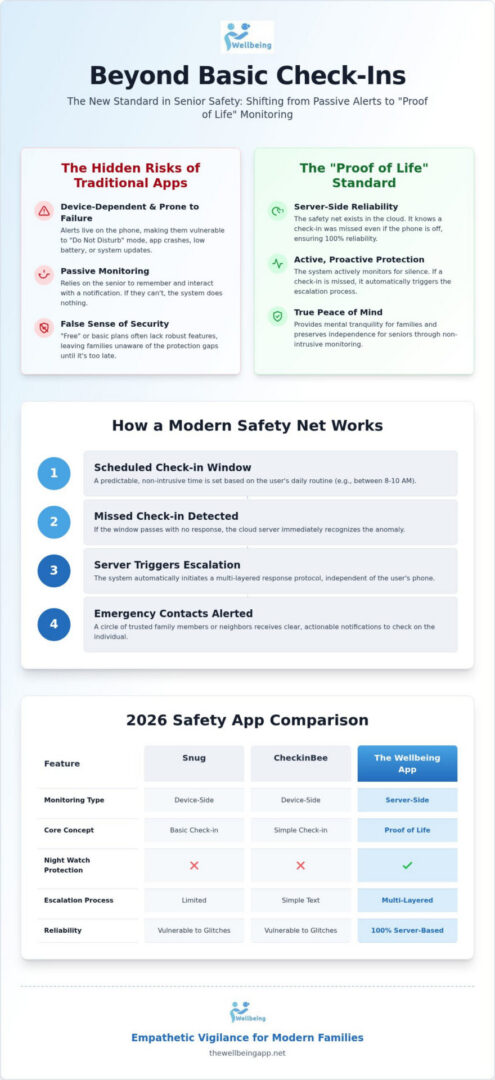
Standard safety apps live entirely on the user’s phone, making them vulnerable to common technical glitches. If a senior accidentally enables “Do Not Disturb” mode or if a system update changes battery optimization settings, critical check-in prompts may never appear. We’ve seen cases where app crashes prevent emergency escalations entirely, leaving families in the dark. To ensure 100% reliability, monitoring must be server-side. This means the safety net exists in the cloud, independent of the phone’s current state. If a check-in is missed, the server triggers an alert automatically, ensuring that a dead battery or a crashed app doesn’t result in a “found too late” scenario.
The Emotional Need for ‘Empathetic Vigilance’
Safety shouldn’t feel like a constant interrogation or a series of nagging texts. When monitoring feels like a chore, it can lead to resentment and a loss of personal agency for the senior. We focus on a concept called Proof of Life, which provides a non-intrusive way to confirm well-being. This approach offers:
- Mental tranquility for family members who no longer need to worry about unreturned texts.
- Preservation of independence for seniors who don’t want to feel “watched.”
- Proactive protection that steps in only when an indicator is missed.
By balancing independence with a watchful, automated eye, families can move from a state of constant anxiety to one of harmonious connection.
Defining the New Standard: What is a Proof of Life App?
As we look toward the safety standards of 2026, the industry has moved beyond the basic “check-in” and toward a more comprehensive concept. Finding the best snug app alternative involves shifting from passive notifications to active, server-side protection. A Proof of Life app acts as a digital guardian that bridges the vital gap between occasional manual phone calls and the high-stakes activation of a traditional medical alert pendant. It provides a consistent, automated rhythm of safety that doesn’t rely on a senior’s memory or a family member’s availability to send a “how are you?” text every few hours.
In the past, many tools relied on simple SMS replies or local push notifications. These are easily missed or buried in a crowded inbox. Modern technology favors integrated ecosystems where the monitoring happens on the server rather than just on the user’s phone. This server-side architecture is the critical difference between a tool that works and one that fails when it’s needed most. If a phone dies, loses signal, or the app crashes, the server still knows that a check-in was expected. It can then trigger an emergency protocol without needing any input from the local device, ensuring help is dispatched when silence is detected.
How Modern Check-in Systems Work
Reliable systems operate on scheduled check-in windows that match the user’s daily routine. This creates a predictable rhythm of safety that feels like a supportive background presence rather than an intrusion. If a window passes without a response, the system begins a structured escalation path. It starts with a gentle user notification and moves quickly to alerting a primary circle of emergency contacts. Proof of Life is a proactive status indicator designed to confirm the ongoing well-being of vulnerable individuals through automated, non-intrusive monitoring.
Key Features of a Professional-Grade Alternative
A professional solution must provide automated alert dispatch that functions without human intervention. This ensures that even if you are asleep or in a meeting, the safety net remains active. During an active emergency, real-time location sharing becomes essential, allowing responders to find your loved one immediately. By integrating with existing health and safety sensors on a smartphone, these apps create a multi-layered shield. You can experience true mental tranquility by choosing a system that prioritizes server-side reliability over simple, buggy push notifications. This sophisticated approach transforms a smartphone into a watchful protector that respects independence while maintaining constant, empathetic vigilance.
Snug vs. CheckinBee vs. The Wellbeing App: A 2026 Comparison
Selecting the best snug app alternative requires looking beyond the surface of a user interface to the technical backbone that supports your family’s safety. Many families begin with the free tier of Snug, which offers a reliable daily check-in but often lacks the depth of protection needed for higher-risk scenarios. As we move through 2026, the gap between basic notification apps and professional monitoring services has widened. While CheckinBee utilizes SMS to bypass some of the common notification bugs found in smartphone operating systems, it still functions as a reactive tool rather than a proactive guardian. True peace of mind comes from a system that doesn’t just wait for a response but actively watches for its absence.
The “reliability gap” is most evident when comparing local app logic to server-side monitoring. If a senior’s phone dies or loses its data connection, a standard app might fail to trigger an alert because the instruction lives only on the device. Professional subscription models move this responsibility to the cloud. This ensures that the safety net remains intact regardless of the phone’s status. For those seeking a best snug app alternative, the priority should be a service that treats every missed indicator as a critical event requiring immediate, automated escalation.
Feature Breakdown: Safety Beyond the Button
Safety is about the protocol that follows a silence. Snug’s escalation relies heavily on the user’s phone being functional and the app remaining active in the background. In contrast, The Wellbeing App utilizes server-side automated alert dispatch. This means the system doesn’t wait for the phone to send a signal; it acts because it didn’t receive one. We also see a significant difference in active safety features like the Chaperone service. While competitors focus primarily on the daily check-in, a virtual Chaperone provides active monitoring during specific, high-risk moments. This might include walking to a car at night or navigating an unfamiliar area, offering a layer of protection that a simple button-press cannot match. Location sharing transparency is also vital; modern platforms prioritize privacy by only activating real-time tracking during an active emergency.
The Verdict on Reliability
The true test of a safety net is its performance during the most vulnerable hours. This is where The Wellbeing App distinguishes itself through specialized services like Night Watch. While basic apps go silent overnight, Night Watch provides dedicated protection for solo dwellers during the hours when help is hardest to reach. This level of watchful protection creates a sense of mental tranquility that simple daily pings cannot replicate. For a non-tech-savvy senior, the interface must remain intuitive and accessible. The goal is empowerment, not confusion. By choosing a system that prioritizes server-side logic over local app stability, you’re investing in a compassionate guardian that is always on, even when the phone is not. This proactive approach ensures that your loved ones are never truly alone, providing a reliable safety net that fosters both independence and security.
Creating a Comprehensive Safety Net: A Step-by-Step Guide
Building an effective safety net requires more than just a digital ping; it involves creating a structured framework that supports a senior’s independence while ensuring help is always within reach. When you are evaluating the best snug app alternative, the process starts with a thoughtful assessment of the user’s daily routine. Identify high-risk periods, such as late-night hours or times when they are typically alone. Once you have a clear picture of their needs, follow these steps to secure their environment:
- Step 1: Assess risk factors including mobility levels, medication schedules, and cognitive health to determine the necessary frequency of check-ins.
- Step 2: Designate a primary and secondary circle of emergency contacts to ensure a redundant response chain that never fails.
- Step 3: Align check-in windows with Activities of Daily Living (ADLs), such as morning coffee or evening meals, to make the process feel natural rather than intrusive.
- Step 4: Conduct a live test of the escalation path so every contact understands their specific responsibilities when an alert is triggered.
By following this sequence, you transform a simple app into a robust safety system. This proactive approach ensures that your loved ones are never truly alone, providing a reliable safety net that fosters both independence and security. It moves the conversation from “what if” to “we are prepared,” which is the foundation of true mental tranquility for the entire family.
Setting Up Your Automated Chaperone
A virtual chaperone provides active monitoring during specific transitions, such as walking to a vehicle after an evening event or navigating an unfamiliar area. This feature allows for real-time location sharing only when it matters most, protecting personal privacy while maintaining a high level of empathetic vigilance. It’s a sophisticated way to offer support without being overbearing. You must verify that your phone’s ‘Critical Alerts’ settings are enabled for the app to ensure emergency notifications always break through silent or “Do Not Disturb” modes. This simple technical check is vital for maintaining the integrity of your safety net and ensuring that silence is always addressed.
Maintaining the System
A safety system is not a “set it and forget it” tool; it requires ongoing attention to remain effective. We suggest holding brief monthly safety drills with your emergency contacts to keep the escalation process fresh in everyone’s mind. During these reviews, take a moment to update medical notes and contact details within the app to reflect any recent changes in health or living situations. Regularly reviewing Night Watch logs can also provide insights into long-term wellbeing trends, such as sleep consistency or nocturnal activity levels. By staying proactive, you preserve the mental tranquility of the entire family and ensure your protective shield remains strong.
If you’re ready to move beyond basic apps and implement a professional-grade safety net, get started with our Chaperone and Proof of Life services today.
The Wellbeing App: The Compassionate Guardian for Modern Families
While many tools focus on a single daily event, The Wellbeing App redefines safety as a continuous, server-side commitment. It stands as the best snug app alternative for families who recognize that vulnerability doesn’t follow a schedule. By utilizing sophisticated Proof of Life indicators, the platform creates a persistent safety net that operates in the background of a senior’s life. This approach ensures that independence is never sacrificed for security, allowing seniors to live with agency while their families enjoy a restored sense of harmony. When you choose a system built on server-side reliability, you eliminate the anxiety caused by app crashes or dead batteries.
Most alternatives fail to address the risks that occur outside the home or during the quietest hours of the night. Our Night Watch service provides dedicated protection specifically during those overnight windows when a fall or medical event is most dangerous due to isolation. Additionally, the Virtual Chaperone feature transforms the smartphone into an active travel partner. Whether a loved one is walking home after an evening event or navigating a new city, the Chaperone service provides real-time monitoring and location sharing until they are safely inside. This moves the technology from a passive check-in tool to a proactive, watchful protector that bridges the gap between daily check-ins and emergency response.
Why Our Approach is Different
We believe that safety messaging shouldn’t rely on fear or anxiety. Our philosophy is rooted in the concept of mental tranquility, framing our services as a means to emotional well-being for the entire family. By operating within a subscription-based, server-monitored ecosystem, we eliminate the reliability gaps inherent in free, device-only apps. This structure empowers users through proactive safety management, fostering a community built on collective responsibility. When searching for the best snug app alternative, it’s vital to choose a partner that values the dignity of the individual as much as their physical security. You aren’t just installing an app; you are joining a circle of protection that watches when you can’t.
Getting Started with the Watchful Protector
Choosing the right level of protection is a simple process designed to fit your family’s specific needs. You can select between monthly and annual peace-of-mind plans, both of which grant full access to our suite of automated indicators and escalation protocols. Once your account is active, inviting family members to join your safety circle takes only a few moments, ensuring that the burden of care is shared across a trusted group. This collaborative approach turns safety into a shared effort, reinforcing the bonds that keep families connected and secure. Secure your peace of mind with The Wellbeing App today and ensure your loved ones are always under the care of a compassionate guardian.
Securing a Future of Independent and Protected Living
Choosing the right safety net is about more than just technology; it’s about preserving the mental tranquility of your entire family. You’ve seen how server-side monitoring provides a reliability that local app notifications simply can’t match, ensuring that a dead battery or a software crash never leaves a loved one vulnerable. By embracing proactive indicators like Proof of Life and specialized overnight protection through Night Watch, you move beyond the limitations of a single daily check-in toward a state of constant, empathetic vigilance. Finding the best snug app alternative means prioritizing a system that watches when you can’t, offering a compassionate guardian for every transition of the day.
Whether it’s a walk home at night with a Virtual Chaperone or the steady rhythm of automated alerts, true safety is a shared journey. You have the power to replace anxiety with confidence, creating an environment where independence and security exist in perfect harmony. Protect your loved ones with The Wellbeing App’s proactive monitoring and take the first step toward a more secure tomorrow. Your commitment to their well-being is the ultimate gift of peace of mind.
Frequently Asked Questions
Is there a completely free alternative to the Snug app?
Yes, options like imalive offer free daily check-ins, but these often rely on local phone notifications that can fail if the device is silent. When looking for the best snug app alternative, it’s important to consider if a free service provides the server-side reliability needed for true safety. Subscription models like ours ensure that alerts are dispatched even if the user’s phone is offline or the app isn’t running in the foreground.
What happens if my phone dies and I miss a Proof of Life check-in?
If your phone dies, our server-side monitoring system still expects your check-in at the scheduled time. Because the monitoring happens in the cloud rather than on your local device, the system detects your silence immediately. It will automatically begin the escalation process by notifying your designated emergency contacts. This proactive approach ensures that a dead battery or a lost signal doesn’t result in a missed opportunity for help when it matters most.
How does a virtual chaperone app differ from standard GPS tracking?
Standard GPS tracking is often a passive, always-on tool that can feel intrusive to a senior’s privacy. A virtual Chaperone is an active travel partner used during specific, high-risk transitions, such as walking to a car at night. It provides a dedicated window of empathetic vigilance where location sharing is only active until you reach your destination safely. This allows for a balance between personal agency and the security of a watchful protector.
Can I use The Wellbeing App for my elderly parents who live in another state?
Yes, The Wellbeing App provides comprehensive safety monitoring across the entire United States. You can coordinate protection for your parents regardless of which state they reside in, as our server-side alerts and location sharing features function nationally. This allows family members to maintain a sense of harmony and connection while ensuring their loved ones have access to a reliable safety net, no matter the distance between your homes.
What is ‘Night Watch’ and how does it protect seniors at home?
Night Watch is a specialized service designed to protect solo dwellers during their most vulnerable overnight hours. While standard apps might only check in once during the day, Night Watch monitors for well-being when help is typically hardest to reach. It provides a layer of protective reassurance that ensures silence is addressed even while the rest of the world is asleep, offering true mental tranquility for families who worry about nighttime emergencies.
Is an app-based check-in more reliable than a medical alert necklace?
These tools often work best when used together to create a multi-layered safety net. A medical alert necklace is a reactive tool that requires the user to be conscious and able to press a button after a fall. An app-based Proof of Life indicator is a proactive system that triggers an alert if you don’t check in. This makes it a best snug app alternative for scenarios where a user might be unable to reach their pendant.
Does The Wellbeing App work on both iPhone and Android devices?
Yes, The Wellbeing App is designed to work seamlessly on both iPhone and Android platforms. Our integrated ecosystem ensures that all family members can participate in a safety circle regardless of their specific smartphone brand. By supporting both major operating systems, we foster a sense of collective responsibility and community unity, making it easy for every generation of the family to stay connected and protected through a single, reliable interface.
How do I convince my independent parent to use a safety monitoring app?
We recommend framing the conversation around empowerment and the mental tranquility of the entire family. Explain that using a safety app isn’t about losing independence; it’s about having a compassionate guardian that watches in the background so they can live more freely. Emphasize that automated indicators like Proof of Life replace the need for constant, intrusive check-in texts, allowing your relationship to focus on meaningful connection rather than just safety updates.